
I'm trying to figure out which environment variable java uses to find/detect the JRE used by C:\ProgramData\Oracle\Java\javapath\java.exe.
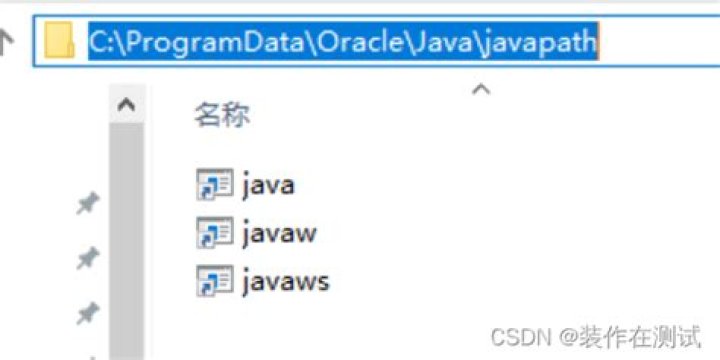
As per Oracle's design, the only files I have in the C:\ProgramData\Oracle\Java\javapath\ are
java.exejavaw.exejavaws.exe
If I set my JAVA_HOME to empty or to some random folder, running an application with java.exe still works. So I can only assume that it isn't using the JAVA_HOME value. So how does it find the JRE folder? Does it default to something specific? I have no JRE_HOME var set either.
4 Answers
Regular Directory with File Symlinks inside
If you look at the files in C:\ProgramData\Oracle\Java\javapath\ you will see that they are actually symlinks to a specific java binaries.
2015-11-13 06:11 PM <SYMLINK> java.exe [C:\Program Files\Java\jre1.8.0_65\bin\java.exe] 2015-11-13 06:11 PM <SYMLINK> javaw.exe [C:\Program Files\Java\jre1.8.0_65\bin\javaw.exe] 2015-11-13 06:11 PM <SYMLINK> javaws.exe [C:\Program Files\Java\jre1.8.0_65\bin\javaws.exe] Directory Junction with regular Files inside
Using the latest (64! bit) install of Java 8 actually prepends onto the system path another location: c:\Program Files (x86)\Common Files\Oracle\Java\javapath. This time, the javapath itself is the junction:
2018-07-21 05:59 PM <JUNCTION> javapath [C:\Program Files (x86)\Common Files\Oracle\Java\javapath_target_172906453] 2018-07-21 05:59 PM <DIR> javapath_target_172906453 And now, interestingly, the java.exe etc. in the javapath_target_... folder are not symlinks. These files find JRE and JDK versions using this registry location:
[HKEY_LOCAL_MACHINE\SOFTWARE\JavaSoft\Java Runtime Environment] "CurrentVersion"="1.8" [HKEY_LOCAL_MACHINE\SOFTWARE\JavaSoft\Java Runtime Environment\1.8] "JavaHome"="C:\\Program Files\\Java\\jre1.8.0_65" This will give you an idea:
java -verbose | more These "new" JDK 8 / 64-bit behavior is so obfuscated, I could not guess why my application would not start, because I had the JDK (with the private JRE) and every path variable setup, still no start. After some time I installed JRE8 alone and it worked. Firstly the regedit - keys are only written by the public JRE.... Ok.
Then I wanted to know which Runtime the app used, I renamed all java* .exe, yet it still worked64-bitI renamed all-new regedit keys. It still worked...
End of story: with Windows 64 the regedit keys are in HKEY_LOCAL_MACHINE\SOFTWARE\JavaSoft (32bit) and
HKEY_LOCAL_MACHINE\SOFTWARE\WOW6432Node\JavaSoft (64bit)
and my app worked because
HKEY_LOCAL_MACHINE\SOFTWARE\WOW6432Node\JavaSoft\Java Runtime Environment\1.8\RuntimeLib\ pointed to jvm.dll which revered a symlink. I need a beer, I want another Job :-)
Here is a nice link, which explains the Regedit-Keys and the different "discovery methods" which Java uses to find the newest installed version:
Still the SYSLink - Change with JDK8 seems to be an undocumented change which was introduced before JRE8u171.
My sysLink Path was C:\Program Files (x86)\Common Files\Oracle\Java with was actually a Junction to a subdirectory. And the JDK8 installer copies the java*.exe files into Windows\System32\ btw.
More Infos:
Sorry for my rant, I'm so frustrated right now. I hope it helps somebody else.
1Try java -verbose with findstr
Example:
C:\>java -verbose 2>nul | findstr /I opened [Opened C:\Program Files\Java\jre1.8.0_201\lib\rt.jar] Try reg query with /s
Example:
C:\>reg query "HKEY_LOCAL_MACHINE\SOFTWARE\JavaSoft\Java Runtime Environment" /s HKEY_LOCAL_MACHINE\SOFTWARE\JavaSoft\Java Runtime Environment CurrentVersion REG_SZ 1.8 BrowserJavaVersion REG_SZ 11.201.2 HKEY_LOCAL_MACHINE\SOFTWARE\JavaSoft\Java Runtime Environment\1.8 RuntimeLib REG_SZ C:\Program Files\Java\jre1.8.0_201\bin\server\jvm.dll JavaHome REG_SZ C:\Program Files\Java\jre1.8.0_201 MicroVersion REG_SZ 0 HKEY_LOCAL_MACHINE\SOFTWARE\JavaSoft\Java Runtime Environment\1.8.0_201 JavaHome REG_SZ C:\Program Files\Java\jre1.8.0_201 MicroVersion REG_SZ 0 RuntimeLib REG_SZ C:\Program Files\Java\jre1.8.0_201\bin\server\jvm.dll HKEY_LOCAL_MACHINE\SOFTWARE\JavaSoft\Java Runtime Environment\1.8.0_201\MSI INSTALLDIR REG_SZ C:\Program Files\Java\jre1.8.0_201\ JU REG_SZ OEMUPDATE REG_SZ FROMVERSION REG_SZ NA FROMVERSIONFULL REG_SZ PRODUCTVERSION REG_SZ 8.0.2010.9 EULA REG_SZ JAVAUPDATE REG_SZ 1 AUTOUPDATECHECK REG_SZ 1 AUTOUPDATEDELAY REG_SZ FullVersion REG_SZ 1.8.0_201-b09 C:\> Try Get-Command java
Note: If you just care about the version number, then you might want to try PowerShell's Get-Command:
PS C:\> Get-Command java | ft -AutoSize CommandType Name Version Source ----------- ---- ------- ------ Application java.exe 8.0.201.9 C:\Program Files (x86)\Common Files\Oracle\Java\javapath\java.exe 



