Performing ./gradlew assembleRelease and hit the issue of this. Below shows the entire error log...
> Task :app:mergeDexRelease FAILED java.nio.file.NoSuchFileException: /Users/path/Desktop/project/android/app/build/intermediates/external_file_lib_dex_archives/release/out at (UnixException.java:92) at (UnixException.java:111) at (UnixException.java:116) at (UnixFileSystemProvider.java:412) at (Files.java:472) at (Files.java:3699) at com.android.build.gradle.internal.tasks.DexMergingParams.getAllDexFiles(DexMergingTask.kt:502) at com.android.build.gradle.internal.tasks.DexMergingTaskRunnable.run(DexMergingTask.kt:423) at com.android.build.gradle.internal.tasks.Workers$ActionFacade.run(Workers.kt:335) at org.gradle.workers.internal.AdapterWorkAction.execute(AdapterWorkAction.java:57) at org.gradle.workers.internal.DefaultWorkerServer.execute(DefaultWorkerServer.java:63) at org.gradle.workers.internal.NoIsolationWorkerFactory$1$1.create(NoIsolationWorkerFactory.java:66) at org.gradle.workers.internal.NoIsolationWorkerFactory$1$1.create(NoIsolationWorkerFactory.java:62) at org.gradle.internal.classloader.ClassLoaderUtils.executeInClassloader(ClassLoaderUtils.java:98) at org.gradle.workers.internal.NoIsolationWorkerFactory$1.lambda$execute$0(NoIsolationWorkerFactory.java:62) at org.gradle.workers.internal.AbstractWorker$1.call(AbstractWorker.java:44) at org.gradle.workers.internal.AbstractWorker$1.call(AbstractWorker.java:41) at org.gradle.internal.operations.DefaultBuildOperationExecutor$CallableBuildOperationWorker.execute(DefaultBuildOperationExecutor.java:416) at org.gradle.internal.operations.DefaultBuildOperationExecutor$CallableBuildOperationWorker.execute(DefaultBuildOperationExecutor.java:406) at org.gradle.internal.operations.DefaultBuildOperationExecutor$1.execute(DefaultBuildOperationExecutor.java:165) at org.gradle.internal.operations.DefaultBuildOperationExecutor.execute(DefaultBuildOperationExecutor.java:250) at org.gradle.internal.operations.DefaultBuildOperationExecutor.execute(DefaultBuildOperationExecutor.java:158) at org.gradle.internal.operations.DefaultBuildOperationExecutor.call(DefaultBuildOperationExecutor.java:102) at org.gradle.internal.operations.DelegatingBuildOperationExecutor.call(DelegatingBuildOperationExecutor.java:36) at org.gradle.workers.internal.AbstractWorker.executeWrappedInBuildOperation(AbstractWorker.java:41) at org.gradle.workers.internal.NoIsolationWorkerFactory$1.execute(NoIsolationWorkerFactory.java:59) at org.gradle.workers.internal.DefaultWorkerExecutor.lambda$submitWork$2(DefaultWorkerExecutor.java:198) at (FutureTask.java:264) at org.gradle.internal.work.DefaultConditionalExecutionQueue$ExecutionRunner.runExecution(DefaultConditionalExecutionQueue.java:215) at org.gradle.internal.work.DefaultConditionalExecutionQueue$ExecutionRunner.runBatch(DefaultConditionalExecutionQueue.java:164) at org.gradle.internal.work.DefaultConditionalExecutionQueue$ExecutionRunner.run(DefaultConditionalExecutionQueue.java:131) at (Executors.java:515) at (FutureTask.java:264) at org.gradle.internal.concurrent.ExecutorPolicy$CatchAndRecordFailures.onExecute(ExecutorPolicy.java:64) at org.gradle.internal.concurrent.ManagedExecutorImpl$1.run(ManagedExecutorImpl.java:48) at (ThreadPoolExecutor.java:1128) at (ThreadPoolExecutor.java:628) at org.gradle.internal.concurrent.ThreadFactoryImpl$ManagedThreadRunnable.run(ThreadFactoryImpl.java:56) at (Thread.java:834) w: Detected multiple Kotlin daemon sessions at build/kotlin/sessions FAILURE: Build failed with an exception. * What went wrong: Execution failed for task ':app:mergeDexRelease'. > A failure occurred while executing com.android.build.gradle.internal.tasks.Workers$ActionFacade > java.nio.file.NoSuchFileException: /Users/path/Desktop/project/android/app/build/intermediates/external_file_lib_dex_archives/release/out Some story
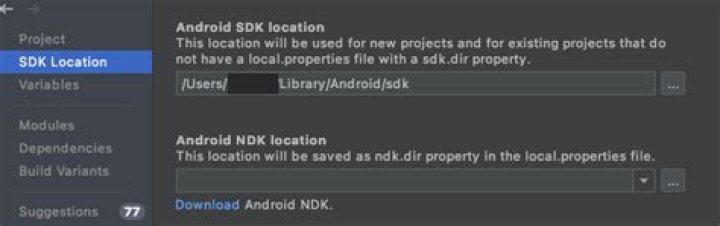
During the debugging of this "multiple Koltin" issue, I found out that my NDK wasn't install. Hence I went to SDK Manager and install the NDK (Side by side). Then issue of toolchain occurred, shown as below.
No toolchains found in the NDK toolchains folder for ABI with prefix: arm-linux-androideabi Fixed was done by downloading older NDK version, android-ndk-r19c and pointed the NDK path in my local.properties.
Local.properties
sdk.dir=/Users/path/Library/Android/sdk ndk.dir=/Users/path/Library/Android/android-ndk-r19c TLDR
What I've tried
./gradlew clean && ./gradlew assembleRelease- Appending the following code + Step 1
# FILE 1: Gradle.properties org.gradle.jvmargs=-Xmx4096m -XX:MaxPermSize=1024m -XX:+HeapDumpOnOutOfMemoryError -Dfile.encoding=UTF-8 # FILE 2: app/build.gradle ( under android{} ) dexOptions { incremental true javaMaxHeapSize "4g" } My project env
react: 16.13.1 => 16.13.1 react-native: 0.63.2 => 0.63.2 My Project Structure 
Any idea what causes this issue and how to fix this? 🆘
14 Answers
UNBELIEVABLE FIXED, seems to be a 63.x issue? As there's another person having this issue after upgrading from 62.2 to 63.3
The fixed was done as suggested here
3Solved this issue by deleting the .gradle folder from /android and again run npm run android, and it solved this error.
seems like running ./gradlew -stop inside android folder is working for me
Just deleting the .gradle folder did not resolve this issue in my case.
But after executing ./gradlew clean in the android folder as suggested here I'm back on track.
I solve this issue with this solution.
In gradle.properties add following code
org.gradle.daemon=true org.gradle.configureondemand=true org.gradle.jvmargs=-Xmx4g -XX:MaxPermSize=2048m -XX:+HeapDumpOnOutOfMemoryError -Dfile.encoding=UTF-8 Additionally, insert these lines in app/build.gradle
android{ dexOptions { javaMaxHeapSize "3g" } } After making these changes run .\gradle clean and .\gradle assembleRelease
What resolved this error for me, was killing all running Java processes in Task Manager.
I had an actual bug in my code, which caused dangling processes, so I was getting only this error and not the one related to the bug.
After killing all processes & running the usual gradle cleanup, I got the right error message I could work with further.
just reboot! it worked for my case
0Kotlin gradle compilation is kind of borken in 1.1.2
Add : kotlin.incremental=false to your gradle.properties file to disable the incremental building.
i have faced same problem with rn 0.67.2 i tried all options mentioned here did not solved, finally i have deleted all java_pid[XXXX].hprof in android folder then all works fine
I use react native 0.67.4 I followed these codes:
cd android ./gradlew clean cd .. run this command multiple times:
react-native run-android it's ridiculous but react-native-maps package can be the cause of this error. and when I ran react-native run-android for the second time it worked for me, but In another post I've read we should it 5-6 times
Simply delete the hidden folder .gradle from your home directory and after that clean your android project with ./gradlew clean and delete your node_modules and re-install your dependencies.
I've tried to answer this in more details here: Multiple Kotlin Daemon Session Error
I also get this error. and easier way to solve this follow the below steps:
Step-1: Terminate/close the running npm.
Step-2: Now go to the project and clean the project by running this command
-- For android --
cd android &&./gradlew clean && cd ../ -- For ios --
cd ios && xcodebuild clean && cd ../ Step-3: Go to the android folder and delete the .gradle folder
Step-4: Now run the command to run android using these command
npm run android OR
npx react-native run-android if you are want to build a release apk file then run this command
npx react-native run-android --variant=release Or to get an aab file the run
cd android &&./gradlew bundleRelease && cd ../ If you are still getting the same error then close the terminal or restart the laptop and follow the same step again
Kill all java processes and try building again.
cd android &&./gradlew clean && cd ../ then
npm install or
npm install force that worked for me
I had the same issue when I was trying to use my phone as an emulator.
In my case physical device was running out of space...
Deleted some of my files and build was successful.
1



