I have the following (simplified) gitlab-ci.yml:
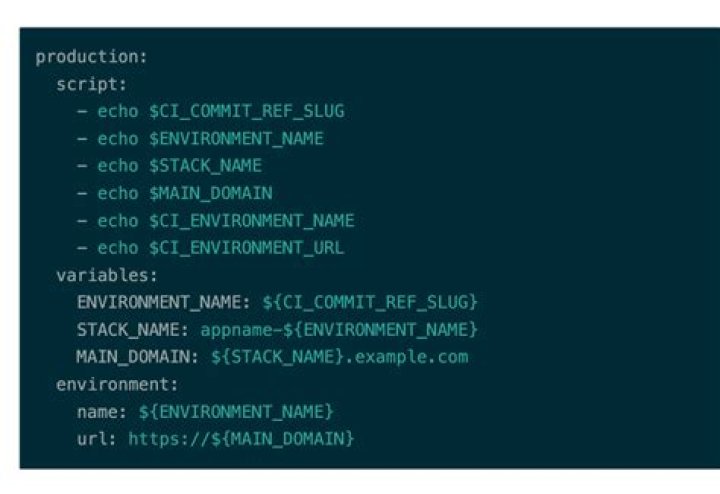
variables: APP_NAME: "hello-gitlab-ci" deploy: stage: deploy script: some-script environment: name: staging url: The resulting url in the Gitlab UI is e.g.: . $APP_NAME seems to resolve to an empty String, whereas the runner variable $CI_BUILD_REF_NAME resolves correctly.
GitLab Community Edition 8.13.0, gitlab-runner 1.7.1. What am I missing?
4 Answers
From GitLab doc, the YAML-defined variables are supported with GitLab Runner 0.5.0 or higher and GitLab CI 7.14 or higher, so first, check your GitLab component versions.
Try also enabling debug, to have more clues on why this variable is not resolved:
job1: variables: CI_DEBUG_TRACE: "true" This is most likely a bug in GitLab Runner where the env variables are defined after the environment but before the script. Have you considered opening an issue?
0GitLab variables are not translated specifically in the environment section of .gitlab-ci.yml. There are a few issues open regarding this (and the lack of documentation regarding this), e.g.
This is now (6 years later) supported with GitLab 15.0 (May 2022)
Use nested CI/CD variables with environments in pipeline configuration
Using CI/CD variables with the
environmentskeyword in your CI/CD configuration is great, because it lets you create environments dynamically. While this is already a powerful feature, there were still some limitations, because you could not use nested variables to define environments.Starting in GitLab 15.0, you can nest variables inside other variables, and have them all expand the way you expect. This makes dynamic environments even more powerful due to the increased flexibility!
See Documentation and Issue.