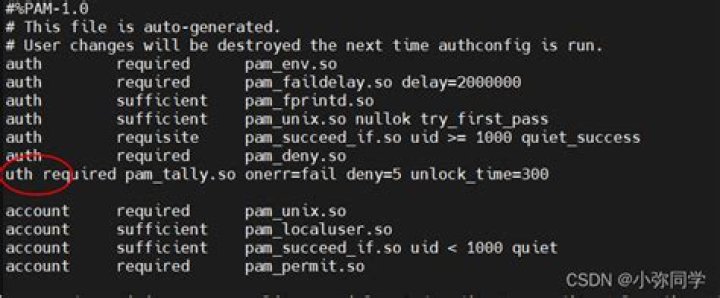

I'm trying connect a Linux machine to AD and I made some changes in some files below:
/etc/krb5.conf
/etc/pam.d/system-auth
/etc/samba/smb.conf
After these changes I connected the server to AD with "net ads join" command. But then users in sudoers cannot do sudo. The error is:
$sudo -i sudo: PAM account management error: Permission denied in /etc/ssh/sshd file, UsePAM is no. and I appanded the line "+:ALL:ALL" to /etc/security/access.conf
/var/log/secure output:
sudo: PAM (sudo-i) illegal module type: %PAM-1.0 sudo: PAM (sudo-i) no control flag supplied sudo: PAM (sudo-i) no module name supplied sudo: PAM (sudo-i) illegal module type: %PAM-1.0 sudo: PAM (sudo-i) no control flag supplied sudo: PAM (sudo-i) no module name supplied sudo: PAM (sudo-i) illegal module type: %PAM-1.0 sudo: PAM (sudo-i) no control flag supplied sudo: PAM (sudo-i) no module name supplied sudo: PAM (sudo-i) illegal module type: %PAM-1.0 sudo: PAM (sudo-i) no control flag supplied sudo: PAM (sudo-i) no module name supplied sudo: myuser : PAM account management error: Permission denied ; TTY=pts/1 ; PWD=/home/myuser ; USER=root ; COMMAND=/bin/bash How can I give sudo permission again to my user?
1 Answer
You mentioned making changes to /etc/pam.d/system-auth (which should be a link to /etc/pam.d/system-auth-ac)... have you tried adding no_access_check after the first occurrence of account sufficient pam_vas3.so?
# cat system-auth-ac ... account sufficient pam_vas3.so no_access_check ... 



