I am setting up a new laptop (win10, old one was win7). At my shop, we use a custom task in most of our SSIS packages. When I open an existing package using this task I get an error:
TITLE: Microsoft Visual Studio
The task with the name "Log Start Event" and the creation name "TBSM.Vision.SSIS.LoggingTask.VisionLoggingTask, TBSM.Vision.SSIS.LoggingTask, Version=1.0.0.0, Culture=neutral, PublicKeyToken=ed92d0ee7f09d162" is not registered for use on this computer. Contact Information: Vision Logging Task
------------------------------ BUTTONS:
OK
Running Visual Studio 17, version 15.9.6
At first I thought I messed up the gac, but looks like I didn't:
C:\Windows\System32>gacutil /l TBSM.Vision.SSIS.LoggingTask Microsoft (R) .NET Global Assembly Cache Utility. Version 4.0.30319.0 Copyright (c) Microsoft Corporation. All rights reserved.
The Global Assembly Cache contains the following assemblies:
TBSM.Vision.SSIS.LoggingTask, Version=1.0.0.0, Culture=neutral, PublicKeyToken=ed92d0ee7f09d162, processorArchitecture=MSILNumber of items = 1
What else am I missing?
Update 1
Targeted server:

64-bit false:
DLL is in every folder it should be:
2 Answers
There are many possible causes:
(1) TargetServerVersion not adequate
You are selecting a TargetServerVersion which is not relevant to the dll.
GoTo Project Properties >> Configuration Properties >> TargetServerVersion
Or you have selected a TargetServerVersion that doesn't contains the task dll in the corresponding Task folders.
- SSIS 2012 = C:\Program Files (x86)\Microsoft SQL Server\110\DTS\Task
- SSIS 2014 = C:\Program Files (x86)\Microsoft SQL Server\120\DTS\Task
- SSIS 2016 = C:\Program Files (x86)\Microsoft SQL Server\130\DTS\Task
- SSIS 2017 = C:\Program Files (x86)\Microsoft SQL Server\140\DTS\Task
- SSIS 2019 = C:\Program Files (x86)\Microsoft SQL Server\150\DTS\Task
Check the first link, it contains more helpful details
References
- Error - the creation name "SSIS.ReplacementTask" is not registered
- How to change SSIS Package Version in Visual Studio 2015 or Higher
(2) Registered 32-bit dll
It looks like you registered a 32-bit dll
Try running the package in 32-bit mode:
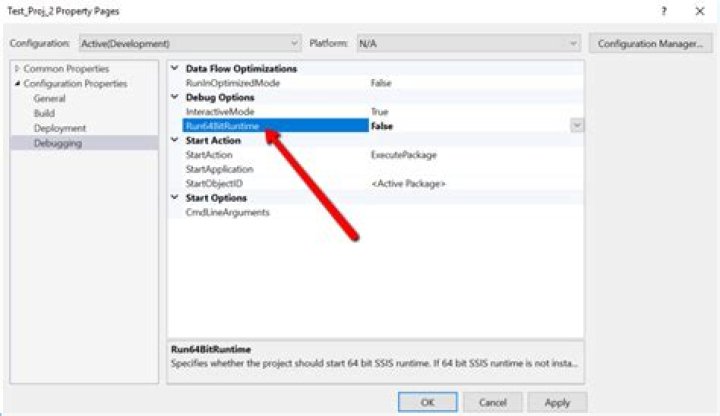
GoTo Project properties >> Debugging >> Run64BitRuntime = False
More information at:
12Found the problem.
In order to use the custom Task .DLL, you need to put the .DLL file in the ./Task sub-directory, not the ./Pipeline directory.




