
Spring Boot 2.6.3 with Springdoc.
<dependency> <groupId>org.springdoc</groupId> <artifactId>springdoc-openapi-ui</artifactId> <version>1.6.5</version> </dependency> In applicaton.yaml, when I set the path as /v3/api-docs or remove it, that means use the default path "/v3/api-docs". The Swagger UI page shows up correctly with the APIs
But I want to overite the path as below
api-docs.path: /bus/v3/api-docs then Swagger UI displays the "Failed to load remote configuration" error:
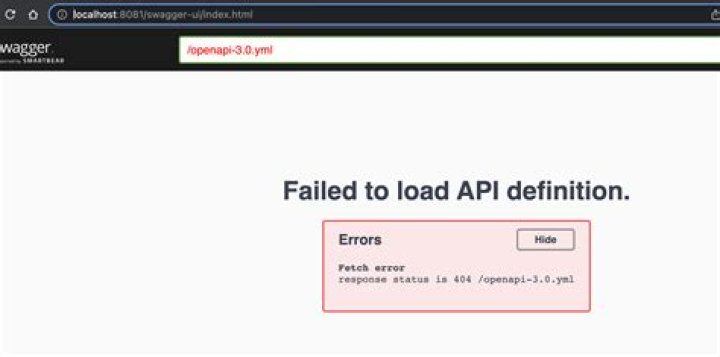
10 Answers
Make sure to add "/v3/api-docs/**" in configure method. @Configuration public class WebSecurityConfiguration extends WebSecurityConfigurerAdapter { @Override public void configure(WebSecurity web) throws Exception { web.ignoring().antMatchers("/swagger-ui/**", " /v3/api-docs/**"); } } I had the same problem, If you are behind a reverse proxy, the fix was to add the following property in application.yml
server: forward-headers-strategy: framework this is needed due to the following
Swagger relies on internal routing to make requests from the clients perspective. Putting the service behind a reverse-proxy without providing the X-Forwarded headers will result in the user not being able to use the documentation as intended
2If you are using Spring Security in your app, you must include the URL in the configs. Add the code below please to your project.
@Configuration public class WebSecurityConfiguration extends WebSecurityConfigurerAdapter { @Override public void configure(WebSecurity web) throws Exception { web.ignoring().antMatchers("/swagger-ui/**", "/bus/v3/api-docs/**"); } } Perform "Empty cache and hard refresh" in your browser.
I think I have solved the problem (thanks to @Ivan Zaitsev), just wanted to add more clarification to the answer.
I too have changed the api-docs.path property and I had the same problem. When I inspect the requests on swagger UI page, swagger-config request returns 404 since it was still trying to get the config from the old URL.
Even though I have changed api-docs.path property, here is the request URL that tries to retrieve swagger-config.
It turned out to be a problem related to openapi-ui, because I was able to solve it when I cleared the browser cache and cookies. It is better do to the tests with incognito browser since it does not hold any data on the session.
If you use the org.spring framework.security:spring-security-config:6.1.3, this would be able to help you.
@Configuration @EnableWebSecurity class WebSecurity { @Bean fun securityFilterChain(http: HttpSecurity): SecurityFilterChain { http.authorizeHttpRequests { it.requestMatchers(antMatcher("/swagger-ui/**")).permitAll() it.requestMatchers(antMatcher("/api-docs/**")).permitAll() it.anyRequest().authenticated() } return http.build() } } application.yml
springdoc: swagger-ui: enabled: true path: /swagger-ui.html api-docs.path: /api-docs If you are using SpringBoot v3, you must use springdoc-openapi v2:
With gradle, for example:
implementation 'org.springdoc:springdoc-openapi-starter-webmvc-ui:2.0.2' It's old question but when I was looking for answer I came here, so after I make it work with newer version, I decided to share my answer, maybe someone find it useful.
This is my implementation for spring security - 3.1.0 and openApi 2.1.0 with gradle:
implementation "org.springframework.boot:spring-boot-starter-security:3.1.0" implementation "org.springdoc:springdoc-openapi-starter-webmvc-ui:2.1.0" @EnableWebSecurity public class SecurityConfiguration { @Bean SecurityFilterChain filterChain(HttpSecurity http) throws Exception { http .csrf().disable() .sessionManagement() .sessionCreationPolicy(SessionCreationPolicy.STATELESS) .and() .authorizeHttpRequests() .requestMatchers("/swagger-ui/**", "/swagger-resources/*", "/v3/api-docs/**") .permitAll() .anyRequest() .authenticated(); return http.build(); } } You need to specify paths in requestMatcher like "/bus/v3/api-docs". The best option is to implement it one by one:
- check if "/**" works, then
- check if /bus/** works (in my case matcher with default path "/api" which is set for whole project and whole path looked like this - /api/swagger-ui/** didn't work, but /swagger-ui/** worked)
- then another check if /bus/v3/** work
** - two stars are wildcard.
Even my path for swagger looks like this: api/swagger-ui/index.html#/ I needed to add matcher: v3/api-docs/** to make it work.
You can write this code in SecurityConfig class:
@Configuration public class SecurityConfig extends WebSecurityConfigurerAdapter { @Override protected void configure(HttpSecurity http) throws Exception { http .cors() .and() .csrf().disable() .headers() .frameOptions() .deny() .and() .authorizeRequests() .antMatchers(getPermitAll()).permitAll() .antMatchers(AUTH_WHITELIST).permitAll(); } The AUTH_WHITELIST like this:
private static final String[] AUTH_WHITELIST = { "/v2/api-docs", "/swagger-resources", "/swagger-resources/**", "/configuration/ui", "/configuration/security", "/swagger-ui.html", "/webjars/**", "/v3/api-docs/**", "/swagger-ui/**" }; In my case, spring-boot app was deployed behind a reverse proxy and the reverse-proxy had a context-root.
in localhost everything was working fine because the swagger would be on and this would load fine
But when it was hosted on the test-server, the url will change to and this would load instead of my-app/v3/api-docs/swagger-config
the following in application.properties fixed it
server.forward-headers-strategy=framework 



