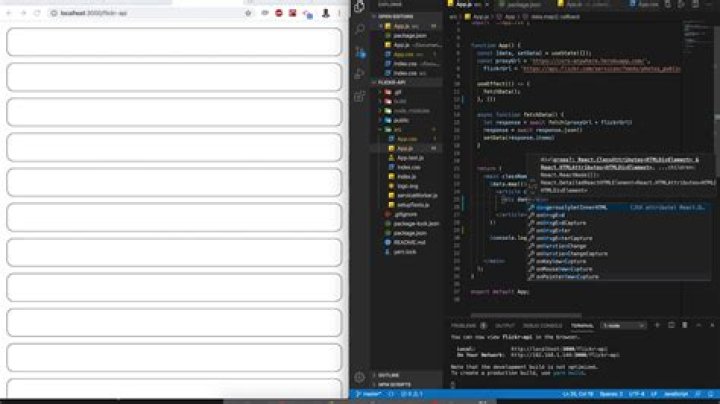
Here's what I tried and how it goes wrong.
This works:
<div dangerouslySetInnerHTML={{ __html: "<h1>Hi there!</h1>" }} /> This doesn't:
<div dangerouslySetInnerHTML={{ __html: this.props.match.description }} /> The description property is just a normal string of HTML content. However it's rendered as a string, not as HTML for some reason.

Any suggestions?
013 Answers
Is this.props.match.description a string or an object? If it's a string, it should be converted to HTML just fine. Example:
class App extends React.Component { constructor() { super(); this.state = { description: '<h1>something</h1>' } } render() { return ( <div dangerouslySetInnerHTML={{ __html: this.state.description }} /> ); } } ReactDOM.render(<App />, document.getElementById('root')); However if description is <h1>something</h1> without the quotes '', you're going to get:
Object { $$typeof: [object Symbol] {}, _owner: null, key: null, props: Object { children: "something", style: "color:red;" }, ref: null, type: "h1" } If It's a string and you don't see any HTML markup the only problem I see is wrong markup..
UPDATE
If you are dealing with HTML Entities, You need to decode them before sending them to dangerouslySetInnerHTML that's why it's called "dangerously" :)
Working example:
class App extends React.Component { constructor() { super(); this.state = { description: '<p><strong>Our Opportunity:</strong></p>' } } htmlDecode(input){ var e = document.createElement('div'); e.innerHTML = input; return e.childNodes.length === 0 ? "" : e.childNodes[0].nodeValue; } render() { return ( <div dangerouslySetInnerHTML={{ __html: this.htmlDecode(this.state.description) }} /> ); } } ReactDOM.render(<App />, document.getElementById('root')); I use 'react-html-parser'
yarn add react-html-parser import ReactHtmlParser from 'react-html-parser'; <div> { ReactHtmlParser (html_string) } </div> Source on npmjs.com
Lifting up @okram's comment for more visibility:
5from its github description: Converts HTML strings directly into React components avoiding the need to use dangerouslySetInnerHTML from npmjs.com A utility for converting HTML strings into React components. Avoids the use of dangerouslySetInnerHTML and converts standard HTML elements, attributes and inline styles into their React equivalents.
Check if the text you're trying to append to the node is not escaped like this:
var prop = { match: { description: '<h1>Hi there!</h1>' } }; Instead of this:
var prop = { match: { description: '<h1>Hi there!</h1>' } }; if is escaped you should convert it from your server-side.
The node is text because is escaped
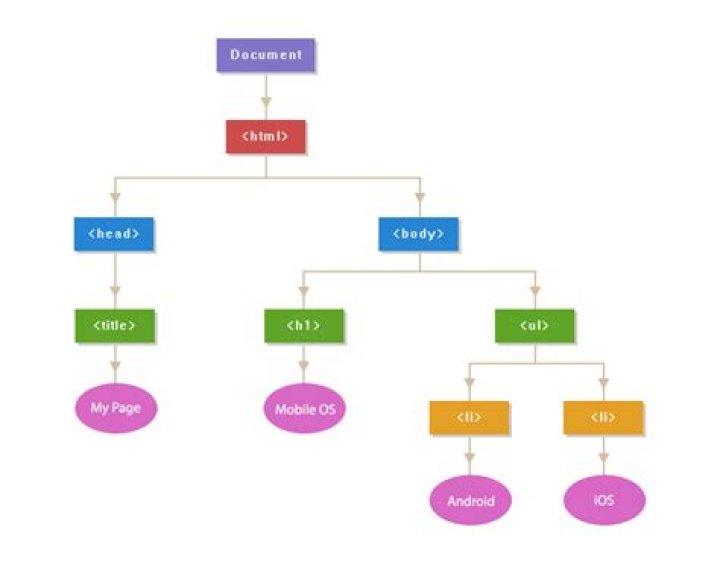
The node is a dom node because isn't escaped
3If you have HTML in a string I would recommend using a package called html-react-parser.
Installation
NPM:
npm install html-react-parser yarn:
yarn add html-react-parser Usage
import parse from 'html-react-parser' const yourHtmlString = '<h1>Hello</h1>' code:
<div> {parse(yourHtmlString)} </div> If you have control over where the string containing html is coming from (ie. somewhere in your app), you can benefit from the new <Fragment> API, doing something like:
import React, {Fragment} from 'react' const stringsSomeWithHtml = { testOne: ( <Fragment> Some text <strong>wrapped with strong</strong> </Fragment> ), testTwo: `This is just a plain string, but it'll print fine too`, } ... render() { return <div>{stringsSomeWithHtml[prop.key]}</div> } I use innerHTML together a ref to span:
import React, { useRef, useEffect, useState } from 'react'; export default function Sample() { const spanRef = useRef<HTMLSpanElement>(null); const [someHTML,] = useState("some <b>bold</b>"); useEffect(() => { if (spanRef.current) { spanRef.current.innerHTML = someHTML; } }, [spanRef.current, someHTML]); return <div> my custom text follows<br /> <span ref={spanRef} /> </div> } UPDATE:
I removed someHTML state and added comments to make the example more coincise around the concept.
/** * example how to retrieve a reference to an html object */ import React, { useRef, useEffect } from 'react'; /** * this component can be used into another for example <Sample/> */ export default function Sample() { /** * 1) spanRef is now a React.RefObject<HTMLSpanElement> * initially created with null value */ const spanRef = useRef<HTMLSpanElement>(null); /** * 2) later, when spanRef changes because html span element with ref attribute, * follow useEffect hook will triggered because of dependent [spanRef]. * in an if ( spanRef.current ) that states if spanRef assigned to valid html obj * we do what we need : in this case through current.innerHTML */ useEffect(() => { if (spanRef.current) { spanRef.current.innerHTML = "some <b>bold</b>"; } }, [spanRef]); return <div> my custom text follows<br /> {/* ref={spanRef] will update the React.RefObject `spanRef` when html obj ready */} <span ref={spanRef} /> </div> } You just use dangerouslySetInnerHTML method of React
<div dangerouslySetInnerHTML={{ __html: htmlString }} />
Or you can implement more with this easy way: Render the HTML raw in React app
In my case, I used react-render-html
First install the package by npm i --save react-render-html
then,
import renderHTML from 'react-render-html'; renderHTML("<a class='github' href='") I could not get npm build to work with react-html-parser. However, in my case, I was able to successfully make use of . I had a requirement to show few html unicode characters , but they should not be directly embedded in the JSX. Within the JSX, it had to be picked from the Component's state. Component code snippet is given below :
constructor() { this.state = { rankMap : {"5" : <Fragment>★ ★ ★ ★ ★</Fragment> , "4" : <Fragment>★ ★ ★ ★ ☆</Fragment>, "3" : <Fragment>★ ★ ★ ☆ ☆</Fragment> , "2" : <Fragment>★ ★ ☆ ☆ ☆</Fragment>, "1" : <Fragment>★ ☆ ☆ ☆ ☆</Fragment>} }; } render() { return (<div> <small>{ this.state.rankMap["5"] }</small> </div>); } const HtmlToReactParser = require('html-to-react').Parser; let htmlInput = html.template; let htmlToReactParser = new HtmlToReactParser(); let reactElement = htmlToReactParser.parse(htmlInput); return(<div>{reactElement}</div>) You can also use parseReactHTMLComponent from Jumper Package. Just look at it, it's easy and you don't need to use JSX syntax.
More on Jumper:
NPM Package:
// For typescript import parse, { HTMLReactParserOptions } from "html-react-parser"; import { Element } from "domhandler/lib/node"; export function contentHandler(postContent: string) { const options: HTMLReactParserOptions = { replace: (domNode: Element) => { if (domNode.attribs) { if (domNode.attribs.id === 'shortcode') { return <div className="leadform">Shortcode</div>; } } }, }; return parse(postContent, options); } // Usage: contentHandler("<span>Hello World!</span>")If you have control to the {this.props.match.description} and if you are using JSX. I would recommend not to use "dangerouslySetInnerHTML".
// In JSX, you can define a html object rather than a string to contain raw HTML let description = <h1>Hi there!</h1>; // Here is how you print return ( {description} ); 



