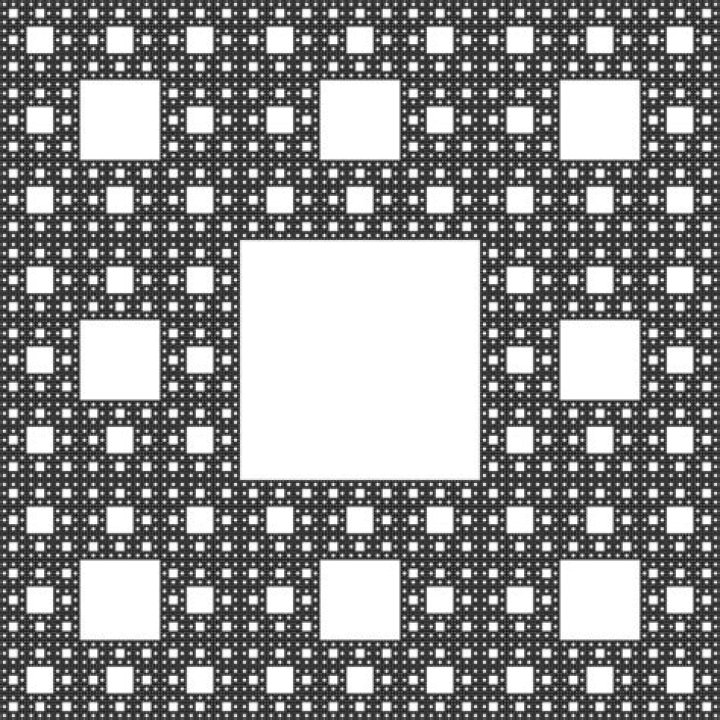

I'm having some problems whit drawing a sierpinski carpet, and would apreciate any help.
I was able to define the stoping condition, draw the central rectangle, and recursively, draw the next level of the image, all while keeping count.
It just so happens that I can only draw on the top left side. I'd say I'm confusing variables, but I can't seem to figure it out. Would apreciate any help
This is the part of the code where i'm having problems.
int smallerWidth = newWidth / 3; int smallerHeight = newHeight / 3; int sX = 0; int sY = 0; if (currentDeep > 1) { for (int i = 0; i < 3; i++) { sX = width / 9 + (i * 3 * (width / 9)); sY = height / 9; g.fillRect(sX, sY, smallerWidth, smallerHeight); for (int j = 0; j < 3; j++) { sY = height / 9 + (j * 3 * (height / 9)); g.fillRect(sX, sY, smallerWidth, smallerHeight); } } return 1 + printSquares(g, sX, sY, newWidth, newHeight, currentDeep - 1); } else return 1; } In sum my question is. What should I change/create in order for my program to draw the remaining 7 squares?
2 Answers
The issue with your code is, that you are trying to perform actions for multiple layers of the recursion at once. Normally, in the recursion, you would only paint the Quadrado central, calculate the sizes and coordinates of the smaller rectangles, and call the method recursively. That way you ensure that the recursive calls do not influence the stuff that is already there.
private int printSquares(Graphics g, int xi, int yi, int width, int height, int currentDeep) { //Quadrado central int newWidth = width / 3; int newHeight = height / 3; int x = (width / 3) + xi; int y = (height / 3) + yi; g.fillRect(x, y, newWidth, newHeight); int sX = 0; int sY = 0; if (currentDeep > 1) { int sum = 0; for (int i = 0; i < 3; i++) { for (int j = 0; j < 3; j++) { //This is the position of each of the small rectangles sX = i * (width / 3) + xi; sY = j * (height / 3) + yi; // Call the method recursively in order to draw the smaller rectangles sum += printSquares(g, sX, sY, newWidth, newHeight, currentDeep - 1); } } return 1 + sum; } else return 1; } I hope, this resolves you issue.
2I hope this is ok. This is amazing code. I took the liberty to complete this with the original code provided in the question and added the code that fixed it that Illedhar recommended as a added method. Here it is. Thank you for sharing this.
import java.awt.Color; import java.awt.Graphics; import javax.swing.JFrame; import javax.swing.JLabel; import javax.swing.SwingUtilities; import javax.swing.WindowConstants; public class sierpinskicarpet { public static Color BACKGROUNDCOLOR = new Color(0, 0, 150); public static Color FOREGROUNDCOLOR = new Color(255, 180, 0); // Padrao = 5, alterado public static int DEEP = 10; /** * Build the frame and shows it */ public sierpinskicarpet(int deep) { // the frame and title JFrame frame = new JFrame(); frame.setTitle("...: Recursive Squares with deep " + deep + " :..."); // Dispose frame on click on close button frame.setDefaultCloseOperation(WindowConstants.DISPOSE_ON_CLOSE); // set size and center frame on screen frame.setSize(400, 400); frame.setLocationRelativeTo(null); // add print area occupying all the frame content area frame.add(new PrintArea(deep)); // put frame visible frame.setVisible(true); } /** * Main method */ public static void main(String[] args) { SwingUtilities.invokeLater( new Runnable() { public void run() { // launch for 1 to DEEP squares frames for (int i = DEEP; i >= 1; --i) { // build a new object each time: objects will run // independently new sierpinskicarpet(i); } } }); } } /** * Our print area is, in fact, a label extended with the paint squares behavior */ class PrintArea extends JLabel { private static final long serialVersionUID = 1L; // local deep variable, will keep the registered deep for this the print // area int deep; /** * constructor */ public PrintArea(int deep) { // call super, that is JLabel, constructor super(); // set background color and set as well opaque to allow the background // to be visible setBackground(sierpinskicarpet.BACKGROUNDCOLOR); setOpaque(true); // save the deep this.deep = deep; } /** * paint method, called by JVM, when it is needed to update the PrintArea */ public void paint(Graphics g) { // call paint from the JLABEL, draws the background of the PrintArea super.paint(g); // set drawing color g.setColor(sierpinskicarpet.FOREGROUNDCOLOR); // call the amazing print square method int n = printSquares(g, 0, 0, getWidth(), getHeight(), this.deep); // put to the world how much squares we printed System.out.println("Deep = " + deep + ", squares painted: " + n); } /** * Auxiliary method that will to the work. It must print a square with 1/3 * of the length of the frame and at the center and if not the bottom level * ask to do the same for each of the other 8 square with 1/3 of length but * called with the new deep */ private int printSquares(Graphics g, int xi, int yi, int width, int height, int currentDeep) { //Quadrado central int newWidth = width / 3; int newHeight = height / 3; int x = (width / 3) + xi; int y = (height / 3) + yi; g.fillRect(x, y, newWidth, newHeight); int sX = 0; int sY = 0; if (currentDeep > 1) { int sum = 0; for (int i = 0; i < 3; i++) { for (int j = 0; j < 3; j++) { //This is the position of each of the small rectangles sX = i * (width / 3) + xi; sY = j * (height / 3) + yi; // Call the method recursively in order to draw the smaller rectangles sum += printSquares(g, sX, sY, newWidth, newHeight, currentDeep - 1); } } return 1 + sum; } else return 1; } } /* Works Cited: Recursive changing variables - sierpinski carpet. Stack Overflow. Retrieved May 4, 2022, from */ 



