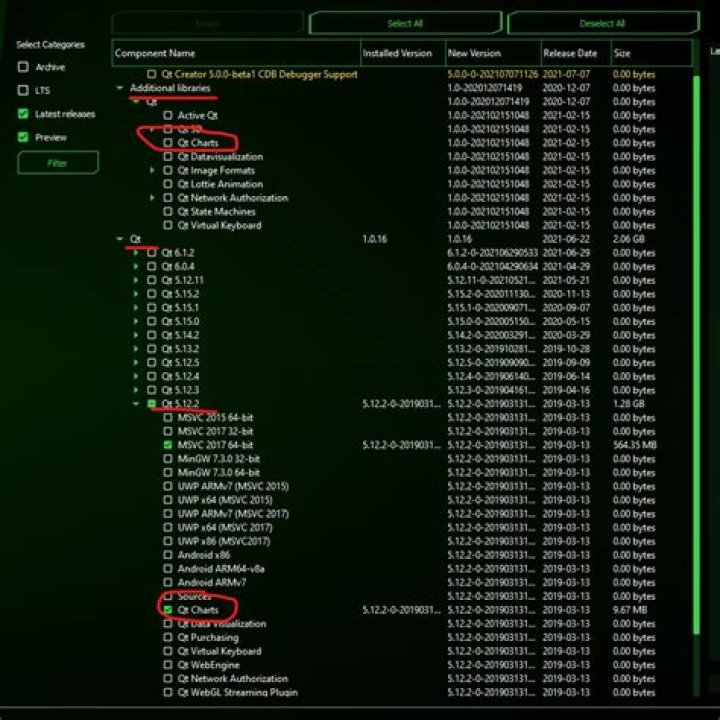
I know that there're many questions regarding this aspect:
- QML module not found (QtCharts)
- How to include the QtCharts library in Qt Creator 4.2.0 (Community)
- How to fix "QtCharts" library file not found/can't include <QtCharts>?
- Importing QtCharts in QML causes module not installed error
- Many more...
But most of them solve this issue by adding QtChart in Qt Maintenance tool, and I've already done this (and re-checked it).

But when using it:
QT += charts
I still received the Unknown module(s) in Qt error.
I've already asked this question in forum.qt.io, (and as I was asking, this question received no satisfactory answer, so please don't judge me if an answer is found on the forum by the time you answer this question), and some people said that I need to install and build the module first.
If this is the case, how do I do it? If not, what should I do with this? I'm thinking of reinstalling Qt and adding the module immediately when installation occured.
Some system info:
- Windows 10, 64 bit
- QtCreator 4.15.1
- Qt 5.12.2 (MSVC 2019, 64 bit)
2 Answers
It seems you have only installed Qtcharts in the Additional libraries section.I know it's showing 0mb installation which is useless.
Select the QT section which is below the additional libraries section. Then select the version you have installed. Under the selected version there is a QT charts module, select it and install that.
Then go to your project and run a 'qmake'. Now you can observe all the errors are gone.
I had the same problem and I uninstalled and reinstalled Qt with QTChart. But the problem was not solved. Accidentally, after installing Qt5, I used the following command to uninstall Qt4 libraries, and the problem was solved!
sudo apt purge qt4*




