I am trying to install NVIDIA CUDA 8.0 on my Ubuntu 16.04 LTS, even following the Linux Install Guide from NVIDIA I can not get it working.
Here is the details.
I have a laptop Acer Aspire VX, it cames with Windows 10 and I did a dual boot installation of Ubuntu. The hardware is a Intel Core i5 7300HQ with an NVIDIA GeForce 1050.
The pre-installation actions and their output:
$ lspci | grep -i nvidia 01:00.0 3D controller: NVIDIA Corporation Device 1c8d (rev a1) $ uname -m && cat /etc/*release x86_64 DISTRIB_ID=Ubuntu DISTRIB_RELEASE=16.04 DISTRIB_CODENAME=xenial DISTRIB_DESCRIPTION="Ubuntu 16.04.3 LTS" NAME="Ubuntu" VERSION="16.04.3 LTS (Xenial Xerus)" ID=ubuntu ID_LIKE=debian PRETTY_NAME="Ubuntu 16.04.3 LTS" VERSION_ID="16.04" HOME_URL="" SUPPORT_URL="" BUG_REPORT_URL="" VERSION_CODENAME=xenial UBUNTU_CODENAME=xenial $ gcc --version gcc (Ubuntu 5.4.0-6ubuntu1~16.04.4) 5.4.0 20160609 Copyright (C) 2015 Free Software Foundation, Inc. This is free software; see the source for copying conditions. There is NO warranty; not even for MERCHANTABILITY or FITNESS FOR A PARTICULAR PURPOSE. $ uname -r 4.10.0-33-generic Until here everything was ok. Moreover, I install it following the pass by pass of the guide. I downloaded the file .deb from the NVIDIA site for Linux x86_64 machines.
- $ sudo dpkg -i /home/marlosdamasceno/Downloads/cuda-repo-ubuntu1604-8-0-local-ga2_8.0.61-1_amd64.deb
- $ sudo apt-get update
- $ sudo apt-get install cuda
That was ok as well. Aftet that I installed the Patch 2 (Released Jun 26, 2017). Here are the steps.
- $ sudo dpkg -i /home/marlosdamasceno/Downloads/cuda-repo-ubuntu1604-8-0-local-cublas-performance-update_8.0.61-1_amd64.deb
- $ sudo apt-get update
- $ sudo apt-get upgrade cuda
Everything looks like ok until here. Therefore, I follow the post-installation actions.
$ export PATH=/usr/local/cuda-8.0/bin${PATH:+:${PATH}} $ nvcc --version nvcc: NVIDIA (R) Cuda compiler driver Copyright (c) 2005-2016 NVIDIA Corporation Built on Tue_Jan_10_13:22:03_CST_2017 Cuda compilation tools, release 8.0, V8.0.61 $ cuda-install-samples-8.0.sh /home/marlosdamasceno/ Ok, everything looks ok again, however here was the first problem, when I was checking the driver, there was no folder at all of nvidia.
$ cat /proc/driver/nvidia/version cat: /proc/driver/nvidia/version: No such file or directory
Here is a print of the folder: https: //
The only thing on the folder is a rtc file.
I tryed to keep going and did the make step of the samples. I got this:
/usr/bin/ld: cannot find -lnvcuvid collect2: error: ld returned 1 exit status Makefile:381: recipe for target 'cudaDecodeGL' failed make[1]: *** [cudaDecodeGL] Error 1 make[1]: Leaving directory '/home/marlosdamasceno/NVIDIA_CUDA-8.0_Samples/3_Imaging/cudaDecodeGL' Makefile:52: recipe for target '3_Imaging/cudaDecodeGL/Makefile.ph_build' failed make: *** [3_Imaging/cudaDecodeGL/Makefile.ph_build] Error 2 Moreover, when I ran the deviceQuery, I got this message.
./deviceQuery Starting... CUDA Device Query (Runtime API) version (CUDART static linking) cudaGetDeviceCount returned 35 -> CUDA driver version is insufficient for CUDA runtime version Result = FAIL In addition, here are some more commands and outputs to help.
Nothing happens when typing this command.
$ lsmod | grep nvidia Another command.
$ nvidia-smi nvidia-smi: command not found Another command.
$ sudo lshw -c video *-display description: 3D controller product: NVIDIA Corporation vendor: NVIDIA Corporation physical id: 0 bus info: pci@0000:01:00.0 version: a1 width: 64 bits clock: 33MHz capabilities: pm msi pciexpress bus_master cap_list configuration: driver=nouveau latency=0 resources: irq:318 memory:a3000000-a3ffffff memory:90000000-9fffffff memory:a0000000-a1ffffff ioport:4000(size=128) *-display description: VGA compatible controller product: Intel Corporation vendor: Intel Corporation physical id: 2 bus info: pci@0000:00:02.0 version: 04 width: 64 bits clock: 33MHz capabilities: pciexpress msi pm vga_controller bus_master cap_list rom configuration: driver=i915 latency=0 resources: irq:319 memory:a2000000-a2ffffff memory:b0000000-bfffffff ioport:5000(size=64) memory:c0000-dffff So here are the questions.
I have Secure Boot enable, it is possible to be that?
The path file from the command export PATH=/usr/local/cuda-8.0/bin${PATH:+:${PATH}} always keep erasing it self. So when I do the command $ nvcc --version, I got the message.
The program 'nvcc' is currently not installed. You can install it by typing: sudo apt install nvidia-cuda-toolkit How can I set the path and keep it that way?
Am I missing a step?
Thanks in advance for any help!!!
62 Answers
After a lot of effort for a new fella on Ubuntu I got it working!!!
@ubfan1 helped me when he said the command lshw -c video the hint I needed to know that I was not running on NVIDIA's driver.
After that I tried to install without success (the secure boot was off). I got this error: The system is running in low-graphics mode” (see this question). Therefore, I boot using the command **Alt+Ctrl+F1* and removed all files from NVIDIA using the command below.
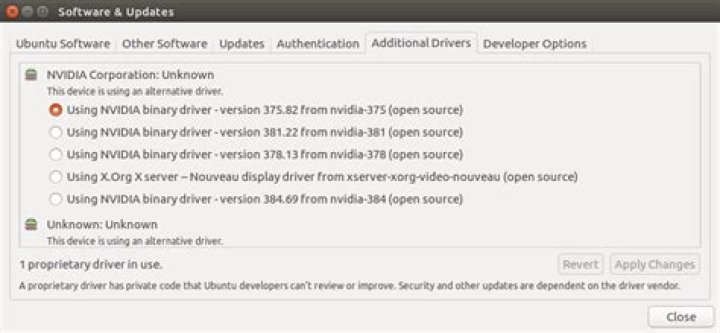
sudo apt-get remove --purge nvidia-* With that I could come back to my Desktop, where I could use the System Settings tool from Ubuntu to install the drivers (Software & Updates ->Addtional Drivers->Using NVIDIA binary -version 375.82 from nvidia-375 (open source). See the print:
I reboot the system and everything was installed!!! After that I tested the command ./deviceQuery from the bin inside the samples and the test PASS!
./deviceQuery Starting... CUDA Device Query (Runtime API) version (CUDART static linking) Detected 1 CUDA Capable device(s) Device 0: "GeForce GTX 1050" CUDA Driver Version / Runtime Version 8.0 / 8.0 CUDA Capability Major/Minor version number: 6.1 Total amount of global memory: 4041 MBytes (4237426688 bytes) ( 5) Multiprocessors, (128) CUDA Cores/MP: 640 CUDA Cores GPU Max Clock rate: 1493 MHz (1.49 GHz) Memory Clock rate: 3504 Mhz Memory Bus Width: 128-bit L2 Cache Size: 524288 bytes Maximum Texture Dimension Size (x,y,z) 1D=(131072), 2D=(131072, 65536), 3D=(16384, 16384, 16384) Maximum Layered 1D Texture Size, (num) layers 1D=(32768), 2048 layers Maximum Layered 2D Texture Size, (num) layers 2D=(32768, 32768), 2048 layers Total amount of constant memory: 65536 bytes Total amount of shared memory per block: 49152 bytes Total number of registers available per block: 65536 Warp size: 32 Maximum number of threads per multiprocessor: 2048 Maximum number of threads per block: 1024 Max dimension size of a thread block (x,y,z): (1024, 1024, 64) Max dimension size of a grid size (x,y,z): (2147483647, 65535, 65535) Maximum memory pitch: 2147483647 bytes Texture alignment: 512 bytes Concurrent copy and kernel execution: Yes with 2 copy engine(s) Run time limit on kernels: Yes Integrated GPU sharing Host Memory: No Support host page-locked memory mapping: Yes Alignment requirement for Surfaces: Yes Device has ECC support: Disabled Device supports Unified Addressing (UVA): Yes Device PCI Domain ID / Bus ID / location ID: 0 / 1 / 0 Compute Mode: < Default (multiple host threads can use ::cudaSetDevice() with device simultaneously) > deviceQuery, CUDA Driver = CUDART, CUDA Driver Version = 8.0, CUDA Runtime Version = 8.0, NumDevs = 1, Device0 = GeForce GTX 1050 Result = PASS Lesson learned
Before to install CUDA, make sure all drivers of NVIDIA are running OK! You may install them like @ubfan1 suggest in this link.
Execute the following commands to check if the installation is the default and it is running.
$ cat /proc/driver/nvidia/version NVRM version: NVIDIA UNIX x86_64 Kernel Module 375.82 Wed Jul 19 21:16:49 PDT 2017 GCC version: gcc version 5.4.0 20160609 (Ubuntu 5.4.0-6ubuntu1~16.04.4) $ sudo lshw -c video [sudo] password for marlosdamasceno: *-display description: 3D controller product: NVIDIA Corporation vendor: NVIDIA Corporation physical id: 0 bus info: pci@0000:01:00.0 version: a1 width: 64 bits clock: 33MHz capabilities: pm msi pciexpress bus_master cap_list configuration: driver=nvidia latency=0 resources: irq:321 memory:a3000000-a3ffffff memory:90000000-9fffffff memory:a0000000-a1ffffff ioport:4000(size=128) *-display description: VGA compatible controller product: Intel Corporation vendor: Intel Corporation physical id: 2 bus info: pci@0000:00:02.0 version: 04 width: 64 bits clock: 33MHz capabilities: pciexpress msi pm vga_controller bus_master cap_list rom configuration: driver=i915 latency=0 resources: irq:318 memory:a2000000-a2ffffff memory:b0000000-bfffffff ioport:5000(size=64) memory:c0000-dffff $ lsmod | grep nvidia nvidia_uvm 647168 0 nvidia_drm 45056 2 nvidia_modeset 790528 5 nvidia_drm nvidia 12701696 85 nvidia_modeset,nvidia_uvm drm_kms_helper 151552 2 i915,nvidia_drm drm 352256 6 i915,nvidia_drm,drm_kms_helper $ nvidia-smi Fri Sep 8 19:47:17 2017 +-----------------------------------------------------------------------------+ | NVIDIA-SMI 375.82 Driver Version: 375.82 | |-------------------------------+----------------------+----------------------+ | GPU Name Persistence-M| Bus-Id Disp.A | Volatile Uncorr. ECC | | Fan Temp Perf Pwr:Usage/Cap| Memory-Usage | GPU-Util Compute M. | |===============================+======================+======================| | 0 GeForce GTX 1050 Off | 0000:01:00.0 Off | N/A | | N/A 49C P0 N/A / N/A | 536MiB / 4041MiB | 0% Default | +-------------------------------+----------------------+----------------------+ +-----------------------------------------------------------------------------+ | Processes: GPU Memory | | GPU PID Type Process name Usage | |=============================================================================| | 0 996 G /usr/lib/xorg/Xorg 271MiB | | 0 1827 G compiz 177MiB | | 0 2351 G ...el-token=FDDD25D3486FDA0AB5CD0952493279C6 86MiB | | 0 14381 G unity-control-center 1MiB | +-----------------------------------------------------------------------------+ Just to check the secure boot you can run.
$ mokutil --sb-state SecureBoot enabled For permanently setting the path:
$ gedit ~/.bashrc
the file will load. In that file go to bottom and paste this::
export PATH=/usr/local/cuda-8.0/bin:$PATH
save and close.
1