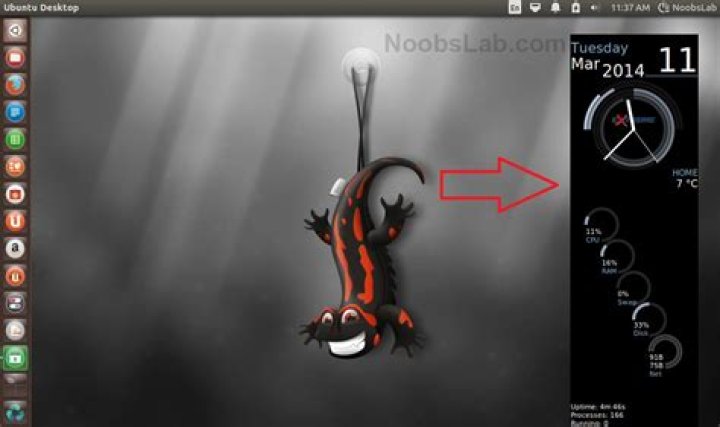

I really like the look Conky should give to my desktop, but it seems to fail to work properly. Conky's window is not transparent, but black. It also is positioned in the top_left position. I want it to be in the middle_middle of my screen.
# Conky settings # background yes update_interval 1 double_buffer yes no_buffers yes # Window specifications # gap_x 0 gap_y 0 minimum_size 600 0 maximum_width 711 own_window yes own_window_type dock own_window_transparent yes own_window_hints undecorate,sticky,skip_taskbar,skip_pager,below #own_window_argb_visual yes #own_window_argb_value 0 #border_margin 0 #border_inner_margin 0 #border_outer_margin 0 #alignment middle_middle # Graphics settings # draw_shades no draw_outline no draw_borders no draw_graph_borders no # Text settings # use_xft yes xftalpha 0 xftfont Open Sans Light:size=10 override_utf8_locale yes imlib_cache_size 0 # Color scheme # default_color FFFFFF color1 FFFFFF color2 FFFFFF color3 FFFFFF color4 FFFFFF color5 FFFFFF color6 FFFFFF color7 333333 TEXT ${execi 300 curl -s "" -o ~/.cache/weather.xml} ${font Raleway:weight=Light :size=100}${voffset -40}${alignc}${time %H}${alignc}:${alignc}${time %M} ${font Raleway:weight=Light:size=32}${voffset -40}${alignc}${time %A %B %d} ${font Raleway:size=20} ${voffset -64}${alignc 216}${execi 300 grep "yweather:condition" ~/.cache/weather.xml | grep -o "temp=\"[^\"]*\"" | grep -o "\"[^\"]*\"" | grep -o "[^\"]*"}° ${font Raleway:weight=Light:size=14} ${voffset -52}${alignc 122}${execi 300 grep "yweather:forecast" ~/.cache/weather.xml | grep -o "high=\"[^\"]*\"" | grep -o "\"[^\"]*\"" | grep -o "[^\"]*" | awk 'NR==2'}° ${voffset -19}${alignc 12}${execi 300 grep "yweather:forecast" ~/.cache/weather.xml | grep -o "high=\"[^\"]*\"" | grep -o "\"[^\"]*\"" | grep -o "[^\"]*" | awk 'NR==3'}° ${voffset -19}${alignc -98}${execi 300 grep "yweather:forecast" ~/.cache/weather.xml | grep -o "high=\"[^\"]*\"" | grep -o "\"[^\"]*\"" | grep -o "[^\"]*" | awk 'NR==4'}° ${voffset -19}${alignc -208}${execi 300 grep "yweather:forecast" ~/.cache/weather.xml | grep -o "high=\"[^\"]*\"" | grep -o "\"[^\"]*\"" | grep -o "[^\"]*" | awk 'NR==5'}° ${font Raleway:weight=Light:size=10} ${voffset -10}${alignc 98}${execi 300 grep "yweather:forecast" ~/.cache/weather.xml | grep -o "low=\"[^\"]*\"" | grep -o "\"[^\"]*\"" | grep -o "[^\"]*" | awk 'NR==2'}° ${voffset -14}${alignc -12}${execi 300 grep "yweather:forecast" ~/.cache/weather.xml | grep -o "low=\"[^\"]*\"" | grep -o "\"[^\"]*\"" | grep -o "[^\"]*" | awk 'NR==3'}° ${voffset -14}${alignc -122}${execi 300 grep "yweather:forecast" ~/.cache/weather.xml | grep -o "low=\"[^\"]*\"" | grep -o "\"[^\"]*\"" | grep -o "[^\"]*" | awk 'NR==4'}° ${voffset -14}${alignc -232}${execi 300 grep "yweather:forecast" ~/.cache/weather.xml | grep -o "low=\"[^\"]*\"" | grep -o "\"[^\"]*\"" | grep -o "[^\"]*" | awk 'NR==5'}° ${font Raleway:weight=Light:size=14} ${voffset -26}${alignc 220}${execi 300 grep "yweather:forecast" ~/.cache/weather.xml | grep -o "day=\"[^\"]*\"" | grep -o "\"[^\"]*\"" | grep -o "[^\"]*" | awk 'NR==1' | tr '[a-z]' '[A-Z]'} ${voffset -18}${alignc 110}${execi 300 grep "yweather:forecast" ~/.cache/weather.xml | grep -o "day=\"[^\"]*\"" | grep -o "\"[^\"]*\"" | grep -o "[^\"]*" | awk 'NR==2' | tr '[a-z]' '[A-Z]'} ${voffset -19}${alignc}${execi 300 grep "yweather:forecast" ~/.cache/weather.xml | grep -o "day=\"[^\"]*\"" | grep -o "\"[^\"]*\"" | grep -o "[^\"]*" | awk 'NR==3' | tr '[a-z]' '[A-Z]'} ${voffset -18}${alignc -110}${execi 300 grep "yweather:forecast" ~/.cache/weather.xml | grep -o "day=\"[^\"]*\"" | grep -o "\"[^\"]*\"" | grep -o "[^\"]*" | awk 'NR==4' | tr '[a-z]' '[A-Z]'} ${voffset -19}${alignc -220}${execi 300 grep "yweather:forecast" ~/.cache/weather.xml | grep -o "day=\"[^\"]*\"" | grep -o "\"[^\"]*\"" | grep -o "[^\"]*" | awk 'NR==5' | tr '[a-z]' '[A-Z]'} ${font Raleway:weight=Light:size=14} ${execi 300 cp -f ~/.conky-weather-icons/$(grep "yweather:condition" ~/.cache/weather.xml | grep -o "code=\"[^\"]*\"" | grep -o "\"[^\"]*\"" | grep -o "[^\"]*").png ~/.cache/weather-1.png}${image ~/.cache/weather-1.png -p 61,320 -s 32x32}${execi 300 cp -f ~/.conky-weather-icons/$(grep "yweather:forecast" ~/.cache/weather.xml | grep -o "code=\"[^\"]*\"" | grep -o "\"[^\"]*\"" | grep -o "[^\"]*" | awk 'NR==2').png ~/.cache/weather-2.png}${image ~/.cache/weather-2.png -p 171,320 -s 32x32}${execi 300 cp -f ~/.conky-weather-icons/$(grep "yweather:forecast" ~/.cache/weather.xml | grep -o "code=\"[^\"]*\"" | grep -o "\"[^\"]*\"" | grep -o "[^\"]*" | awk 'NR==3').png ~/.cache/weather-3.png}${image ~/.cache/weather-3.png -p 281,320 -s 32x32}${execi 300 cp -f ~/.conky-weather-icons/$(grep "yweather:forecast" ~/.cache/weather.xml | grep -o "code=\"[^\"]*\"" | grep -o "\"[^\"]*\"" | grep -o "[^\"]*" | awk 'NR==4').png ~/.cache/weather-4.png}${image ~/.cache/weather-4.png -p 391,320 -s 32x32}${execi 300 cp -f ~/.conky-weather-icons/$(grep "yweather:forecast" ~/.cache/weather.xml | grep -o "code=\"[^\"]*\"" | grep -o "\"[^\"]*\"" | grep -o "[^\"]*" | awk 'NR==5').png ~/.cache/weather-5.png}${image ~/.cache/weather-5.png -p 501,320 -s 32x32}${font} 3 Answers
You can try Conky Color wich is really easy to set up.
1Instead of setting own_window_type to dock, set it to override. This will allow you to set the alignment to middle_middle, or anywhere else for that matter. Also, your config has alignment middle_middle commented out, which you'll need to uncomment. Also, remove (or keep commented) the own_window_argb_visual and own_window_argb_value lines as these are making your background black.
Problem: Conky's window is not transparent, but black.
Solution: own_window_argb_value 0 # Set conky background opacity (0 transparent, 63-127-191 25-50-75% translucent, 255 opaque)
Prerequisite: own_window_argb_visual yes # Enable ARGB settings
Problem: It also is positioned in the top_left position. I want it to be in the middle_middle of my screen.
Solution: alignment middle_middle # Display in middle of screen, horizontally and vertically centered
That should fix your issues. Have fun Conkying!