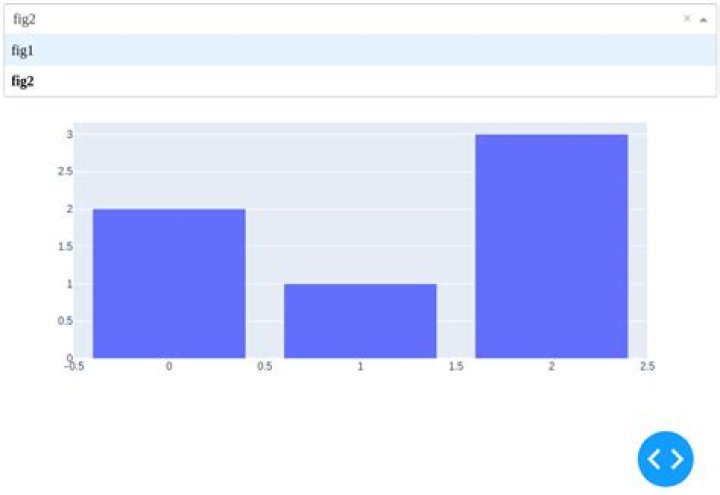
I would like to add a dropdown menu to show only one figure. I mean, if I select fig the dash must show me only the fig and if I select fig2 the dash must show me the fig 2. Is it possible? My code is an example, I have more than 500 figs.
import dash import dash_core_components as dcc import dash_html_components as html import plotly.graph_objects as go # or plotly.express as px fig = go.Figure() fig2 = go.Figure() fig.add_trace(go.Scatter(y=[4, 2, 1], mode="lines")) fig2.add_trace(go.Bar(y=[2, 1, 3])) figs = [fig, fig2] div = [] for item in figs: div.append(dcc.Graph(figure=item)) app = dash.Dash() app.layout = html.Div(div) """ add a dropdown to show only one fig """ app.run_server(debug=True, use_reloader=False) 2 Answers
Yes, it is possible.
First you need to create the dropdown containing the figure-names / filenames or the identifier you wish, just keep the {'label': x, 'value': x} structure for the option parameter. label is what you will see in the dropdown, and value will be passed to the callback (s. below).
fig_names = ['fig1', 'fig2'] fig_dropdown = html.Div([ dcc.Dropdown( id='fig_dropdown', options=[{'label': x, 'value': x} for x in fig_names], value=None )]) Next you need a blank div (with an id) where the plot will appear:
fig_plot = html.Div(id='fig_plot') Now create a callback. When an input with the id='fig_dropdown' is changed, the value parameter will be passed to the update_output function. The output of this function will be passed to passed to the children parameter of the id='fig_plot' div.
@app.callback( dash.dependencies.Output('fig_plot', 'children'), [dash.dependencies.Input('fig_dropdown', 'value')]) def update_output(fig_name): return name_to_figure(fig_name) The name_to_figure(fig_name) function returns a dcc.Graph() objects, containing your figure, depending on the fig_name value of the dropdown.
Full example:
import dash import dash_core_components as dcc import dash_html_components as html import plotly.graph_objects as go # or plotly.express as px app = dash.Dash() fig_names = ['fig1', 'fig2'] fig_dropdown = html.Div([ dcc.Dropdown( id='fig_dropdown', options=[{'label': x, 'value': x} for x in fig_names], value=None )]) fig_plot = html.Div(id='fig_plot') app.layout = html.Div([fig_dropdown, fig_plot]) @app.callback( dash.dependencies.Output('fig_plot', 'children'), [dash.dependencies.Input('fig_dropdown', 'value')]) def update_output(fig_name): return name_to_figure(fig_name) def name_to_figure(fig_name): figure = go.Figure() if fig_name == 'fig1': figure.add_trace(go.Scatter(y=[4, 2, 1])) elif fig_name == 'fig2': figure.add_trace(go.Bar(y=[2, 1, 3])) return dcc.Graph(figure=figure) app.run_server(debug=True, use_reloader=False) 
Incase you have so many fig to choose from in your Drop Down box, the following changes to the code may be necessary to implement:
@app.callback(Output('fig_plot', 'figure'), [Input('fig_dropdown', 'value')]) def cb(plot_type): plot_type = plot_type if plot_type else 'fig1' df_year = head_db.copy() if plot_type: return px.bar(df_year, x='Week #', y=str(plot_type), color='Name') 



