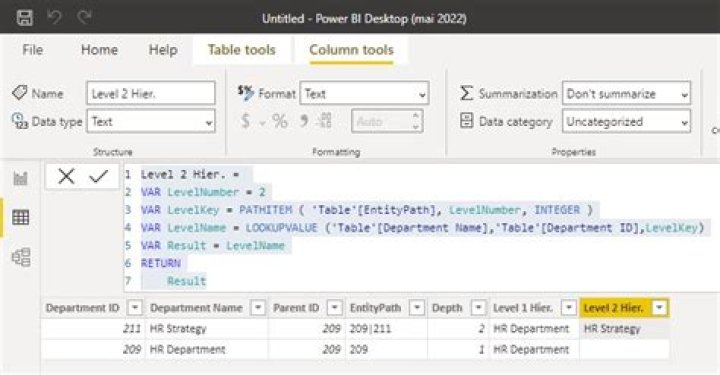
I'm trying to create multiple hierarchy columns in Power Query based on a PATH column.
My data looks like the following, where:
- Parent Path has multiple nested parent IDs,
- All levels of hierarchy are in the same Department ID column (even if they are level 1, 2 or 3). In the following case, HR Strategy is part of HR Department:
| Department ID | Department Name | Parent ID | Parent Path |
|---|---|---|---|
| 211 | HR Strategy | 209 | 209|211 |
| 209 | HR Department | 209 | 209 |
The output I want is the following:
| Department ID | Department Name | Parent ID | Parent Path | Level 1 Hier. | Level 2 Hier. |
|---|---|---|---|---|---|
| 211 | HR Strategy | 209 | 209|211 | HR Department | HR Strategy |
... and so on, where it extracts unit names onto the corresponding rows by ID.
I've looked into the DAX PATH expression, but it seems to be used for generating such PATH columns.
3 Answers
Keep in your table only Department ID, Department Name and Parent ID.
Then add the following columns=
EntityPath = PATH ( 'Table'[Department ID], 'Table'[Parent ID]) Depth = PATHLENGTH ( 'Table'[EntityPath] ) Level 1 Hier. = VAR LevelNumber = 1 VAR LevelKey = PATHITEM ( 'Table'[EntityPath], LevelNumber, INTEGER ) VAR LevelName = LOOKUPVALUE ('Table'[Department Name],'Table'[Department ID],LevelKey) VAR Result = LevelName RETURN Result Level 2 Hier. = VAR LevelNumber = 2 VAR LevelKey = PATHITEM ( 'Table'[EntityPath], LevelNumber, INTEGER ) VAR LevelName = LOOKUPVALUE ('Table'[Department Name],'Table'[Department ID],LevelKey) VAR Result = LevelName RETURN Result 
Didn't figure out how to do it in Power Query, but there's a function named PATHITEM in DAX, which I used to create a new column:
Level 1 Hier. = LOOKUPVALUE( Department_Table[Department Name], Department_Table[Department ID], PATHITEM( Department_Table[Parent Path], 1, TEXT ) ) let Source = SomeTable, #"Added custom - path" = Table.AddColumn(Source, "Path", each let mytable=Source, p="parent_id_col", c="child_id_col", r="child_title_col" in let mylist={Record.Field(_,r)} & List.Generate(()=>[x=0, y=Record.Field(_,p), w=1, phi=""], each [w] > 0, each [z=[y], x=Table.Column(Table.SelectRows(mytable,each Record.Field(_,c)=z),p), y=x{0}, w=List.Count(x), phi=Table.Column(Table.SelectRows(mytable,each Record.Field(_,c)=z),r){0}], each [phi]) in Text.Combine(List.Reverse(List.RemoveItems(List.Transform(mylist,each Text.From(_)), {null,""} ) ), "|")), in #"Added custom - path" 



