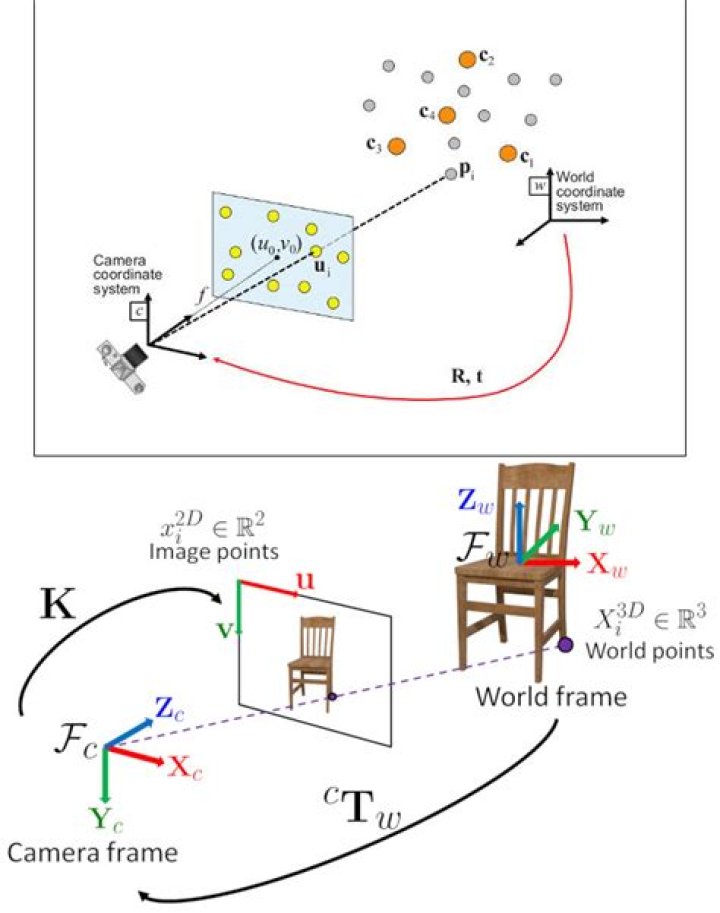

I am running solvePnPRansac on an image dataset, with 2d feature points and triangulated 3d landmark points. It runs great, and the results in rotation, and in the forward and side axes, look great. The Y axis though, is completely wrong.
I am testing the output against the ground truth from the data set, and it goes up where it should go down, and drifts off the ground truth very quickly. The other axes stay locked on for much much longer.
this strikes me as strange, how can it be correct for the other axes, and wrong for one? Surely that is not possible, I would have thought that either every axis was bad, or every axis was good.
What could i possibly be doing wrong to make this happen? And how can i debug this weirdness? My PnP code is very standard:
cv::Mat inliers; cv::Mat rvec = cv::Mat::zeros(3, 1, CV_64FC1); int iterationsCount = 500; // number of Ransac iterations. float reprojectionError = 2.0; //2.0 // maximum allowed distance to consider it an inlier. float confidence = 0.95; // RANSAC successful confidence. bool useExtrinsicGuess = false; int flags = cv::SOLVEPNP_ITERATIVE; int num_inliers_; //points3D_t0 cv::solvePnPRansac(points3D_t0, points_left_t1, intrinsic_matrix, distCoeffs, rvec, translation_stereo, useExtrinsicGuess, iterationsCount, reprojectionError, confidence, inliers, flags); 1 Answer
I encountered similar problem for images taking by a drone – sometimes the Y value (camera line of sight axis – the height axis in my case) was BELOW the ground. If you think about it – for a plane view (or close to a plane) - there are two possible ‘y’ solutions : before the plane and away to the plane (below and under the ground in my case). So both are a legal solutions.




