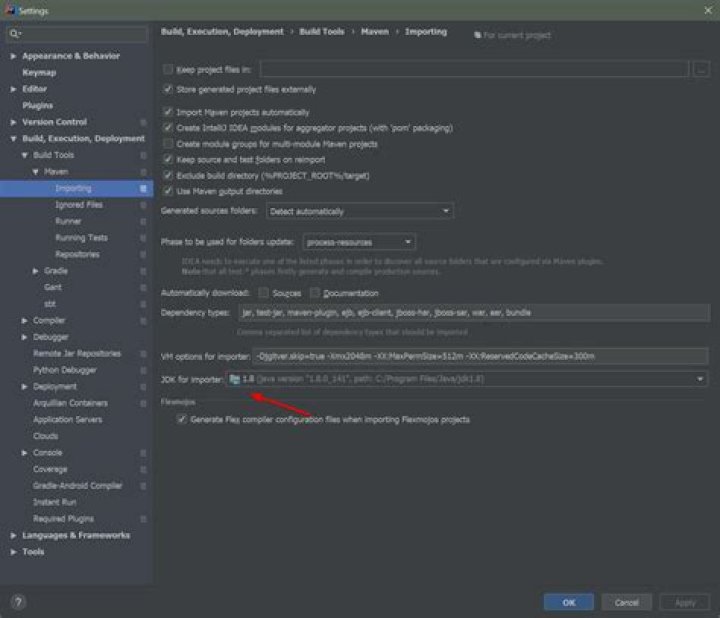

Getting below error while mvn clean package.I am compiling this on command line.
>mvn -f myapp/pom.xml clean package This is my command and bellow is the error. can someone please help me with this
[INFO] Compiling 1 source file to C:\VaibhavNandkule\myapp\target\classes [INFO] ------------------------------------------------------------- [ERROR] COMPILATION ERROR : [INFO] ------------------------------------------------------------- [ERROR] No compiler is provided in this environment. Perhaps you are running on a JRE rather than a JDK? [INFO] 1 error [INFO] ------------------------------------------------------------- [INFO] ------------------------------------------------------------------------ [INFO] BUILD FAILURE [INFO] ------------------------------------------------------------------------ [INFO] Total time: 1.170 s [INFO] Finished at: 2020-01-24T19:20:14+05:30 [INFO] ------------------------------------------------------------------------ [ERROR] Failed to execute goal org.apache.maven.plugins:maven-compiler-plugin:3.1:compile (default-compile) on project myapp: Compilation failure [ERROR] No compiler is provided in this environment. Perhaps you are running on a JRE rather than a JDK? [ERROR] [ERROR] -> [Help 1] [ERROR] [ERROR] To see the full stack trace of the errors, re-run Maven with the -e switch. [ERROR] Re-run Maven using the -X switch to enable full debug logging. [ERROR] [ERROR] For more information about the errors and possible solutions, please read the following articles: [ERROR] [Help 1] 4 Answers
so i had the same issue and was finally able to resolve it. The problem was my ~/.mavenrc file was pointing to the wrong java path.I had defined my java_home to JAVA_HOME=/usr/libexec/java_home -v 1.8 Type the command : /usr/libexec/java_home -V. It would show something like this
Matching Java Virtual Machines (2): 1.8.261.12 (x86_64) "Oracle Corporation" - "Java" /Library/Internet Plug-Ins/ 1.8.0_261 (x86_64) "Oracle Corporation" - "Java SE 8" /Library/Java/JavaVirtualMachines/jdk1.8.0_261.jdk/Contents/Home Now the problem was defining /usr/libexec/java_home -V as the java path it was picking up this /Library/Internet Plug-Ins/ rather than /Library/Java/JavaVirtualMachines/jdk1.8.0_261.jdk/Contents/Home . Changing the path to /Library/Java/JavaVirtualMachines/jdk1.8.0_261.jdk/Contents/Home in mavenrc(or in your case where ever you have defined the java path) fixed this issue
For Mac, Update the "Java SE 8" /Library/Java/JavaVirtualMachines/jdk1.8.0_261.jdk/Contents/Home" in bash_profile.
Execute the following command :
vi ~/.bash_profile
Update the JAVA_HOME
export JAVA_HOME=/Library/Java/JavaVirtualMachines/jdk1.8.0_221.jdk/Contents/Home
. ~/.bash_profile
While setting the absolute path of the JDK in pom.xml works, this is not a portable way to set java. Your colleagues wont appreciate when you'll commit and push that pom.xml.
For Maven, you have to make sure that JAVA_HOME points to the root of the JDK.
set JAVA_HOME="C:\Program Files\Java\jdk1.8.0_171" Since your on Windows you may as well set this in the standard Environment Variables panel.
You can verify your configuration by running mvn -version:
Apache Maven 3.6.3 (cecedd343002696d0abb50b32b541b8a6ba2883f) Maven home: C:\tools\apache-maven-3.6.3\bin\.. Java version: 1.8.0_232, vendor: Amazon.com Inc., runtime: C:\tools\java\jdk1.8.0_232\jre Default locale: fr_CA, platform encoding: Cp1252 OS name: "windows 10", version: "10.0", arch: "amd64", family: "windows" Finally, It worked for me. I have to add the below code in my pom.xml.
<plugin> <artifactId>maven-compiler-plugin</artifactId> <version>3.1</version> <configuration> <fork>true</fork> <executable>C:\Program Files\Java\jdk1.8.0_171\bin\javac.exe</executable> </configuration> </plugin> 



