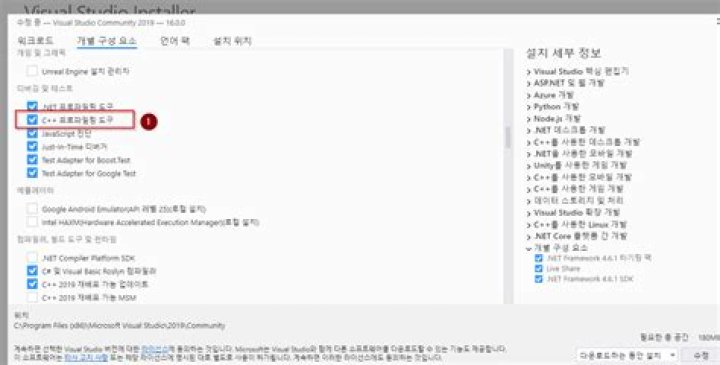
Until Visual Studio 2017, there is vsperf.exe.
From Visual Studio 2019, even if I turned on the check box "C++ Profiling Tools" at Visual Studio 2019 Installer ("1" below), but there is no vsperf.exe.

Is vsperf.exe deprecated? If it is, what is the alternative?
There are some vsperf*.exe files in Visual Studio 2019 installed directory, such as vsperfmon.exe, vsperfcmd.exe, vsperfsrv.exe, vsperfreport.exe, vsinstr.exe, etc. What are these executable files?
1 Answer
Here is what I have found:
You can use VSPerfMon tool to collect performance data for an application; typically this tool is launched by VSPerfCmd.exe. VSPerfMon displays additional information about process attach or detach which is not available by using the VSPerfCmd tool. To view this information, start VSPerfMon in a separate window.
You can launch VsPerfCmd like this:
VSPerfCmd.exe /start:sample /output:myoutputfile.vsp /launch:myapp.exe /args:"..." Then run the application you want to profile, and finally:
VsPerfCmd.exe /Shutdown This will produce the myoutputfile.vsp that you can open with Visual Studio.
Here are more options you can choose:
- Coverage
- Concurrency
- Trace
The Sample option is probably your best default choice while Trace instruments your code and causes your program to slow down but it records the time in each method so it can be more accurate.
Here is how you could setup a trace:
SET pt="C:\Program Files (x86)\Microsoft Visual Studio\Shared\Common\VSPerfCollectionTools\vs2022" %pt%\VSPerfClrEnv /traceon %pt%\vsperfcmd /start:trace /output:my_trace_data.vsp VSPerfNativeSampleApp.exe %pt%\vsperfcmd /shutdown %pt%\VSPerfClrEnv /off %pt%\vsperfreport /summary:all my_trace_data.vsp /symbolpath:"srv*C:\Symbols*" 



