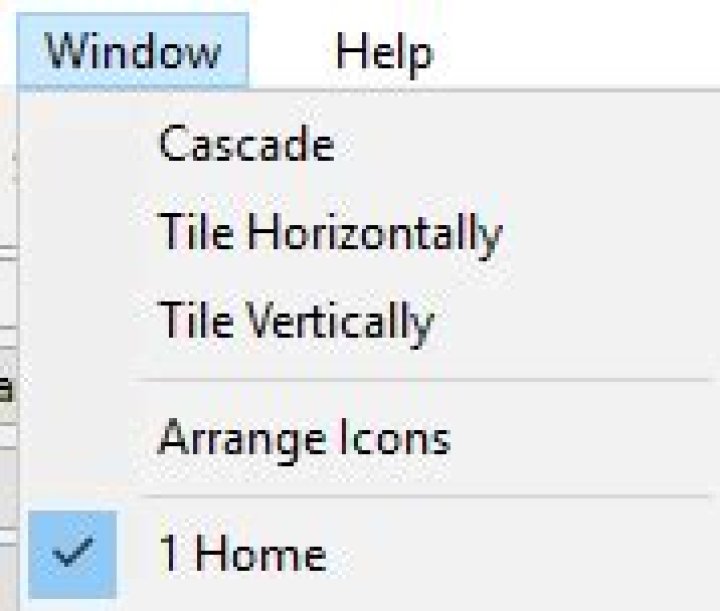
I am working with a MFC application, and would like to remove the dynamic entry that appears under "Arrange Icons".
I am not sure how this is added to the application, or how could I switch that off?

1 Answer
The list of open windows is added to the "Window" menu by the MFC framework, in the application's main window handler for the WM_INITMENUPOPUP command. (Actually, the framework adds the items to all menus that already contain any command with an ID between AFX_IDM_WINDOW_FIRST and AFX_IDM_WINDOW_LAST – which includes the "Cascasde," "Tile..." and "Arrange Icons" default values.)
You can remove these items by adding the ON_WM_INITMENUPOPUP() handler to your frame window's message map and overriding that frame's OnInitMenuPopup() member function.
Assuming your main frame is derived from the CMDIFrameWnd class, this override would look something like the following:
void MyFrameWnd::OnInitMenuPopup(CMenu *pPopupMenu, UINT nIndex, BOOL bSysMenu) { CMDIFrameWnd::OnInitMenuPopup(pPopupMenu, nIndex, bSysMenu);// Call base class FIRST // <Insert any other code for your override> UINT commID = AFX_IDM_FIRST_MDICHILD; // MFC gives the first item this ID BOOL hadID; do { hadID = pPopupMenu->RemoveMenu(commID, MF_BYCOMMAND); ++commID; } while (hadID); return; } The declaration of the function in your class should properly have the afx_msg attribute, as shown below, although this is generally defined as 'nothing' in the recent MFC versions:
class MyFrameWnd : public CMDIFrameWnd { //... protected: afx_msg void OnInitMenuPopup(CMenu *pPopupMenu, UINT nIndex, BOOL bSysMenu); //... You could also reduce the removal 'loop' code to the following single line, if you prefer such compressed code:
for (UINT commID = AFX_IDM_FIRST_MDICHILD; Menu->RemoveMenu(commID, MF_BYCOMMAND); ++commID) ; // Empty loop Note that this removal process will leave a 'separator' at the bottom of your application's "Window" menu; removing this as well would involve a bit more work, as that separator doesn't have a command ID – so you would need to determine its position (index) in the menu and call the RemoveMenu() function using that index and the MF_BYPOSITION flag as the second argument.
Using the code from the first snippet, and assuming that separator is at the very end of your menu, this could be achieved by adding the following code after the removal loop:
if (commID > AFX_IDM_FIRST_MDICHILD + 1) { // We removed at least one item, so ... int nItems = Menu->GetMenuItemCount(); // ... remove the separator, pPopupMenu->RemoveMenu(nItems - 1, MF_BYPOSITION); // assuming it's the last item! } 



