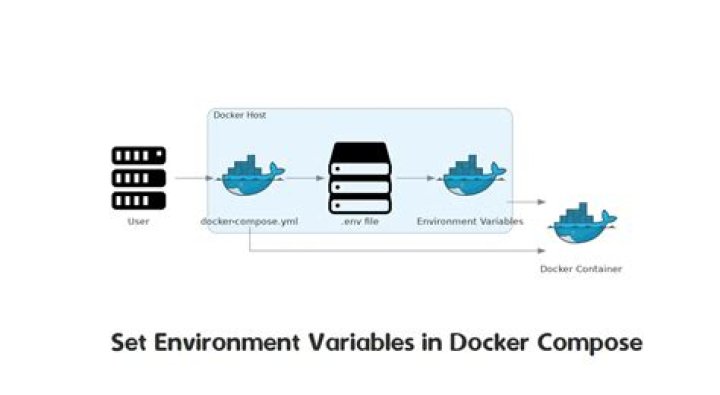

I would like to be able to use env variables inside docker-compose.yml, with values passed in at the time of docker-compose up. This is the example.
I am doing this today with basic docker run command, which is wrapped around my own script. Is there a way to achieve it with compose, without any such bash wrappers?
proxy: hostname: $hostname volumes: - /mnt/data/logs/$hostname:/logs - /mnt/data/$hostname:/data 18 Answers
The DOCKER solution:
It looks like docker-compose 1.5+ has enabled variables substitution:
The latest Docker Compose allows you to access environment variables from your compose file. So you can source your environment variables, then run Compose like so:
set -a source .my-env docker-compose up -d Then you can reference the variables in docker-compose.yml using ${VARIABLE}, like so:
db: image: "postgres:${POSTGRES_VERSION}" And here is more info from the docs, taken here:
When you run docker-compose up with this configuration, Compose looks for the POSTGRES_VERSION environment variable in the shell and substitutes its value in. For this example, Compose resolves the image to postgres:9.3 before running the configuration.
If an environment variable is not set, Compose substitutes with an empty string. In the example above, if POSTGRES_VERSION is not set, the value for the image option is postgres:.
Both $VARIABLE and ${VARIABLE} syntax are supported. Extended shell-style features, such as ${VARIABLE-default} and ${VARIABLE/foo/bar}, are not supported.
If you need to put a literal dollar sign in a configuration value, use a double dollar sign ($$).
And I believe this feature was added in this pull request:
The BASH solution:
I notice folks have issues with Docker's environment variables support. Instead of dealing with environment variables in Docker, let's go back to basics, like bash! Here is a more flexible method using a bash script and a .env file.
An example .env file:
EXAMPLE_URL= # Note that the variable below is commented out and will not be used: # EXAMPLE_URL= SECRET_KEY=ABDFWEDFSADFWWEFSFSDFM # You can even define the compose file in an env variable like so: COMPOSE_CONFIG=my-compose-file.yml # You can define other compose files, and just comment them out # when not needed: # COMPOSE_CONFIG=another-compose-file.yml then run this bash script in the same directory, which should deploy everything properly:
#!/bin/bash docker rm -f `docker ps -aq -f name=myproject_*` set -a source .env cat ${COMPOSE_CONFIG} | envsubst | docker-compose -f - -p "myproject" up -d Just reference your env variables in your compose file with the usual bash syntax (ie ${SECRET_KEY} to insert the SECRET_KEY from the .env file).
Note the COMPOSE_CONFIG is defined in my .env file and used in my bash script, but you can easily just replace {$COMPOSE_CONFIG} with the my-compose-file.yml in the bash script.
Also note that I labeled this deployment by naming all of my containers with the "myproject" prefix. You can use any name you want, but it helps identify your containers so you can easily reference them later. Assuming that your containers are stateless, as they should be, this script will quickly remove and redeploy your containers according to your .env file params and your compose YAML file.
Update Since this answer seems pretty popular, I wrote a blog post that describes my Docker deployment workflow in more depth: This might be helpful when you add more complexity to a deployment configuration, like nginx configs, LetsEncrypt certs, and linked containers.
8It seems that docker-compose has native support now for default environment variables in file.
all you need to do is declare your variables in a file named .env and they will be available in docker-compose.yml.
For example, for .env file with contents:
MY_SECRET_KEY=SOME_SECRET IMAGE_NAME=docker_image You could access your variable inside docker-compose.yml or forward them into the container:
my-service: image: ${IMAGE_NAME} environment: MY_SECRET_KEY: ${MY_SECRET_KEY} - Create a
template.yml, which is yourdocker-compose.ymlwith environment variable. - Suppose your environment variables are in a file 'env.sh'
- Put the below piece of code in a sh file and run it.
source env.sh; rm -rf docker-compose.yml; envsubst < "template.yml" > "docker-compose.yml";
A new file docker-compose.yml will be generated with the correct values of environment variables.
Sample template.yml file:
oracledb: image: ${ORACLE_DB_IMAGE} privileged: true cpuset: "0" ports: - "${ORACLE_DB_PORT}:${ORACLE_DB_PORT}" command: /bin/sh -c "chmod 777 /tmp/start; /tmp/start" container_name: ${ORACLE_DB_CONTAINER_NAME} Sample env.sh file:
#!/bin/bash export ORACLE_DB_IMAGE=<image-name> export ORACLE_DB_PORT=<port to be exposed> export ORACLE_DB_CONTAINER_NAME=ORACLE_DB_SERVER The best way is to specify environment variables outside the docker-compose.yml file. You can use env_file setting, and define your environment file within the same line. Then doing a docker-compose up again should recreate the containers with the new environment variables.
Here is how my docker-compose.yml looks like:
services: web: env_file: variables.env 3Note: docker-compose expects each line in an env file to be in
VAR=VALformat. Avoid usingexportinside the.envfile. Also, the.envfile should be placed in the folder where the docker-compose command is executed.
The following is applicable for docker-compose 3.x Set environment variables inside the container
method - 1 Straight method
web: environment: - DEBUG=1 POSTGRES_PASSWORD: 'postgres' POSTGRES_USER: 'postgres' method - 2 The “.env” file
Create a .env file in the same location as the docker-compose.yml
$ cat .env TAG=v1.5 POSTGRES_PASSWORD: 'postgres' and your compose file will be like
$ cat docker-compose.yml version: '3' services: web: image: "webapp:${TAG}" postgres_password: "${POSTGRES_PASSWORD}" When using environment variables for volumes you need:
create .env file in the same folder which contains
docker-compose.yamlfiledeclare variable in the
.envfile:HOSTNAME=your_hostnameChange
$hostnameto${HOSTNAME}atdocker-compose.yamlfileproxy: hostname: ${HOSTNAME} volumes: - /mnt/data/logs/${HOSTNAME}:/logs - /mnt/data/${HOSTNAME}:/data
Of course you can do that dynamically on each build like:
echo "HOSTNAME=your_hostname" > .env && sudo docker-compose up Since 1.25.4, docker-compose supports the option --env-file that enables you to specify a file containing variables.
Yours should look like this:
hostname=my-host-name And the command:
docker-compose --env-file /path/to/my-env-file config You cannot ... yet. But this is an alternative, think like a docker-composer.yml generator:
Basically a shell script that will replace your variables. Also you can use Grunt task to build your docker compose file at the end of your CI process.
env SOME_VAR="I am some var" OTHER_VAR="I am other var" docker stack deploy -c docker-compose.yml Use the version 3.6 :
version: "3.6" services: one: image: "nginx:alpine" environment: foo: "bar" SOME_VAR: baz: "${OTHER_VAR}" labels: some-label: "$SOME_VAR" two: image: "nginx:alpine" environment: hello: "world" world: "${SOME_VAR}" labels: some-label: "$OTHER_VAR" To add and env variable you may define an env_file (let's call it var.env) as:
ENV_A=A ENV_B=B and add it to the docker compose manifest service. Moreover, you can define env variables directly with environment.
For instance in docker-compose.yaml:
version: '3.8' services: myservice: build: context: . dockerfile: ./docker/Dockerfile.myservice image: myself/myservice env_file: - ./var.env environment: - VAR_C=C - VAR_D=D volumes: - $HOME/myfolder:/myfolder ports: - "5000:5000" Please check here for more/updated information :
I have a simple bash script I created for this it just means running it on your file before use:
Basically just create your compose file using double curly braces to denote environment variables e.g:
app: build: "{{APP_PATH}}" ports: - "{{APP_PORT_MAP}}" Anything in double curly braces will be replaced with the environment variable of the same name so if I had the following environment variables set:
APP_PATH=~/my_app/build APP_PORT_MAP=5000:5000 on running subber docker-compose.yml the resulting file would look like:
app: build: "~/my_app/build" ports: - "5000:5000" As far as I know, this is a work-in-progress. They want to do it, but it's not released yet. See 1377 (the "new" 495 that was mentioned by @Andy).
I ended up implementing the "generate .yml as part of CI" approach as proposed by @Thomas.
add env to .env file
Such as
VERSION=1.0.0 then save it to deploy.sh
INPUTFILE=docker-compose.yml RESULT_NAME=docker-compose.product.yml NAME=test prepare() { local inFile=$(pwd)/$INPUTFILE local outFile=$(pwd)/$RESULT_NAME cp $inFile $outFile while read -r line; do OLD_IFS="$IFS" IFS="=" pair=($line) IFS="$OLD_IFS" sed -i -e "s/\${${pair[0]}}/${pair[1]}/g" $outFile done <.env } deploy() { docker stack deploy -c $outFile $NAME } prepare deploy To focus solely on the issue of default and mandatory values for environment variables, and as an update to @modulito's answer:
Using default values and enforcing mandatory values within the docker-compose.yml file is now supported (from the docs):
Both $VARIABLE and ${VARIABLE} syntax are supported. Additionally when using the 2.1 file format, it is possible to provide inline default values using typical shell syntax:
${VARIABLE:-default} evaluates to default if VARIABLE is unset or empty in the environment. ${VARIABLE-default} evaluates to default only if VARIABLE is unset in the environment.
Similarly, the following syntax allows you to specify mandatory variables:
${VARIABLE:?err} exits with an error message containing err if VARIABLE is unset or empty in the environment. ${VARIABLE?err} exits with an error message containing err if VARIABLE is unset in the environment.
Other extended shell-style features, such as ${VARIABLE/foo/bar}, are not supported.
Use .env file to define dynamic values in docker-compse.yml. Be it port or any other value.
Sample docker-compose:
testcore.web: image: volumes: - c:/logs:c:/logs ports: - ${TEST_CORE_PORT}:80 environment: - CONSUL_URL= - HOST=${HOST_ADDRESS}:${TEST_CORE_PORT} Inside .env file you can define the value of these variables:
CONSUL_IP=172.31.28.151 HOST_ADDRESS=172.31.16.221 TEST_CORE_PORT=10002 I ended up using "sed" in my deploy.sh script to accomplish this, though my requirements were slightly different since docker-compose is being called by Terrafom: Passing Variables to Docker Compose via a Terraform script for an Azure App Service
eval "sed -i 's/MY_VERSION/$VERSION/' ../docker-compose.yaml" cat ../docker-compose.yaml terraform init terraform apply -auto-approve \ -var "app_version=$VERSION" \ -var "client_id=$ARM_CLIENT_ID" \ -var "client_secret=$ARM_CLIENT_SECRET" \ -var "tenant_id=$ARM_TENANT_ID" \ -var "subscription_id=$ARM_SUBSCRIPTION_ID" eval "sed -i 's/$VERSION/MY_VERSION/' ../docker-compose.yaml" It's simples like this:
Using comand line as mentioned in the doc:
docker-compose --env-file ./config/.env.dev config Or using .env file, I think this is the easiest way:
web: env_file: - web-variables.env This was written for Docker v20, using the docker compose v2 commands.
I was having a similar roadblock and found that the --env-file parameter ONLY works for docker compose config command. On top of that using the docker compose env_file variable, still forced me to repeat values for the variables, when wanting to reuse them in other places than the Dockerfile such as environment for docker-compose.yml. I just wanted one source of truth, my .env, with the ability to swap them per deployment stage. So here is how I got it to work, basically use docker compose config to generate a base docker-compose.yml file that will pass ARG into Dockerfile's.
.local.env This would be your .env, I have mine split for different deployments.
DEVELOPMENT=1 PLATFORM=arm64 docker-compose.config.yml - This is my core docker compose file.
services: server: build: context: . dockerfile: docker/apache2/Dockerfile args: - PLATFORM=${PLATFORM} - DEVELOPMENT=${DEVELOPMENT} environment: - PLATFORM=${PLATFORM} - DEVELOPMENT=${DEVELOPMENT} Now sadly I do need to pass in the variables twice, once for the Dockerfile, the other for environment. However, they are still coming from the single source .local.env so at least I do not need to repeat values.
I then use docker compose config to generate a semi-final docker-compose.yml. This lets me pass in my companion override docker-compose.local.yml for where the final deployment is happening.
docker compose --env-file=.local.env -f docker-compose.config.yml config > docker-compose.yml This will now let my Dockerfile access the .env variables.
FROM php:5.6-apache # Make sure to declare after FROM ARG PLATFORM ARG DEVELOPMENT # Access args in strings with $PLATFORM, and can wrap i.e ${PLATFORM} RUN echo "SetEnv PLATFORM $PLATFORM" > /etc/apache2/conf-enabled/environment.conf RUN echo "SetEnv DEVELOPMENT $DEVELOPMENT" > /etc/apache2/conf-enabled/environment.conf This then passes the .env variables from the docker-compose.yml into Dockerfile which then passes it into my Apache HTTP server, which passes it to my final destination, the PHP code.
My next step to then to pass in my docker compose overrides from my deployment stage.
docker-compose.local.yml - This is my docker-compose override.
services: server: volumes: - ./localhost+2.pem:/etc/ssl/certs/localhost+2.pem - ./localhost+2-key.pem:/etc/ssl/private/localhost+2-key.pem Lastly, run the docker compose command.
docker compose -f docker-compose.yml -f docker-compose.local.yml up --build Please note if you change anything in you .env file you will need to re-run the docker compose config and add --build for docker compose up. Since builds are cached it has little impact.
So for my final command I normally run:
docker compose --env-file=.local.env -f docker-compose.config.yml config > docker-compose.yml; docker compose --env-file=.local.env -f docker-compose.yml -f docker-compose.local.yml up --build 



