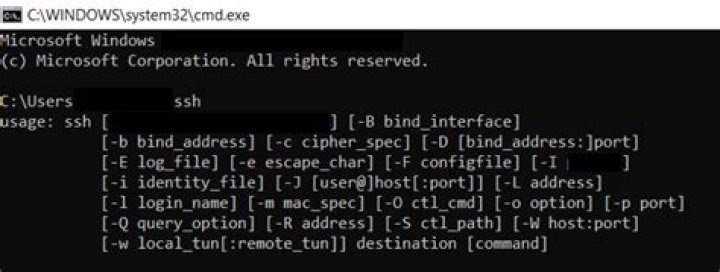

I'm following #335 Deploying to a VPS , and near the end of the episode, we need to run ssh-add to give server access to github repo.
The problem is how do I run it in windows? What need to install?
I know that to run ssh to access the remote server, I can use Putty. But this command needs to run locally, I do know how to use Putty to do this.
13 Answers
Original answer using git's start-ssh-agent
Make sure you have Git installed and have git's cmd folder in your PATH. For example, on my computer the path to git's cmd folder is C:\Program Files\Git\cmd
Make sure your id_rsa file is in the folder c:\users\yourusername\.ssh
Restart your command prompt if you haven't already, and then run start-ssh-agent. It will find your id_rsa and prompt you for the passphrase
Update 2019 - A better solution if you're using Windows 10: OpenSSH is available as part of Windows 10 which makes using SSH from cmd/powershell much easier in my opinion. It also doesn't rely on having git installed, unlike my previous solution.
Open
Manage optional featuresfrom the start menu and make sure you haveOpen SSH Clientin the list. If not, you should be able to add it.Open
Servicesfrom the start MenuScroll down to
OpenSSH Authentication Agent> right click > propertiesChange the Startup type from Disabled to any of the other 3 options. I have mine set to
Automatic (Delayed Start)Open cmd and type
where sshto confirm that the top listed path is in System32. Mine is installed atC:\Windows\System32\OpenSSH\ssh.exe. If it's not in the list you may need to close and reopen cmd.
Once you've followed these steps, ssh-agent, ssh-add and all other ssh commands should now work from cmd. To start the agent you can simply type ssh-agent.
- Optional step/troubleshooting: If you use git, you should set the
GIT_SSHenvironment variable to the output ofwhere sshwhich you ran before (e.gC:\Windows\System32\OpenSSH\ssh.exe). This is to stop inconsistencies between the version of ssh you're using (and your keys are added/generated with) and the version that git uses internally. This should prevent issues that are similar to this
Some nice things about this solution:
- You won't need to start the ssh-agent every time you restart your computer
- Identities that you've added (using ssh-add) will get automatically added after restarts. (It works for me, but you might possibly need a config file in your c:\Users\User\.ssh folder)
- You don't need git!
- You can register any rsa private key to the agent. The other solution will only pick up a key named
id_rsa
Hope this helps
10One could install Git for Windows and subsequently run ssh-add:
Step 3: Add your key to the ssh-agent
12To configure the ssh-agent program to use your SSH key:
If you have GitHub for Windows installed, you can use it to clone repositories and not deal with SSH keys. It also comes with the Git Bash tool, which is the preferred way of running git commands on Windows.
Ensure ssh-agent is enabled:
If you are using Git Bash, turn on ssh-agent:
# start the ssh-agent in the background ssh-agent -s # Agent pid 59566If you are using another terminal prompt, such as msysgit, turn on ssh-agent:
# start the ssh-agent in the background eval $(ssh-agent -s) # Agent pid 59566Add your SSH key to the ssh-agent:
ssh-add ~/.ssh/id_rsa
2021 Answer
Microsoft has improved ssh-key support in recent years. There is now a full featured "service" included with Windows. From Windows Server (applies to other versions too) Documentation:
In (Admin) Powershell:
# By default the ssh-agent service is disabled. Get-Service -Name ssh-agent | Set-Service -StartupType Automatic Start-Service ssh-agent Then from any user shell:
ssh-add path/to/.ssh/id_rsa Programs that need the path to the agent socket should use: \\.\pipe\openssh-ssh-agent.
If you are not using GitBash - you need to start your ssh-agent using this command
start-ssh-agent.cmd If your ssh agent is not set up, you can open PowerShell as admin and set it to manual mode
Get-Service -Name ssh-agent | Set-Service -StartupType Manual If you are trying to setup a key for using git with ssh, there's always an option to add a configuration for the identity file.
vi ~/.ssh/config Host example.com IdentityFile ~/.ssh/example_key I have been in similar situation before. In Command prompt, you type 'start-ssh-agent' and voila! The ssh-agent will be started. Input the passphrase if it asked you.
2In order to run ssh-add on Windows one could install git using choco install git. The ssh-add command is recognized once C:\Program Files\Git\usr\bin has been added as a PATH variable and the command prompt has been restarted:
C:\Users\user\Desktop\repository>ssh-add .ssh/id_rsa Enter passphrase for .ssh/id_rsa: Identity added: .ssh/id_rsa (.ssh/id_rsa) C:\Users\user\Desktop\repository> The Git GUI for Windows has a window-based application that allows you to paste in locations for ssh keys and repo url etc:
eval "$(ssh-agent -s)" ssh-add C:/Users/Dell/.ssh/gitlab (your path) git clone repo_link The below solution solved my problem. Be sure to run your powershell in admin mode and perform the below operation:
Check the current status of ssh-agent: "Get-Service | select -property name,starttype" --> should be Disabled
Set the new type : "Set-Service -Name ssh-agent -StartupType Manual"
Start it: "Start-Service ssh-agent"
Add simply your key as before: "ssh-add" (Eg. ssh-add keyfile)
I found the solution here:
This works with plain cmd on win7 and win10 and cygwin ssh/git/github:
c:\> type ssh-agent-start-cmd.cmd @echo off @ by github/moshahmed if "%1" == "" ( echo "Usage: ssh-agent-cmd keyfile .. starts ssh-agent and load ~/.ssh/*keyfile*" goto :eof ) taskkill /f /im ssh-agent.exe :: pskill ssh-agent 2> nul for /f "tokens=1 delims=;" %%a in ('ssh-agent') do ( echo %%a | findstr /C:"SSH" 1>nul if errorlevel 1 ( echo Ignore %%a ) else ( echo set %%a set %%a ) ) ssh-add ~/.ssh/*%1* ssh-add -l I just set up the SSH authentication with Github. Just can just use "Pageant" which is installed with Putty.
You'll need to add pageant to your Windows startup folder so that it starts when windows does (or start it each time before you need to authenticate)
This blog post does a nice job of explaining everything you need to do to configure Github on Windows with Putty and Pageant.
You should start ssh agent and generate ssh key with recommand command
ssh-keygen -t rsa -b 4096 -C "your email" 



