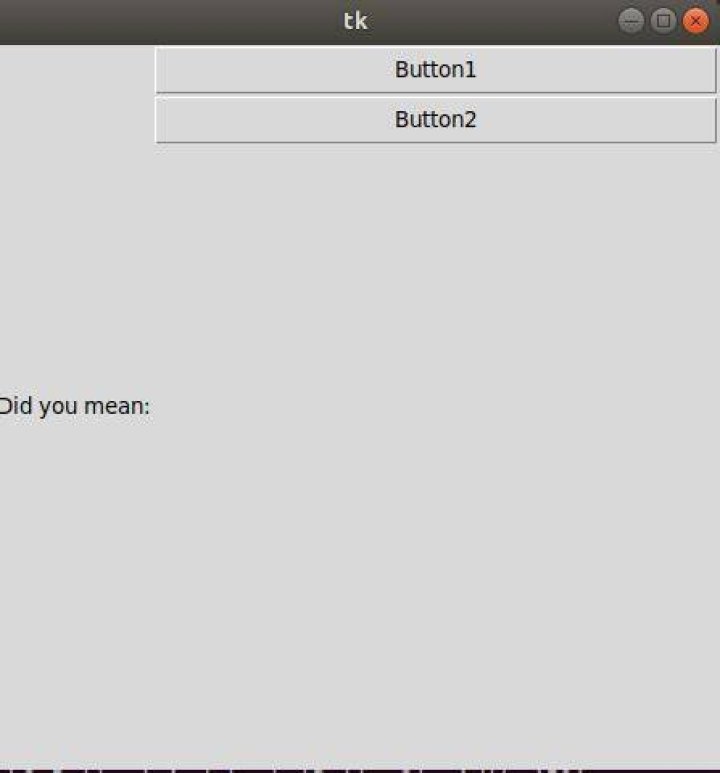

I am using pack() to align label and buttons on tkinter.The following code:
from tkinter import * wind=Tk() wind.geometry('450x450') l1=Label(wind,text='Did you mean:') l1.pack(side=LEFT) b1=Button(wind,text='Button1',width=450) b1.pack() b2=Button(wind,text='Button2',width=450) b2.pack() wind.mainloop() gives output:1
I tried removing the side=LEFT from l1.pack(side=LEFT) it gives: 2.
For me expected output is label l1 on top left corner and the buttons stacked below it.
1 Answer
pack works with a box model, aligning widgets along one side of the empty space in a container. Thus, to put something along the top, you need to use side="top" (or side=TOP if you prefer using a named constant), and it needs to come before other widgets.
In your specific case, to get the widget aligned at the top, you would do the following:
l1.pack(side=TOP) By default this will center the widget along the top edge. If you also want the label aligned to the left, you would use the anchor option, which takes points of a compass ("n", "s", "e", "w", "nw", etc).
Thus, to place the widget at the top, and anchor it to the top-left corner you would do something like this:
l1.pack(side=TOP, anchor=NW) 



