
I want my python script to wait until the user presses any key.
How do I do that?
13 Answers
In Python 3 use input():
input("Press Enter to continue...") In Python 2 use raw_input():
raw_input("Press Enter to continue...") This only waits for the user to press enter though.
One might want to use msvcrt ((Windows/DOS only) The msvcrt module gives you access to a number of functions in the Microsoft Visual C/C++ Runtime Library (MSVCRT)):
import msvcrt as m def wait(): m.getch() This should wait for a key press.
Additional info:
in Python 3 raw_input() does not exist
In Python 2 input(prompt) is equivalent to eval(raw_input(prompt))
One way to do this in Python 2, is to use raw_input():
raw_input("Press Enter to continue...") In python3 it's just input()
On my linux box, I use the following code. This is similar to code I've seen elsewhere (in the old python FAQs for instance) but that code spins in a tight loop where this code doesn't and there are lots of odd corner cases that code doesn't account for that this code does.
def read_single_keypress(): """Waits for a single keypress on stdin. This is a silly function to call if you need to do it a lot because it has to store stdin's current setup, setup stdin for reading single keystrokes then read the single keystroke then revert stdin back after reading the keystroke. Returns a tuple of characters of the key that was pressed - on Linux, pressing keys like up arrow results in a sequence of characters. Returns ('\x03',) on KeyboardInterrupt which can happen when a signal gets handled. """ import termios, fcntl, sys, os fd = sys.stdin.fileno() # save old state flags_save = fcntl.fcntl(fd, fcntl.F_GETFL) attrs_save = termios.tcgetattr(fd) # make raw - the way to do this comes from the termios(3) man page. attrs = list(attrs_save) # copy the stored version to update # iflag attrs[0] &= ~(termios.IGNBRK | termios.BRKINT | termios.PARMRK | termios.ISTRIP | termios.INLCR | termios. IGNCR | termios.ICRNL | termios.IXON ) # oflag attrs[1] &= ~termios.OPOST # cflag attrs[2] &= ~(termios.CSIZE | termios. PARENB) attrs[2] |= termios.CS8 # lflag attrs[3] &= ~(termios.ECHONL | termios.ECHO | termios.ICANON | termios.ISIG | termios.IEXTEN) termios.tcsetattr(fd, termios.TCSANOW, attrs) # turn off non-blocking fcntl.fcntl(fd, fcntl.F_SETFL, flags_save & ~os.O_NONBLOCK) # read a single keystroke ret = [] try: ret.append(sys.stdin.read(1)) # returns a single character fcntl.fcntl(fd, fcntl.F_SETFL, flags_save | os.O_NONBLOCK) c = sys.stdin.read(1) # returns a single character while len(c) > 0: ret.append(c) c = sys.stdin.read(1) except KeyboardInterrupt: ret.append('\x03') finally: # restore old state termios.tcsetattr(fd, termios.TCSAFLUSH, attrs_save) fcntl.fcntl(fd, fcntl.F_SETFL, flags_save) return tuple(ret) If you are ok with depending on system commands you can use the following:
Linux and Mac OS X:
import os os.system("/bin/bash -c 'read -s -n 1 -p \"Press any key to continue...\"'") print() Windows:
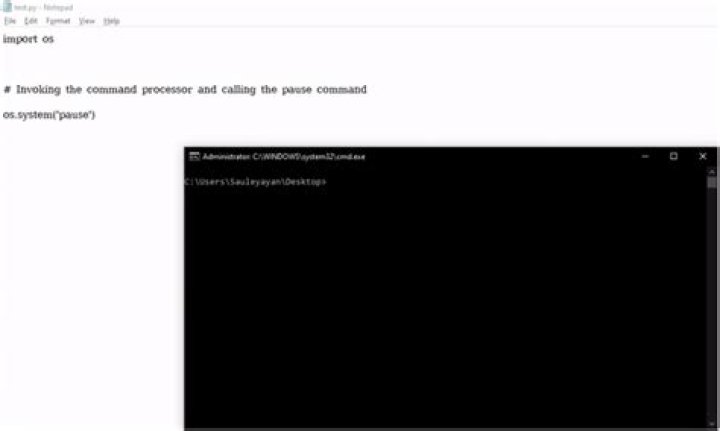
import os os.system("pause") Simply using
input("Press Enter to continue...") will cause the following error when using Python 2:
SyntaxError: expected EOF while parsing.
Simple fix for the code to work on both Python 2 and Python 3 is to use:
try: input("Press enter to continue") except SyntaxError: pass Cross Platform, Python 2/3 code:
# import sys, os def wait_key(): ''' Wait for a key press on the console and return it. ''' result = None if os.name == 'nt': import msvcrt result = msvcrt.getch() else: import termios fd = sys.stdin.fileno() oldterm = termios.tcgetattr(fd) newattr = termios.tcgetattr(fd) newattr[3] = newattr[3] & ~termios.ICANON & ~termios.ECHO termios.tcsetattr(fd, termios.TCSANOW, newattr) try: result = sys.stdin.read(1) except IOError: pass finally: termios.tcsetattr(fd, termios.TCSAFLUSH, oldterm) return result I removed the fctl/non-blocking stuff because it was giving IOErrors and I didn't need it. I'm using this code specifically because I want it to block. ;)
Addendum:
I implemented this in a package on PyPI with a lot of other goodies called console:
>>> from console.utils import wait_key >>> wait_key() 'h' The python manual provides the following:
import termios, fcntl, sys, os fd = sys.stdin.fileno() oldterm = termios.tcgetattr(fd) newattr = termios.tcgetattr(fd) newattr[3] = newattr[3] & ~termios.ICANON & ~termios.ECHO termios.tcsetattr(fd, termios.TCSANOW, newattr) oldflags = fcntl.fcntl(fd, fcntl.F_GETFL) fcntl.fcntl(fd, fcntl.F_SETFL, oldflags | os.O_NONBLOCK) try: while 1: try: c = sys.stdin.read(1) print "Got character", repr(c) except IOError: pass finally: termios.tcsetattr(fd, termios.TCSAFLUSH, oldterm) fcntl.fcntl(fd, fcntl.F_SETFL, oldflags) which can be rolled into your use case.
4I don't know of a platform independent way of doing it, but under Windows, if you use the msvcrt module, you can use its getch function:
import msvcrt c = msvcrt.getch() print 'you entered', c mscvcrt also includes the non-blocking kbhit() function to see if a key was pressed without waiting (not sure if there's a corresponding curses function). Under UNIX, there is the curses package, but not sure if you can use it without using it for all of the screen output. This code works under UNIX:
import curses stdscr = curses.initscr() c = stdscr.getch() print 'you entered', chr(c) curses.endwin() Note that curses.getch() returns the ordinal of the key pressed so to make it have the same output I had to cast it.
1I am new to python and I was already thinking I am too stupid to reproduce the simplest suggestions made here. It turns out, there's a pitfall one should know:
When a python-script is executed from IDLE, some IO-commands seem to behave completely different (as there is actually no terminal window).
Eg. msvcrt.getch is non-blocking and always returns $ff. This has already been reported long ago (see e.g. ) - and it's marked as fixed, somehow the problem seems to persist in current versions of python/IDLE.
So if any of the code posted above doesn't work for you, try running the script manually, and NOT from IDLE.
If you want to wait for enter (so the user knocking the keyboard does not cause something un-intended to happen) use
sys.stdin.readline() os.system seems to always invoke sh, which does not recognize the s and n options for read. However the read command can be passed to bash:
os.system("""bash -c 'read -s -n 1 -p "Press any key to continue..."'""") Could use the 'Keyboard' library...
import keyboard keyboard.wait('space') print('space was pressed, continuing...') If you want to see if they pressed a exact key (like say 'b') Do this:
while True: choice = raw_input("> ") if choice == 'b' : print "You win" input("yay") break 



