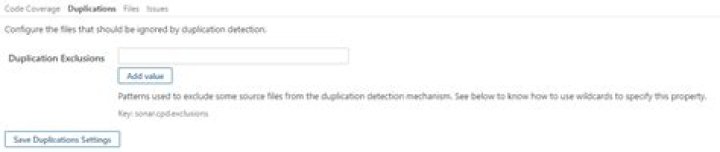

According to the structure of our project, if I want to exclude the .cs files from PY.Models \ Module1, PY.Entities \ Module1, PY.Entities \ Module2, PY.Entities \ Module3 and that "PY. Repository.ModuleN "are not going to be excluded ?. How to combine "sonar.cpd.exclusions" with the parameters in SONARQUBE Server?
D:\MYCOMPANY \ MYPROJECT\00_Transversal\PY.Models\PY.Models\Modulo1-- D:\MYCOMPANY\MYPROJECT\00_Transversal\PY.Models\PY.Models\Modulo2 D:\MYCOMPANY\MYPROJECT\00_Transversal\PY.Models\PY.Models\Modulo3 D:\MYCOMPANY \ MYPROJECT \01_Data\PY.Entities\PY.Entities\Module1-- D:\MYCOMPANY \ MYPROJECT \01_Data\PY.Entities\PY.Entities\Module2-- D:\MYCOMPANY \ MYPROJECT \01_Data\PY.Entities\PY.Entities\Module3-- D:\MYCOMPANY\MYPROJECT\01_Data\PY.Repository.Module1 D:\MYCOMPANY\MYPROJECT\01_Data\PY.Repository.Module2 D:\MYCOMPANY\MYPROJECT\01_Data\PY.Repository.Module3 Configuration On the SONARQUBE-Duplications Tab-page Server
22 Answers
To exclude a file or directory entirely from analysis, go to Administration > General Settings > Analysis Scope > Files and set sonar.exclusions using patterns* to describe what should be left out.
To exclude a file or directory from duplication detection, you want to set sonar.cpd.exclusions, as you surmised. Again, use a pattern* for this value.
Regarding whether to set this in analysis parameters or the server, I'd personally set it server-side. Just cleaner, IMO.
Recognized wildcards: * 0-n char; ** 0-n directories; ? any single character
The properties are set via ItemGroup in each .csproj file, this way:
<ItemGroup> <SonarQubeSetting Include="sonar.cpd.exclusions"> <Value>Models/**/*.cs</Value> </SonarQubeSetting> </ItemGroup> 



