
How can I stash a specific file leaving the others currently modified out of the stash I am about to save?
For example, if git status gives me this:
younker % gst # On branch master # Your branch is ahead of 'origin/master' by 1 commit. # # Changes not staged for commit: # (use "git add <file>..." to update what will be committed) # (use "git checkout -- <file>..." to discard changes in working directory) # # modified: app/controllers/cart_controller.php # modified: app/views/cart/welcome.thtml # no changes added to commit (use "git add" and/or "git commit -a") and I only want to stash app/views/cart/welcome.thtml, how would I do that? Something like (but of course this does not work):
git stash save welcome_cart app/views/cart/welcome.thtml 9 Answers
EDIT: Since git 2.13, there is a command to save a specific path to the stash: git stash push <path>. For example:
git stash push -m welcome_cart app/views/cart/welcome.thtml OLD ANSWER:
You can do that using git stash --patch (or git stash -p) -- you'll enter interactive mode where you'll be presented with each hunk that was changed. Use n to skip the files that you don't want to stash, y when you encounter the one that you want to stash, and q to quit and leave the remaining hunks unstashed. a will stash the shown hunk and the rest of the hunks in that file.
Not the most user-friendly approach, but it gets the work done if you really need it.
26I usually add to index changes I don't want to stash and then stash with --keep-index option.
git add app/controllers/cart_controller.php git stash --keep-index git reset The last step is optional, but usually, you want it. It removes changes from the index.
Warning As noted in the comments, git stash --keep-index pushes everything onto the stash, both staged and unstaged. The --keep-index just leaves the index alone after the stash is done. This can cause merge conflicts when you later pop the stash.
To add to svick's answer, the -m option simply adds a message to your stash, and is entirely optional. Thus, the command
git stash push [paths you wish to stash] is perfectly valid. So for instance, if I want to only stash changes in the src/ directory, I can just run
git stash push src/ For stashing one file:
git stash -- filename.txt For stashing more than one files:
git stash -- filename1.txt filename2.txt If you are using visual studio code there is a simpler way to stash selected files.
- Make sure you have installed GitLens extension in VSCode
- Go to Source Control tab
- Select files those you want to stash
- Right click on it, you will see many options. Click on Stash Changes

- Now it will ask you to add some stash message. Add understandable message and hit enter.
Short and Simple solution:
git stash -- finename.ext in your case git stash -- app/views/cart/welcome.thtml
If you're OK with using a GIT GUI client, Fork can pretty seamlessly do this as of May 2020. A GIF of the partial stash functionality will show this better than any words: 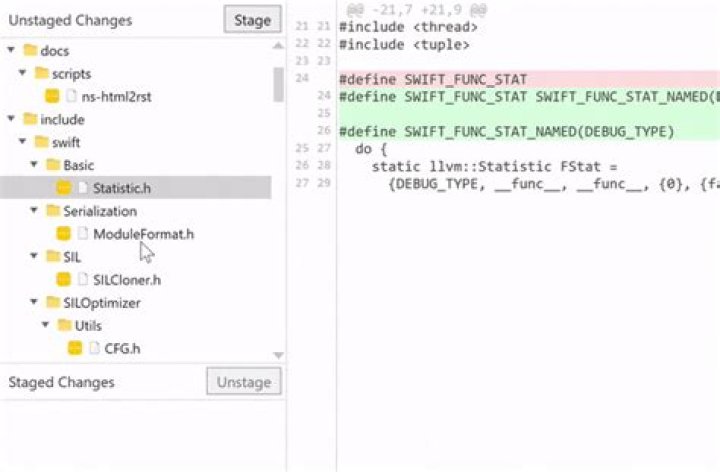
Note that Fork (which is a difficult name to Google for!) is not free software and costs $50 after the evaluation period, but you can just ignore the popups like you do for WinRAR or WinZip.
- stage the changes you do NOT want to stash.
- stash the remaining unstaged files with:
$ git stash save <give_it_a_name> --keep-index The unstaged files are now stashed. See the stash list with your named stash:
$ git stash list stash@{0}: On mybranch: WIP220412-1119am stash@{1}: On mybranch: WIP220312-749am To restore the stashed files:
$ git stash apply stash@{<index_of_saved_stash>} $ git stash apply stash@{0} The changes stashed in WIP220412-1119am are now restored. And the stash list remains as well, (instead of "git stash pop", you can retain the list this way.)
1In Source Control tab of vs-code, hold shift key and then select the files you want to stash, then right click and choose stash changes option.




