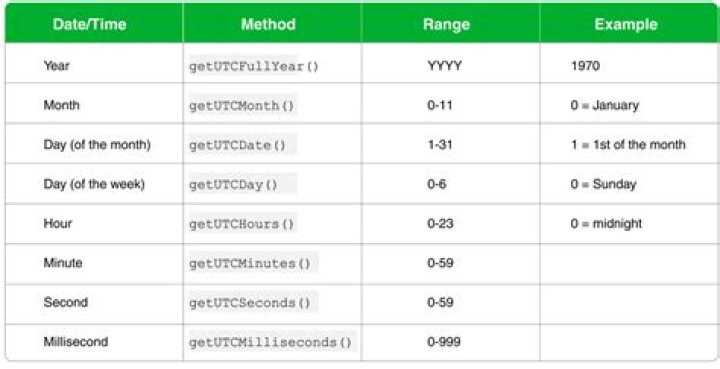

I have a script that prints the current date and time in JavaScript, but the DATE is always wrong. Here is the code:
var currentdate = new Date(); var datetime = "Last Sync: " + currentdate.getDay() + "/" + currentdate.getMonth() + "/" + currentdate.getFullYear() + " @ " + currentdate.getHours() + ":" + currentdate.getMinutes() + ":" + currentdate.getSeconds(); It should print 18/04/2012 15:07:33 and prints 3/3/2012 15:07:33
32 Answers
.getMonth() returns a zero-based number so to get the correct month you need to add 1, so calling .getMonth() in may will return 4 and not 5.
So in your code we can use currentdate.getMonth()+1 to output the correct value. In addition:
.getDate()returns the day of the month <- this is the one you want.getDay()is a separate method of theDateobject which will return an integer representing the current day of the week (0-6)0 == Sundayetc
so your code should look like this:
var currentdate = new Date(); var datetime = "Last Sync: " + currentdate.getDate() + "/" + (currentdate.getMonth()+1) + "/" + currentdate.getFullYear() + " @ " + currentdate.getHours() + ":" + currentdate.getMinutes() + ":" + currentdate.getSeconds(); JavaScript Date instances inherit from Date.prototype. You can modify the constructor's prototype object to affect properties and methods inherited by JavaScript Date instances
You can make use of the Date prototype object to create a new method which will return today's date and time. These new methods or properties will be inherited by all instances of the Date object thus making it especially useful if you need to re-use this functionality.
// For todays date; Date.prototype.today = function () { return ((this.getDate() < 10)?"0":"") + this.getDate() +"/"+(((this.getMonth()+1) < 10)?"0":"") + (this.getMonth()+1) +"/"+ this.getFullYear(); } // For the time now Date.prototype.timeNow = function () { return ((this.getHours() < 10)?"0":"") + this.getHours() +":"+ ((this.getMinutes() < 10)?"0":"") + this.getMinutes() +":"+ ((this.getSeconds() < 10)?"0":"") + this.getSeconds(); } You can then simply retrieve the date and time by doing the following:
var newDate = new Date(); var datetime = "LastSync: " + newDate.today() + " @ " + newDate.timeNow(); Or call the method inline so it would simply be -
var datetime = "LastSync: " + new Date().today() + " @ " + new Date().timeNow(); To get time and date you should use
new Date().toLocaleString(); >> "09/08/2014, 2:35:56 AM" To get only the date you should use
new Date().toLocaleDateString(); >> "09/08/2014" To get only the time you should use
new Date().toLocaleTimeString(); >> "2:35:56 AM" Or if you just want the time in the format hh:mm without AM/PM for US English
new Date().toLocaleTimeString('en-US', { hour12: false, hour: "numeric", minute: "numeric"}); >> "02:35" or for British English
new Date().toLocaleTimeString('en-GB', { hour: "numeric", minute: "numeric"}); >> "02:35" Read more here.
3For true mysql style output use this function below: 2019/02/28 15:33:12
- If you click the 'Run code snippet' button below
- It will show you an simple realtime digital clock example
- The demo will appear below the code snippet.
function getDateTime() { var now = new Date(); var year = now.getFullYear(); var month = now.getMonth()+1; var day = now.getDate(); var hour = now.getHours(); var minute = now.getMinutes(); var second = now.getSeconds(); if(month.toString().length == 1) { month = '0'+month; } if(day.toString().length == 1) { day = '0'+day; } if(hour.toString().length == 1) { hour = '0'+hour; } if(minute.toString().length == 1) { minute = '0'+minute; } if(second.toString().length == 1) { second = '0'+second; } var dateTime = year+'/'+month+'/'+day+' '+hour+':'+minute+':'+second; return dateTime; } // example usage: realtime clock setInterval(function(){ currentTime = getDateTime(); document.getElementById("digital-clock").innerHTML = currentTime; }, 1000);<div></div>Just use:
var d = new Date(); document.write(d.toLocaleString()); document.write("<br>"); Short
I develop Steve answer to get exactly what OP need
new Date().toLocaleString().replace(',','') console.log(new Date().toLocaleString().replace(',',''));var currentdate = new Date(); var datetime = "Last Sync: " + currentdate.getDate() + "/"+(currentdate.getMonth()+1) + "/" + currentdate.getFullYear() + " @ " + currentdate.getHours() + ":" + currentdate.getMinutes() + ":" + currentdate.getSeconds(); Change .getDay() method to .GetDate() and add one to month, because it counts months from 0.
This should do the trick:
function dateToString(date) { var month = date.getMonth() + 1; var day = date.getDate(); var dateOfString = (("" + day).length < 2 ? "0" : "") + day + "/"; dateOfString += (("" + month).length < 2 ? "0" : "") + month + "/"; dateOfString += date.getFullYear(); return dateOfString; } var currentdate = new Date(); var datetime = "Last Sync: "; datetime += dateToString(currentdate ); datetime += + currentdate.getHours() + ":" + currentdate.getMinutes() + ":" + currentdate.getSeconds(); Basic JS (good to learn): we use the Date() function and do all that we need to show the date and day in our custom format.
var myDate = new Date(); let daysList = ['Sunday', 'Monday', 'Tuesday', 'Wednesday', 'Thursday', 'Friday', 'Saturday']; let monthsList = ['Jan', 'Feb', 'Mar', 'Apr', 'May', 'Jun', 'Jul', 'Aug', 'Sep', 'Aug', 'Oct', 'Nov', 'Dec']; let date = myDate.getDate(); let month = monthsList[myDate.getMonth()]; let year = myDate.getFullYear(); let day = daysList[myDate.getDay()]; let today = `${date} ${month} ${year}, ${day}`; let amOrPm; let twelveHours = function (){ if(myDate.getHours() > 12) { amOrPm = 'PM'; let twentyFourHourTime = myDate.getHours(); let conversion = twentyFourHourTime - 12; return `${conversion}` }else { amOrPm = 'AM'; return `${myDate.getHours()}`} }; let hours = twelveHours(); let minutes = myDate.getMinutes(); let currentTime = `${hours}:${minutes} ${amOrPm}`; console.log(today + ' ' + currentTime);Node JS (quick & easy): Install the npm pagckage using (npm install date-and-time), then run the below.
let nodeDate = require('date-and-time'); let now = nodeDate.format(new Date(), 'DD-MMMM-YYYY, hh:mm:ss a'); console.log(now); I have found the simplest way to get current date and time in JavaScript from here - How to get current Date and Time using JavaScript
var today = new Date(); var date = today.getFullYear()+'-'+(today.getMonth()+1)+'-'+today.getDate(); var time = today.getHours() + ":" + today.getMinutes() + ":" + today.getSeconds(); var CurrentDateTime = date+' '+time; getDay() gets the day of the week. 3 is Wednesday. You want getDate(), that will return 18.
Also getMonth() starts at 0, you need to add 1 to get 4 (April).
You need to use getDate() to get the date part. The getDay() function returns the day number (Sunday = 0, Monday = 1...), and the getMonth() returns a 0 based index, so you need to increment it by 1.
var currentdate = new Date(); var datetime = "Last Sync: " + currentdate.getDate() + "/"+ (parseInt(currentdate.getMonth()) + 1) + "/" + currentdate.getFullYear() + " @ " + currentdate.getHours() + ":" + currentdate.getMinutes() + ":" + currentdate.getSeconds(); const date = new Date() console.log(date.toLocaleTimeString("en-us", {timeStyle: "medium"})) // Only Time console.log(date.toLocaleString()) // For both Date and Time function getTimeStamp() { var now = new Date(); return ((now.getMonth() + 1) + '/' + (now.getDate()) + '/' + now.getFullYear() + " " + now.getHours() + ':' + ((now.getMinutes() < 10) ? ("0" + now.getMinutes()) : (now.getMinutes())) + ':' + ((now.getSeconds() < 10) ? ("0" + now .getSeconds()) : (now.getSeconds()))); } get current date and time
var now = new Date(); var datetime = now.getFullYear()+'/'+(now.getMonth()+1)+'/'+now.getDate(); datetime += ' '+now.getHours()+':'+now.getMinutes()+':'+now.getSeconds(); This question is quite old and the answers are too. Instead of those monstrous functions, we now can use moment.js to get the current date, which actually makes it very easy. All that has to be done is including moment.js in our project and get a well formated date, for example, by:
moment().format("dddd, MMMM Do YYYY, h:mm:ss a"); I think that makes it way easier to handle dates in javascript.
0Short and simple:-
console.log(new Date().toLocaleString()); .getDay returns day of week. You need .getDate instead. .getMonth returns values from 0 to 11. You'll need to add 1 to the result to get "human" month number.
This little code is easy and works everywhere.
<p></p> <script> document.getElementById("dnt").innerHTML = Date(); </script> there is room to design
function UniqueDateTime(format='',language='en-US'){ //returns a meaningful unique number based on current time, and milliseconds, making it virtually unique //e.g : 20170428-115833-547 //allows personal formatting like more usual :YYYYMMDDHHmmSS, or YYYYMMDD_HH:mm:SS var dt = new Date(); var modele="YYYYMMDD-HHmmSS-mss"; if (format!==''){ modele=format; } modele=modele.replace("YYYY",dt.getFullYear()); modele=modele.replace("MM",(dt.getMonth()+1).toLocaleString(language, {minimumIntegerDigits: 2, useGrouping:false})); modele=modele.replace("DD",dt.getDate().toLocaleString(language, {minimumIntegerDigits: 2, useGrouping:false})); modele=modele.replace("HH",dt.getHours().toLocaleString(language, {minimumIntegerDigits: 2, useGrouping:false})); modele=modele.replace("mm",dt.getMinutes().toLocaleString(language, {minimumIntegerDigits: 2, useGrouping:false})); modele=modele.replace("SS",dt.getSeconds().toLocaleString(language, {minimumIntegerDigits: 2, useGrouping:false})); modele=modele.replace("mss",dt.getMilliseconds().toLocaleString(language, {minimumIntegerDigits: 3, useGrouping:false})); return modele; } var datetime = new Date().toLocaleString().slice(0,9) +" "+new Date(new Date()).toString().split(' ')[4]; console.log(datetime); I think i am very late to share my answer, but i think it will be worth.
function __getCurrentDateTime(format){ var dt=new Date(),x,date=[]; date['d']=dt.getDate(); date['dd']=dt.getDate()>10?dt.getDate():'0'+dt.getDate(); date['m']=dt.getMonth()+1; date['mm']=(dt.getMonth()+1)>10?(dt.getMonth()+1):'0'+(dt.getMonth()+1); date['yyyy']=dt.getFullYear(); date['yy']=dt.getFullYear().toString().slice(-2); date['h']=(dt.getHours()>12?dt.getHours()-12:dt.getHours()); date['hh']=dt.getHours(); date['mi']=dt.getMinutes(); date['mimi']=dt.getMinutes()<10?('0'+dt.getMinutes()):dt.getMinutes(); date['s']=dt.getSeconds(); date['ss']=dt.getSeconds()<10?('0'+dt.getSeconds()):dt.getSeconds(); date['sss']=dt.getMilliseconds(); date['ampm']=(dt.getHours()>=12?'PM':'AM'); x=format.toLowerCase(); x=x.indexOf('dd')!=-1?x.replace(/(dd)/i,date['dd']):x.replace(/(d)/i,date['d']); x=x.indexOf('mm')!=-1?x.replace(/(mm)/i,date['mm']):x.replace(/(m)/i,date['m']); x=x.indexOf('yyyy')!=-1?x.replace(/(yyyy)/i,date['yyyy']):x.replace(/(yy)/i,date['yy']); x=x.indexOf('hh')!=-1?x.replace(/(hh)/i,date['hh']):x.replace(/(h)/i,date['h']); x=x.indexOf('mimi')!=-1?x.replace(/(mimi)/i,date['mimi']):x.replace(/(mi)/i,date['mi']); if(x.indexOf('sss')!=-1){ x=x.replace(/(sss)/i,date['sss']); } x=x.indexOf('ss')!=-1?x.replace(/(ss)/i,date['ss']):x.replace(/(s)/i,date['s']); if(x.indexOf('ampm')!=-1){ x=x.replace(/(ampm)/i,date['ampm']); } return x; } console.log(__getCurrentDateTime()); //returns in dd-mm-yyyy HH:MM:SS console.log(__getCurrentDateTime('dd-mm-yyyy')); //return in 05-12-2016 console.log(__getCurrentDateTime('dd/mm*yyyy')); //return in 05/12*2016 console.log(__getCurrentDateTime('hh:mimi:ss')); //return in 13:05:30 console.log(__getCurrentDateTime('h:mi:ss ampm')); //return in 1:5:30 PM
I needed to figure this out for a slate in after effects. Here's what I came up with after taking elements from a few different sources -- Formatting is MM/DD/YYYY HH:MM AM/PM
D = new Date(Date(00)); M = D.getMonth()+1; H = D.getHours(); Mi = D.getMinutes(); N = "AM" if (H >= 12) N = "PM" if (H > 12) { H = H-12 } amtOfZeroes = 2; isNeg = false; if (M < 0) { M = Math.abs(M); isNeg = true; } Mo = Math.round(M) + ""; while(Mo.length < amtOfZeroes) { Mo = "0" + Mo; } if (isNeg) Mo = "-" + Mo; if (H < 0) { H = Math.abs(H); isNeg = true; } Ho = Math.round(H) + ""; while(Ho.length < amtOfZeroes) { Ho = "0" + Ho; } if (isNeg) Ho = "-" + Ho; if (Mi < 0) { Mi = Math.abs(Mi); isNeg = true; } Min = Math.round(Mi) + ""; while(Min.length < amtOfZeroes) { Min = "0" + Min; } if (isNeg) Min = "-" + Min; T = Ho + ":" + (Min) Mo + "/" + D.getDate() + "/" + D.getFullYear() + " " + T + " " + N If someone is in search of function
console.log(formatAMPM()); function formatAMPM() { var date = new Date(); var hours = date.getHours(); var minutes = date.getMinutes(); var seconds = date.getSeconds(); var ampm = hours >= 12 ? 'PM' : 'AM'; hours = hours % 12; hours = hours ? hours : 12; // the hour '0' should be '12' minutes = minutes < 10 ? '0'+minutes : minutes; return strTime = date.getMonth() + '/' + date.getDay()+'/'+date.getFullYear()+' '+ hours + ':' + minutes +':'+ seconds + " " +ampm; } dt= new Date(); alert(dt.toISOString().substring(8,10) + "/" + dt.toISOString().substring(5,7)+ "/" + dt.toISOString().substring(0,4) + " " + dt.toTimeString().substring(0,8)) function display_c(){ var refresh = 1000; // Refresh rate in milli seconds mytime = setTimeout('display_ct()', refresh) } function display_ct() { var strcount var currentdate = new Date(); document.getElementById('ct').innerHTML = currentdate.toDateString() + " " + currentdate.getHours() + ":" + currentdate.getMinutes() + ":" + currentdate.getSeconds(); tt = display_c(); } id = 'ct' // Replace in Your id onload = "display_ct();" // Type inside a Body Tag My well intended answer is to use this tiny bit of JS:
clock.now --> 1462248501241 clock.time --> 11:08 PM clock.weekday --> monday clock.day --> 2 clock.month --> may clock.year --> 2016 clock.since(1462245888784) --> 44 minutes clock.until(1462255888784) --> 2 hours clock.what.time(1462245888784) --> 10:24 PM clock.what.weekday(1461968554458) --> friday clock.what.day('14622458887 84') --> 2 clock.what.month(1461968554458) --> april clock.what.year('1461968554458') --> 2016 clock.what.time() --> 11:11 PM clock.what.weekday('14619685abcd') --> clock.js error : expected unix timestamp as argument clock.unit.seconds --> 1000 clock.unit.minutes --> 60000 clock.unit.hours --> 3600000 clock.unit.days --> 86400000 clock.unit.weeks --> 604800000 clock.unit.months --> 2628002880 clock.unit.years --> 31536000000 Its simple and superb
$(document).ready(function () { var fpsOut = document.getElementById('myTime'); setInterval(function () { var d = new Date(); fpsOut.innerHTML = d; }, 1000); });<script src=""></script> <div></div>please find the below fiddler for the example
0Here is my work around clock full format with day, date, year and time and make Sure the date of your PC is set to the right date and if you are using PHP make sure in php.ini date.timezone= xx where xx your current timezone
function startTime() { var today=new Date(); // 1 2 3 4 5 6 7 8 9 10 11 12 13 14 15 16 17 18 19 20 21 22 23 24 25 26 27 28 29 30 31 32 33 var suffixes = ['','st','nd','rd','th','th','th','th','th','th','th','th','th','th','th','th','th','th','th','th','th','st','nd','rd','th','th','th','th','th','th','th','st','nd','rd']; var weekday = new Array(7); weekday[0] = "Sunday"; weekday[1] = "Monday"; weekday[2] = "Tuesday"; weekday[3] = "Wednesday"; weekday[4] = "Thursday"; weekday[5] = "Friday"; weekday[6] = "Saturday"; var month = new Array(12); month[0] = "January"; month[1] = "February"; month[2] = "March"; month[3] = "April"; month[4] = "May"; month[5] = "June"; month[6] = "July"; month[7] = "August"; month[8] = "September"; month[9] = "October"; month[10] = "November"; month[11] = "December"; document.getElementById('txt').innerHTML=(weekday[today.getDay()] + ',' + " " + today.getDate()+'<sup>'+suffixes[today.getDate()]+'</sup>' + ' of' + " " + month[today.getMonth()] + " " + today.getFullYear() + ' Time Now ' + today.toLocaleTimeString()); t=setTimeout(function(){startTime()},500); }<style> sup { vertical-align: super; font-size: smaller; } </style><html> <body onload="startTime()"> <div></div> </body> </html>This example of UK Time Zone.. set offset for specific Time Zone. Example : for India : +05:30 , UK : +1
function realUKTime() { // create Date object for current location var d = new Date(); offset ='+1'; // convert to msec // subtract local time zone offset // get UTC time in msec var utc = d.getTime() + (d.getTimezoneOffset() * 60000); // create new Date object for different city // using supplied offset var nd = new Date(utc + (3600000*offset)); // return time as a string var s = nd.getSeconds(); var i = nd.getMinutes(); var h = nd.getHours(); var cDate = nd.getDate(); var m = nd.getUTCMonth(); var y = nd.getFullYear(); var newUkTime = nd.toDateString() + " "+ (Number(h)-1)+":"+i+':'+s $("#realTime").html(newUkTime); } setInterval(realUKTime(),1000); Output :: Mon Dec 27 2021 12:6:3
Check this out may be it will work for you
<script language="JavaScript"> var dayarray=new Array("Sunday","Monday", "Tuesday","Wednesday","Thursday","Friday","Saturday") var montharray=new Array("January","February","March", "April","May","June","July","August","September", "October","November","December") function getthedate(){ var mydate=new Date() var year=mydate.getYear() if (year < 1000) year+=1900 var day=mydate.getDay() var month=mydate.getMonth() var daym=mydate.getDate() if (daym<10) daym="0"+daym var hours=mydate.getHours() var minutes=mydate.getMinutes() var seconds=mydate.getSeconds() var dn="AM" if (hours>=12) dn="PM" if (hours>12){ hours=hours-12 } if (hours==0) hours=12 if (minutes<=9) minutes="0"+minutes if (seconds<=9) seconds="0"+seconds //change font size here var cdate="<small><font color='000000' face='Arial'><b>"+dayarray[day]+", "+montharray[month]+" "+daym+", "+year+" "+hours+":" +minutes+":"+seconds+" "+dn +"</b></font></small>" if (document.all) document.all.clock.innerHTML=cdate else if (document.getElementById) document.getElementById("clock").innerHTML=cdate else document.write(cdate) } if (!document.all&&!document.getElementById) getthedate() function goforit(){ if (document.all||document.getElementById) setInterval("getthedate()",1000) } </script> enter code here <span></span> 



