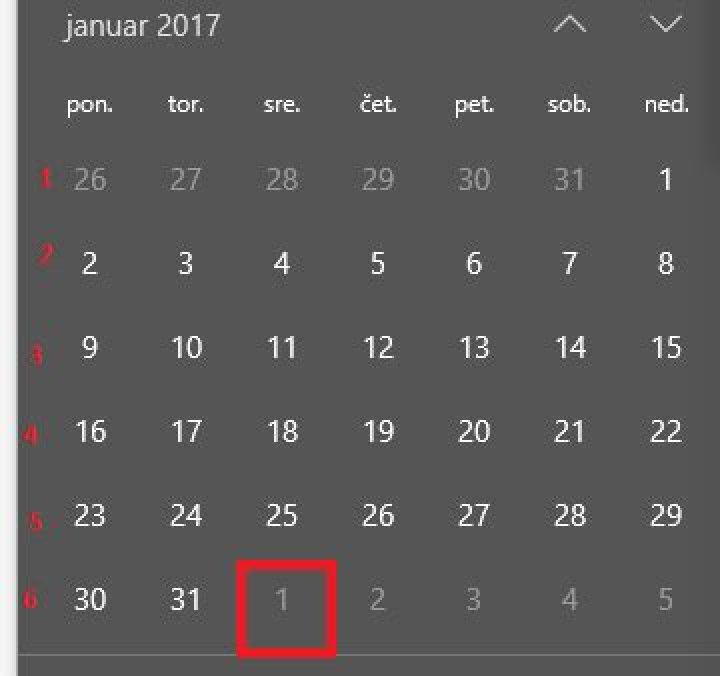
I am looking for a query which will return the week number from given date.
What I've already tried is this:
select datepart(wk, '2017-02-01') but this returns 5 instead of 6. (february 1st is the 6th week of the year).
(week numbers with red)

3 Answers
You probably need to specify the first day of your week with set datefirst:
set datefirst 1; select datepart(week, '2017-02-01'); returns 6
Depending on the default language, your datefirst might be set to 7.
set datefirst 7; select datepart(week, '2017-02-01'); returns 5
You can also consider using 'iso_week' instead of 'week' parameter in 'datepart'. This case you can avoid using 'set datefirst 1', which can be convenient if you can only use a single select.
More details here about 'iso_week': "ISO 8601 includes the ISO week-date system, a numbering system for weeks. Each week is associated with the year in which Thursday occur"
You can compare the two like this:
SELECT datepart(ISO_WEEK, '2020.01.01') -- Wed SELECT datepart(WEEK, '2020.01.01') -- Wed SELECT datepart(ISO_WEEK, '2020.01.05') -- Sun SELECT datepart(WEEK, '2020.01.05') -- Sun SELECT datepart(ISO_WEEK, '2020.01.06') -- Mon SELECT datepart(WEEK, '2020.01.06') -- Mon Note the difference for Sunday, 5 Jan 2020:
----------- 1 1 1 2 2 2 You can get the week number from a specific column which contains a date by using:
DATEPART(WK, orders.createddate) AS Week, This is taken from the DATEPART functions available below:
DATEPART(YY, orders.createddate) AS Year, DATEPART(QQ, orders.createddate) AS Quarter, DATEPART(WK, orders.createddate) AS Week, DATEPART(DY, orders.createddate) AS dayofYear, DATEPART(MM, orders.createddate) AS Month, DATEPART(DD, orders.createddate) AS Date, DATEPART(hour, orders.createddate) AS Hour, DATEPART(minute, orders.createddate) AS Minute, DATEPART(second, orders.createddate) AS Second, DATEPART(millisecond, orders.createddate) AS Millsecond, DATEPART(microsecond, orders.createddate) AS Microsecond, DATEPART(nanosecond, orders.createddate) AS Nanosecond, 



