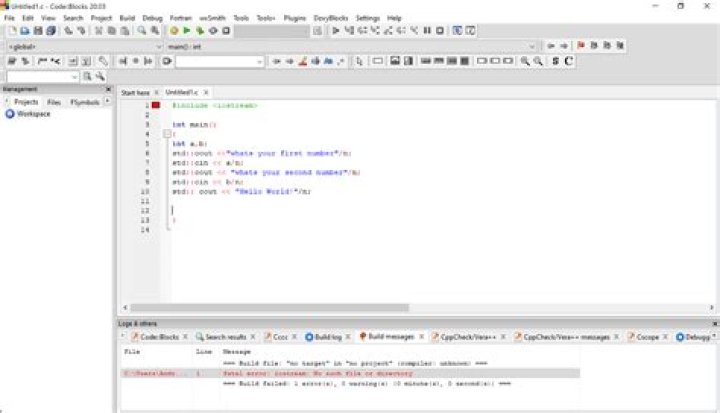

Why when I wan to compile the following multi thread merge sorting C program, I receive this error:
ap@sharifvm:~/forTHE04a$ gcc -g -Wall -o mer mer.c -lpthread mer.c:4:20: fatal error: iostream: No such file or directory #include <iostream> ^ compilation terminated. ap@sharifvm:~/forTHE04a$ gcc -g -Wall -o mer mer.c -lpthread mer.c:4:22: fatal error: iostream.h: No such file or directory #include <iostream.h> ^ compilation terminated. My program:
#include <stdio.h> #include <stdlib.h> #include <pthread.h> #include <iostream> using namespace std; #define N 2 /* # of thread */ int a[] = {10, 9, 8, 7, 6, 5, 4, 3, 2, 1}; /* target array */ /* structure for array index * used to keep low/high end of sub arrays */ typedef struct Arr { int low; int high; } ArrayIndex; void merge(int low, int high) { int mid = (low+high)/2; int left = low; int right = mid+1; int b[high-low+1]; int i, cur = 0; while(left <= mid && right <= high) { if (a[left] > a[right]) b[cur++] = a[right++]; else b[cur++] = a[right++]; } while(left <= mid) b[cur++] = a[left++]; while(right <= high) b[cur++] = a[left++]; for (i = 0; i < (high-low+1) ; i++) a[low+i] = b[i]; } void * mergesort(void *a) { ArrayIndex *pa = (ArrayIndex *)a; int mid = (pa->low + pa->high)/2; ArrayIndex aIndex[N]; pthread_t thread[N]; aIndex[0].low = pa->low; aIndex[0].high = mid; aIndex[1].low = mid+1; aIndex[1].high = pa->high; if (pa->low >= pa->high) return 0; int i; for(i = 0; i < N; i++) pthread_create(&thread[i], NULL, mergesort, &aIndex[i]); for(i = 0; i < N; i++) pthread_join(thread[i], NULL); merge(pa->low, pa->high); //pthread_exit(NULL); return 0; } int main() { ArrayIndex ai; ai.low = 0; ai.high = sizeof(a)/sizeof(a[0])-1; pthread_t thread; pthread_create(&thread, NULL, mergesort, &ai); pthread_join(thread, NULL); int i; for (i = 0; i < 10; i++) printf ("%d ", a[i]); cout << endl; return 0; } 4 Answers
Neither <iostream> nor <iostream.h> are standard C header files. Your code is meant to be C++, where <iostream> is a valid header. Use a C++ compiler such as clang++ or g++ (and a .cpp file extension) for C++ code.
Alternatively, this program uses mostly constructs that are available in C anyway. It's easy enough to convert the entire program to compile using a C compiler. Simply remove #include <iostream> and using namespace std;, and replace cout << endl; with putchar('\n');... I advise compiling using C99, C11 or C18 (eg. gcc -std=c99, clang -std=c18 etc)
Seems like you posted a new question after you realized that you were dealing with a simpler problem related to size_t. I am glad that you did.
Anyways, You have a .c source file, and most of the code looks as per C standards, except that #include <iostream> and using namespace std;
C equivalent for the built-in functions of C++ standard #include<iostream> can be availed through #include<stdio.h>
- Replace
#include <iostream>with#include <stdio.h>, deleteusing namespace std; With
#include <iostream>taken off, you would need a C standard alternative forcout << endl;, which can be done byprintf("\n");orputchar('\n');
Out of the two options,printf("\n");works the faster as I observed.When used
printf("\n");in the code above in place ofcout<<endl;$ time ./thread.exe 1 2 3 4 5 6 7 8 9 10 real 0m0.031s user 0m0.030s sys 0m0.030sWhen used
putchar('\n');in the code above in place ofcout<<endl;$ time ./thread.exe 1 2 3 4 5 6 7 8 9 10 real 0m0.047s user 0m0.030s sys 0m0.030s
Compiled with Cygwin gcc (GCC) 4.8.3 version. results averaged over 10 samples. (Took me 15 mins)
I faced the same error : -
fatal error: iostream: No such file or directory #include <iostream> After some time I found that, I'm making a very very noob mistake here. Actually I was running my program file by giving the extension ".c" only.... :-( So check whether you're saving your file with proper extension or not... In this case, it'll be .cpp for C++ program file. So check that once and maybe you'll be good to go.
So now first check if you have downloaded the MinGW and have added it to the env variables
to check use g++ --version on your cmd/terminal
now if the squiggly lines still appear install the c++ Intellisense extension you will mostly get an error in the c_cpp_properties.json file because the compiler path may not be correct
so all you have to do is put the correct path and the swiggly lines will dissappear




