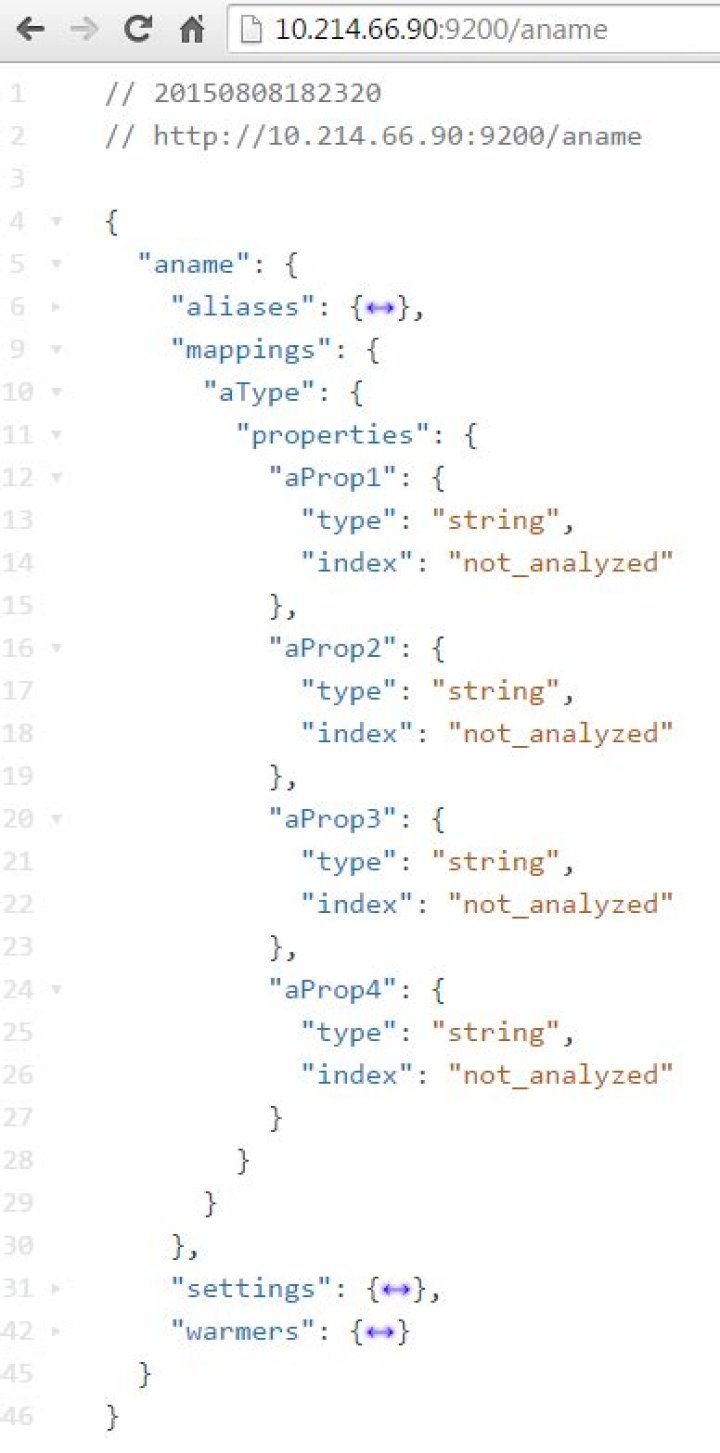
I'm trying to create an elasticsearch index with mappings using the official javascript client.
My code is as follows:
client.indices.create({ index: "aName", "mappings": { "aType": { "properties": { "aProp1": { "type": "string", "index": "not_analyzed" }, "aProp2": { "type": "string", "index": "not_analyzed" }, "aProp3": { "type": "string", "index": "not_analyzed" }, "aProp4": { "type": "string", "index": "not_analyzed" } } } } }, function(err,resp,respcode){ console.log(err,resp,respcode); }); However... the index is created but without the mappings.... The output is:
undefined { ok: true, acknowledged: true } 200 What am I doing wrong?
46 Answers
Refining the answer that is in the comment above from Sander Spilleman. The "mappings" property needs to be inside the "body" property. I am also using the Javascript client 1.3.0 and the docs are still not updated with an example.
Adding an example that worked for me with the javascript API provided by elasticsearch on NPM 1.3.0
var body = { tweet:{ properties:{ tag : {"type" : "string", "index" : "not_analyzed"}, type : {"type" : "string", "index" : "not_analyzed"}, namespace : {"type" : "string", "index" : "not_analyzed"}, tid : {"type" : "string", "index" : "not_analyzed"} } } } client.indices.putMapping({index:"tweets", type:"tweet", body:body}); I tried same but got error from the name of index. aName is not valid, error was about the using lowercase index name. Then It created with mappings.
it.only('putMapping', function (done) { client.indices.create({ index: "aname", body: { "mappings": { "aType": { "properties": { "aProp1": {"type": "string", "index": "not_analyzed"}, "aProp2": {"type": "string", "index": "not_analyzed"}, "aProp3": {"type": "string", "index": "not_analyzed"}, "aProp4": {"type": "string", "index": "not_analyzed"} } } } } }, function (err, resp, respcode) { console.log(err, resp, respcode); }); }) Output:
Elasticsearch DEBUG: 2015-08-08T15:23:09Z starting request { method: 'POST', path: '/aname', body: { mappings: { aType: [Object] } }, query: {} } Elasticsearch TRACE: 2015-08-08T15:23:10Z -> POST { "mappings": { "aType": { "properties": { "aProp1": { "type": "string", "index": "not_analyzed" }, "aProp2": { "type": "string", "index": "not_analyzed" }, "aProp3": { "type": "string", "index": "not_analyzed" }, "aProp4": { "type": "string", "index": "not_analyzed" } } } } } <- 200 { "acknowledged": true } 
Just add body around mappings:
client.indices.create({ index: "aName", body: { "mappings": { "aType": { "properties": { "aProp1": { "type": "string", "index": "not_analyzed" }, "aProp2": { "type": "string", "index": "not_analyzed" }, "aProp3": { "type": "string", "index": "not_analyzed" }, "aProp4": { "type": "string", "index": "not_analyzed" } } } } } }, function (err, resp, respcode) { console.log(err, resp, respcode); }); None of these examples worked for me on ElasticSearch 5.3 API.
Here is an example that works for 5.3.
elasticClient.indices.putMapping({ index: indexName, type: "document", body: { properties: { title: { type: "string" }, content: { type: "string" }, suggest: { type: "completion", analyzer: "simple", search_analyzer: "simple", payloads: true } } } }) Note that the type has been pulled out of the body, and only the sub-params that were under the type are now in the body.
3Note: this uses client.indices.create() and not client.indices.putMapping()
I recently succeeded in creating an index with a custom mapping like this:
client.indices.create({ index: 'yourIndex', body: { yourIndex: { mappings: { yourType: { properties: { yourText: { type: 'string', } } } } } } }); It seems you have to start defining the body with your index, followed by the mappings keyword, followed by your type and so forth. I used the elasticsearch package version 15.4.1 with elastic version 6.5.4
Body property is deprecated after version 8.2.1. Mapping should be set directly in parameters.
await client.indices.create({ index: "user", mappings: { properties: { "name": { type: "text", index: true }, "surname": { type: "text", index: true } } } }); 



