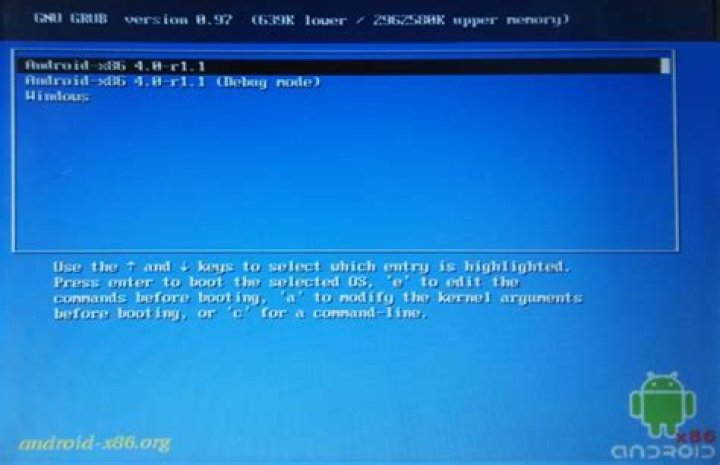
I installed some kind of multiboot device to be able to use Android on my laptop.
I would like to change the boot order to make Windows the default option, but I need to do it from within Windows 10, as I don't have Ubuntu installed. My laptop is old and still uses BIOS.
Boot menu:
2 Answers
You can install Grub2Win () in your Windows and edit the Grub menu. Please remember: if you choose to uninstall GRUB bootloader, you will need to repair the Windows bootloader.
1In order to set some entry in the GRUB as default, you should edit /etc/default/grub with your favourite text editor on Linux (Android is based on it, so you should find some Terminal Emulator for console-based stuff).
The thing you should edit is GRUB_DEFAULT value. 0 means choosing the first value in the menu entry if no input will be given. Try changing it to saved or just 2.
saved will always choose your last choice, 2 sets your third option (counting from 0) in the menu.
After applying changes you should recreate your boot entries by grub-mkconfig -o /boot/grub/grub.cfg or grub2-mkconfig -o /boot/grub/grub.cfg.




