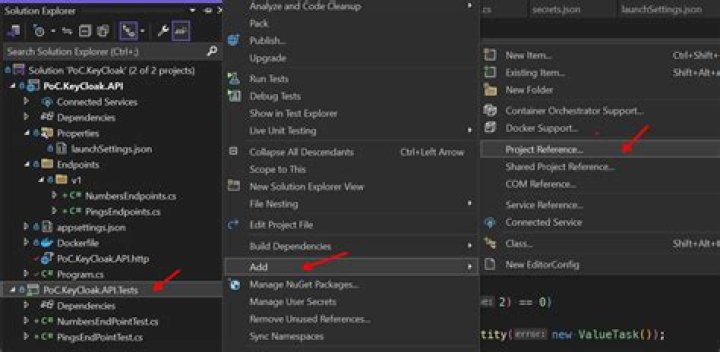
Before I start, I've tried all suggestions from the following and none work:
Integration testing ASP.NET Core with .NET Framework - can't find deps.json
So I'm trying to write some integration tests for dotnet 6. However, my WebApplicationFactory throws the following error:
System.InvalidOperationException: Can't find '/repos/subscription-info-api/tests/
System.InvalidOperationException Can't find '/repos/subscription-info-api/tests/ This file is required for functional tests to run properly. There should be a copy of the file on your source project bin folder. If that is not the case, make sure that the property PreserveCompilationContext is set to true on your project file. E.g 'true'. For functional tests to work they need to either run from the build output folder or the testhost.deps.json file from your application's output directory must be copied to the folder where the tests are running on. A common cause for this error is having shadow copying enabled when the tests run. at Microsoft.AspNetCore.Mvc.Testing.WebApplicationFactory
1.EnsureDepsFile() at Microsoft.AspNetCore.Mvc.Testing.WebApplicationFactory1.EnsureServer() at Microsoft.AspNetCore.Mvc.Testing.WebApplicationFactory1.CreateDefaultClient(DelegatingHandler[] handlers) at Microsoft.AspNetCore.Mvc.Testing.WebApplicationFactory1.CreateDefaultClient(Uri baseAddress, DelegatingHandler[] handlers) at Microsoft.AspNetCore.Mvc.Testing.WebApplicationFactory1.CreateClient(WebApplicationFactoryClientOptions options) at Microsoft.AspNetCore.Mvc.Testing.WebApplicationFactory1.CreateClient() at SubscriptionInfoApi.Tests.Integration.UnitTest1.Test1() in /repos/subscription-info-api/tests/ 14 at SubscriptionInfoApi.Tests.Integration.UnitTest1.Test1() in /repos/subscription-info-api/tests/ 16 at Xunit.Sdk.TestInvoker1.<>c__DisplayClass48_0.<<InvokeTestMethodAsync>b__1>d.MoveNext() in /_/src/ 264 --- End of stack trace from previous location --- at Xunit.Sdk.ExecutionTimer.AggregateAsync(Func1 asyncAction) in //src/ 48 at Xunit.Sdk.ExceptionAggregator.RunAsync(Func`1 code) in //src/ 90
My actual test code is extremely simple:
[Fact] public async Task Test1() { await using var app = new WebApplicationFactory<Program>(); using var client = app.CreateClient(); var res = await (await client.GetAsync("/alive-test")).Content.ReadAsStringAsync(); Assert.Equal("Alive!", res); } As per the suggestions, I've made sure I'm directly referencing Microsoft.AspNetCore.Mvc.Testing -> 6.0.0 in my integration tests project. I've also tried the various tweaks to the .csproj files that were suggested but nothing seems to be working.
I'm stuck for things to try to debug this further, any ideas?
16 Answers
You are probably targeting the wrong namespace for Program in your test file (like I was).
I had to add the following at the end of my Program.cs file (last line) to make it visible to my test projects needing it:
public partial class Program { } An example can be found here: minimal api testing example
5I had the same problem, although for an entirely different reason.
I am using .net 6 but I deliberately chose to use an implementation that actually has a Program.cs file. When I copied the code from the official MS integration test guide, I let VS pull in all the dependencies. The dependency used to resolve the Program.cs was not my own (PersonalSite for the sake of this answer), but one of MS's own implementation:

A small error on my part, sure, but maybe I can help somebody out.
For those who actually need the partial class implementation gimmick, the MS integ test guide I linked lists guidelines to do just that.
1FWIW there is another approach that works as well (which doesn't require modifying code).
In your app's .csproj file add the following (Assuming your test project is called 'Tests'):
<ItemGroup> <InternalsVisibleTo Include="Tests" /> </ItemGroup> This allows your Tests project to see your Program.cs file.
Add this to the bottom of your minimal API controller
public partial class Program { } As explained from Microsoft Docs :
Tip If you’re using minimal API configuration in your Program.cs file, by default the class will be declared internal and won’t be accessible from the test project. You can choose any other instance class in your web project instead, or add this to your Program.cs file: ]{custom-style=Code}csharp // Make the implicit Program class public so test projects can access it public partial class Program { } [
As PmanAce recommends in his answer above
My issue was the wrong using statement:
I changed using Microsoft.VisualStudio.TestPlatform.TestHost; to using TestASPNetMVC.
My solution consists of 2 OOB project templates: ASP.NET Core Web App (Model-View-Controller) named TestASPNetMVC and xUnit Test Project named TestProject1. I didn't change the ASP.NET Core project. Here is my test project in its' entirety:
using Microsoft.AspNetCore.Mvc.Testing; using TestASPNetMVC; //using Microsoft.VisualStudio.TestPlatform.TestHost; namespace TestProject1 { public class UnitTest1 { private HttpClient _httpClient; public UnitTest1() { var webApplicationFactory = new WebApplicationFactory<Program>(); _httpClient = webApplicationFactory.CreateDefaultClient(); } [Fact] public async Task Test1() { var response = await _httpClient.GetAsync("/"); var result = await response.Content.ReadAsStringAsync(); Assert.True(!string.IsNullOrEmpty(result)); } } } As noted above by pmanace, you'll need to add public partial class Program { } to your SUT project if you're not using top-level statements.
change your Program class access specifier in your api from internal to Public
1



