
How do I convert a string of format mmddyyyy into datetime in SQL Server 2008?
My target column is in DateTime
I have tried with Convert and most of the Date style values however I get an error message:
2'The conversion of a varchar data type to a datetime data type resulted in an out-of-range value.'
13 Answers
OP wants mmddyy and a plain convert will not work for that:
select convert(datetime,'12312009') Msg 242, Level 16, State 3, Line 1 The conversion of a char data type to a datetime data type resulted in an out-of-range datetime value so try this:
DECLARE @Date char(8) set @Date='12312009' SELECT CONVERT(datetime,RIGHT(@Date,4)+LEFT(@Date,2)+SUBSTRING(@Date,3,2)) OUTPUT:
----------------------- 2009-12-31 00:00:00.000 (1 row(s) affected) SQL Server can implicitly cast strings in the form of 'YYYYMMDD' to a datetime - all other strings must be explicitly cast. here are two quick code blocks which will do the conversion from the form you are talking about:
version 1 uses unit variables:
BEGIN DECLARE @input VARCHAR(8), @mon CHAR(2), @day char(2), @year char(4), @output DATETIME SET @input = '10022009' --today's date SELECT @mon = LEFT(@input, 2), @day = SUBSTRING(@input, 3,2), @year = RIGHT(@input,4) SELECT @output = @year+@mon+@day SELECT @output END version 2 does not use unit variables:
BEGIN DECLARE @input CHAR(8), @output DATETIME SET @input = '10022009' --today's date SELECT @output = RIGHT(@input,4) + SUBSTRING(@input, 3,2) + LEFT(@input, 2) SELECT @output END Both cases rely on sql server's ability to do that implicit conversion.
0Likely you have bad data that cannot convert. Dates should never be stored in varchar becasue it will allow dates such as ASAP or 02/30/2009. Use the isdate() function on your data to find the records which can't convert.
OK I tested with known good data and still got the message. You need to convert to a different format becasue it does not know if 12302009 is mmddyyyy or ddmmyyyy. The format of yyyymmdd is not ambiguous and SQL Server will convert it correctly
I got this to work:
cast( right(@date,4) + left(@date,4) as datetime) You will still get an error message though if you have any that are in a non-standard format like '112009' or some text value or a true out of range date.
1I found this helpful for my conversion, without string manipulation.
CONVERT(VARCHAR(23), @lastUploadEndDate, 121) yyyy-mm-dd hh:mi:ss.mmm(24h) was the format I needed.
1Convert would be the normal answer, but the format is not a recognised format for the converter, mm/dd/yyyy could be converted using convert(datetime,yourdatestring,101) but you do not have that format so it fails.
The problem is the format being non-standard, you will have to manipulate it to a standard the convert can understand from those available.
Hacked together, if you can guarentee the format
declare @date char(8) set @date = '12312009' select convert(datetime, substring(@date,5,4) + substring(@date,1,2) + substring(@date,3,2),112) Look at CAST / CONVERT in BOL that should be a start.
If your target column is datetime you don't need to convert it, SQL will do it for you.
Otherwise
CONVERT(datetime, '20090101') Should do it.
This is a link that should help as well:
1I'd use STUFF to insert dividing chars and then use CONVERT with the appropriate style. Something like this:
DECLARE @dt VARCHAR(100)='111290'; SELECT CONVERT(DATETIME,STUFF(STUFF(@dt,3,0,'/'),6,0,'/'),3) First you use two times STUFF to get 11/12/90 instead of 111290, than you use the 3 to convert this to datetime (or any other fitting format: use . for german, - for british...) More details on CAST and CONVERT
Best was, to store date and time values properly.
- This should be either "universal unseparated format"
yyyyMMdd - or (especially within XML) it should be ISO8601:
yyyy-MM-ddoryyyy-MM-ddThh:mm:ssMore details on ISO8601
Any culture specific format will lead into troubles sooner or later...
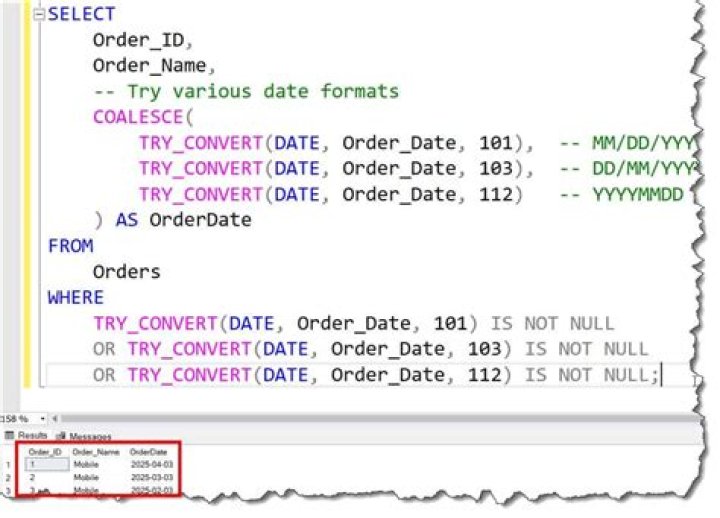
1use Try_Convert:Returns a value cast to the specified data type if the cast succeeds; otherwise, returns null.
DECLARE @DateString VARCHAR(10) ='20160805' SELECT TRY_CONVERT(DATETIME,@DateString) SET @DateString ='Invalid Date' SELECT TRY_CONVERT(DATETIME,@DateString) Link:MSDN TRY_CONVERT (Transact-SQL)
1I had luck with something similar:
Convert(DATETIME, CONVERT(VARCHAR(2), @Month) + '/' + CONVERT(VARCHAR(2), @Day) + '/' + CONVERT(VARCHAR(4), @Year)) The root cause of this issue can be in the regional settings - DB waiting for YYYY-MM-DD while an app sents, for example, DD-MM-YYYY (Russian locale format) as it was in my case. All I did - change locale format from Russian to English (United States) and voilà.
This seems the easiest way..
SELECT REPLACE(CONVERT(CHAR(10), GETDATE(), 110),'-','') SQL standard dates while inserting or updating Must be between 1/1/1753 12:00:00 AM and 12/31/9999 11:59:59 PM.
So if you are inserting/Updating below 1/1/1753 you will get this error.
1DECLARE @d char(8) SET @d = '06082020' /* MMDDYYYY means June 8. 2020 */ SELECT CAST(FORMAT (CAST (@d AS INT), '##/##/####') as DATETIME) Result returned is the original date string in @d as a DateTime.
3



