In our Azure functions, we have powershell scripts that connect to SharePoint online and give monthly reports. Recently, we discovered that connect-pnponline is fail to connect to SharePoint after upgrading to modern authentication in SharePoint.
When we allow access apps without modern authentication, this will work fine.
Is there any way to overcome this issue in Azure functions? When SharePoint is upgraded to modern authentication, how can you connect it with Azure functions? I've tried different PnP commands but no luck

Here is the error :
[Error] Connect-PnPOnline : Cannot contact web site ' or the web site does not support SharePoint Online credentials. The response status code is 'Unauthorized'. The response headers are 'X-SharePointHealthScore=3, X-MSDAVEXT_Error=917656; Access+denied. The response status code is 'Unauthorized'. The response headers are 'X-SharePointHealthScore=1, X-MSDAVEXT_Error=917656;
01 Answer
Glad that you got the solution in Stack Exchange supporting the answer provided by Rajat-Sahani posting it here to help the other community members.
- Need to generate Client Certificate by creating Application in Microsoft Identity platform in Azure Active Directory.
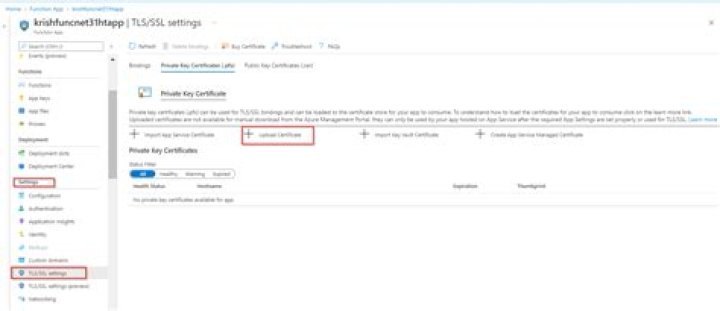
After generating Certificate upload that in function app
After uploading the certificate you can connect the function app with SharePoint using the PnP PowerShell command
Connect-PnPOnline -ClientId fa1a81f1-e729-44d8-bb71-0a0c339c0f62 -Url "" -Tenant tenant.onmicrosoft.com -Thumbprint $thumbprint 



