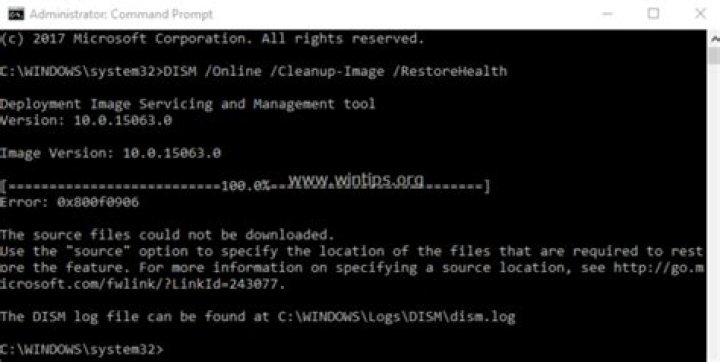

I tried to run DISM but got this error. I plugged in the Windows 8 USB stick that I requested from Dell (no CD-ROMs were provided) and re-ran it with the source options and it still gave the error. I read the link but it didn't make much sense and didn't say exactly what a source was. I don't know what a group policy is, or what a WIM is. Windows Update already works OK. I searched for 'group policy' on my system and in Control Panel, but nothing was found. I don't know why it can't just download the files it needs.
C:\windows\system32>DISM /Online /Cleanup-Image /RestoreHealth /source:j:\ Deployment Image Servicing and Management tool Version: 6.3.9600.17031 Image Version: 6.3.9600.17031 [==========================100.0%==========================] Error: 0x800f0906 The source files could not be downloaded. Use the "source" option to specify the location of the files that are required t o restore the feature. For more information on specifying a source location, see The DISM log file can be found at C:\windows\Logs\DISM\dism.log dism.log2017-11-03 18:12:34, Info DISM DISM Package Manager: PID=6660 TID=3576 Error in operation: (null) (CBS HRESULT=0x800f0906) - CCbsConUIHandler::Error 2017-11-03 18:12:34, Error DISM DISM Package Manager: PID=6660 TID=4736 Failed finalizing changes. - CDISMPackageManager::Internal_Finalize(hr:0x800f0906) 2017-11-03 18:12:34, Error DISM DISM Package Manager: PID=6660 TID=4736 The source files could not be found and download failed. Their location can be specified using the /source option to restore the feature. - GetCbsErrorMsg 2017-11-03 18:12:34, Error DISM DISM Package Manager: PID=6660 TID=4736 Failed processing package changes with session option CbsSessionOptionRepairStoreCorruption - CDISMPackageManager::RestoreHealth(hr:0x800f0906) 2017-11-03 18:12:34, Error DISM DISM Package Manager: PID=6660 TID=4736 The source files could not be found and download failed. Their location can be specified using the /source option to restore the feature. - GetCbsErrorMsg 2017-11-03 18:12:34, Error DISM DISM Package Manager: PID=6660 TID=4736 Failed to restore the image health. - CPackageManagerCLIHandler::ProcessCmdLine_CleanupImage(hr:0x800f0906) 2017-11-03 18:12:34, Error DISM DISM Package Manager: PID=6660 TID=4736 Failed while processing command cleanup-image. - CPackageManagerCLIHandler::ExecuteCmdLine(hr:0x800f0906) 2017-11-03 18:12:34, Info DISM DISM Package Manager: PID=6660 TID=4736 Further logs for online package and feature related operations can be found at %WINDIR%\logs\CBS\cbs.log - CPackageManagerCLIHandler::ExecuteCmdLine 2017-11-03 18:12:34, Info DISM DISM Provider Store: PID=6660 TID=4736 Found the OSServices. Waiting to finalize it until all other providers are unloaded. - CDISMProviderStore::Final_OnDisconnect 2017-11-03 18:12:34, Info DISM DISM Provider Store: PID=6660 TID=4736 Found the OSServices. Waiting to finalize it until all other providers are unloaded. - CDISMProviderStore::Final_OnDisconnect 2017-11-03 18:12:34, Info DISM DISM Provider Store: PID=6660 TID=4736 Found the PE Provider. Waiting to finalize it until all other providers are unloaded. - CDISMProviderStore::Final_OnDisconnect 2017-11-03 18:12:34, Info DISM DISM Provider Store: PID=6660 TID=4736 Finalizing the servicing provider(DISM Package Manager) - CDISMProviderStore::Internal_DisconnectProvider 2017-11-03 18:12:34, Info DISM DISM Package Manager: PID=6660 TID=4736 Finalizing CBS core. - CDISMPackageManager::Finalize 2017-11-03 18:12:34, Info DISM DISM Provider Store: PID=6660 TID=4736 Disconnecting Provider: DISM Package Manager - CDISMProviderStore::Internal_DisconnectProvider 2017-11-03 18:12:34, Info DISM DISM Provider Store: PID=6660 TID=4736 Finalizing the servicing provider(MsiManager) - CDISMProviderStore::Internal_DisconnectProvider 2017-11-03 18:12:34, Info DISM DISM Provider Store: PID=6660 TID=4736 Disconnecting Provider: MsiManager - CDISMProviderStore::Internal_DisconnectProvider 2017-11-03 18:12:34, Info DISM DISM Provider Store: PID=6660 TID=4736 Finalizing the servicing provider(IntlManager) - CDISMProviderStore::Internal_DisconnectProvider 2017-11-03 18:12:34, Info DISM DISM Provider Store: PID=6660 TID=4736 Disconnecting Provider: IntlManager - CDISMProviderStore::Internal_DisconnectProvider 2017-11-03 18:12:34, Info DISM DISM Provider Store: PID=6660 TID=4736 Finalizing the servicing provider(IBSManager) - CDISMProviderStore::Internal_DisconnectProvider 2017-11-03 18:12:34, Info DISM DISM Provider Store: PID=6660 TID=4736 Disconnecting Provider: IBSManager - CDISMProviderStore::Internal_DisconnectProvider 2017-11-03 18:12:34, Info DISM DISM Provider Store: PID=6660 TID=4736 Finalizing the servicing provider(DriverManager) - CDISMProviderStore::Internal_DisconnectProvider 2017-11-03 18:12:34, Info DISM DISM Provider Store: PID=6660 TID=4736 Disconnecting Provider: DriverManager - CDISMProviderStore::Internal_DisconnectProvider 2017-11-03 18:12:34, Info DISM DISM Provider Store: PID=6660 TID=4736 Finalizing the servicing provider(DISM Unattend Manager) - CDISMProviderStore::Internal_DisconnectProvider 2017-11-03 18:12:34, Info DISM DISM Provider Store: PID=6660 TID=4736 Disconnecting Provider: DISM Unattend Manager - CDISMProviderStore::Internal_DisconnectProvider 2017-11-03 18:12:34, Info DISM DISM Provider Store: PID=6660 TID=4736 Finalizing the servicing provider(SmiManager) - CDISMProviderStore::Internal_DisconnectProvider 2017-11-03 18:12:34, Info DISM DISM Provider Store: PID=6660 TID=4736 Disconnecting Provider: SmiManager - CDISMProviderStore::Internal_DisconnectProvider 2017-11-03 18:12:34, Info DISM DISM Provider Store: PID=6660 TID=4736 Finalizing the servicing provider(AppxManager) - CDISMProviderStore::Internal_DisconnectProvider 2017-11-03 18:12:34, Info DISM DISM Provider Store: PID=6660 TID=4736 Disconnecting Provider: AppxManager - CDISMProviderStore::Internal_DisconnectProvider 2017-11-03 18:12:34, Info DISM DISM Provider Store: PID=6660 TID=4736 Finalizing the servicing provider(AssocManager) - CDISMProviderStore::Internal_DisconnectProvider 2017-11-03 18:12:34, Info DISM DISM Provider Store: PID=6660 TID=4736 Disconnecting Provider: AssocManager - CDISMProviderStore::Internal_DisconnectProvider 2017-11-03 18:12:34, Info DISM DISM Provider Store: PID=6660 TID=4736 Finalizing the servicing provider(GenericManager) - CDISMProviderStore::Internal_DisconnectProvider 2017-11-03 18:12:34, Info DISM DISM Provider Store: PID=6660 TID=4736 Disconnecting Provider: GenericManager - CDISMProviderStore::Internal_DisconnectProvider 2017-11-03 18:12:34, Info DISM DISM Provider Store: PID=6660 TID=4736 Finalizing the servicing provider(Edition Manager) - CDISMProviderStore::Internal_DisconnectProvider 2017-11-03 18:12:34, Info DISM DISM Provider Store: PID=6660 TID=4736 Disconnecting Provider: Edition Manager - CDISMProviderStore::Internal_DisconnectProvider 2017-11-03 18:12:34, Info DISM DISM Provider Store: PID=6660 TID=4736 Releasing the local reference to OSServices. - CDISMProviderStore::Internal_DisconnectProvider 2017-11-03 18:12:34, Info DISM DISM Provider Store: PID=6660 TID=4736 Disconnecting Provider: OSServices - CDISMProviderStore::Internal_DisconnectProvider 2017-11-03 18:12:34, Info DISM DISM Provider Store: PID=6660 TID=4736 Releasing the local reference to DISMLogger. Stop logging. - CDISMProviderStore::Internal_DisconnectProvider 2017-11-03 18:12:34, Info DISM DISM.EXE: Image session has been closed. Reboot required=no. 2017-11-03 18:12:34, Info DISM DISM.EXE: 2017-11-03 18:12:34, Info DISM DISM.EXE: <----- Ending Dism.exe session -----> 2017-11-03 18:12:34, Info DISM DISM.EXE: 2017-11-03 18:12:34, Info DISM DISM Provider Store: PID=6640 TID=6872 Found the OSServices. Waiting to finalize it until all other providers are unloaded. - CDISMProviderStore::Final_OnDisconnect 2017-11-03 18:12:34, Info DISM DISM Provider Store: PID=6640 TID=6872 Disconnecting Provider: FolderManager - CDISMProviderStore::Internal_DisconnectProvider 2017-11-03 18:12:34, Info DISM DISM Provider Store: PID=6640 TID=6872 Releasing the local reference to DISMLogger. Stop logging. - CDISMProviderStore::Internal_DisconnectProvider Attempt to add MSU files to WIM:
C:\windows\system32>md \temp\windows C:\Users\Chloe\Downloads>dism /mount-image imagefile:"c:\images\install.wim" /index:1 /mountdir:c:\temp\windows Deployment Image Servicing and Management tool Version: 6.3.9600.17031 Error: 3 The system cannot find the path specified. The DISM log file can be found at C:\windows\Logs\DISM\dism.log C:\Users\Chloe\Downloads>dism /add-package /image:c:\temp\windows /packagepath:"*.msu" /logpath:addpackage.log Deployment Image Servicing and Management tool Version: 6.3.9600.17031 Error: 2 Unable to access the image. Make sure that the image path and the Windows directory for the image exist and you have Read permissions on the folder. The DISM log file can be found at addpackage.log addpackage.log... 2017-11-13 18:18:29, Info DISM DISM WIM Provider: PID=9672 TID=7456 [c:\temp\windows] is not a WIM mount point. - CWimMountedImageInfo::Initialize 2017-11-13 18:18:29, Info DISM DISM Imaging Provider: PID=9672 TID=7456 The provider WimManager does not support CreateDismImage on c:\temp\windows - CGenericImagingManager::CreateDismImage 2017-11-13 18:18:29, Info DISM DISM Imaging Provider: PID=9672 TID=7456 No imaging provider supported CreateDismImage for this path - CGenericImagingManager::CreateDismImage 2017-11-13 18:18:29, Error DISM DISM.EXE: Failed to access the image folder or image's windows folder. 2017-11-13 18:18:29, Info DISM DISM.EXE: Image session has been closed. Reboot required=no. 2017-11-13 18:18:29, Info DISM DISM.EXE: Windows 8.1
62 Answers
I fixed this by running
C:\Windows\System32\wbem>DISM /Online /Cleanup-Image /StartComponentCleanup /ResetBase Deployment Image Servicing and Management tool Version: 6.3.9600.17031 Image Version: 6.3.9600.17031 [==========================100.0%==========================] The operation completed successfully. C:\Windows\System32\wbem>DISM /Online /Cleanup-Image /RestoreHealth Deployment Image Servicing and Management tool Version: 6.3.9600.17031 Image Version: 6.3.9600.17031 [==========================100.0%==========================] The restore operation completed successfully. The component store corruption was repaired. The operation completed successfully. This may also be required, but if I remember correctly, DISM still did not complete correctly right after that.
There is also a Microsoft guy actively answering DISM problems in the comments. I didn't need to use him. Post your CBS.log and DISM.log and console output and he may be able to help if this answer doesn't.
Here are the corrupted files:
(p) CSI Payload Corrupt amd64_microsoft-windows-ie-memoryanalyzer_31bf3856ad364e35_11.0.9600.18793_none_c692555cd6a574c3\MemoryAnalyzer.dll Repair failed: Missing replacement payload. (p) CSI Payload Corrupt amd64_juniper-vpnplugin-appx_31bf3856ad364e35_6.3.9600.17093_none_4788d83836273476\resources.pri Repair failed: Missing replacement payload. (p) CSI Payload Corrupt (Fixed) amd64_microsoft-windows-ie-memoryanalyzer_31bf3856ad364e35_11.0.9600.18450_none_c6af0850d6906eb1\MemoryAnalyzer.dll (p) CSI Payload Corrupt amd64_microsoft-windows-ie-ieetwcollector_31bf3856ad364e35_11.0.9600.18321_none_c6d63f4ce5c07126\ieetwcollectorres.dll Repair failed: Missing replacement payload. (p) CSI Payload Corrupt amd64_microsoft-windows-errorreportingcore_31bf3856ad364e35_6.3.9600.16408_none_118f948ed996c558\werdiagcontroller.dll Repair failed: Missing replacement payload. 11.0.9600.18793 comes from KB4036586, to see which KB updates VPN to 6.3.9600.17093 open regedit.exe, go to HKEY_LOCAL_MACHINE\SOFTWARE\Microsoft\Windows\CurrentVersion\Component Based Servicing\ComponentDetect\amd64_juniper-vpnplugin-appx_31bf3856ad364e35_0.0.0.0_none_d6cef60e62aeb6a8 and look which KB updates the file to 6.3.9600.17093 , 11.0.9600.18450 is KB3185319, 11.0.9600.18321 comes from KB3154070 , 6.3.9600.16408 comes from Windows 8.1 General Availability Update Rollup KB2883200.
Download the MSU files and add them to the Install.wim with DISM. Now run DISM /Online /Cleanup-Image /RestoreHealth /source:D:\install.wim:1 /limitaccess and use the updated WIM as source which includes now all files.




