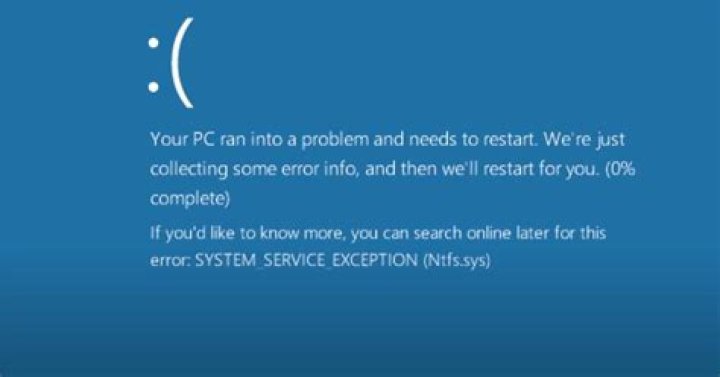

I open my pc failed, it shows blue scree with error (SYSTEM SERVICE EXCEPTION), than I start it for safe mode and get the dump file, open in another pc. This is my analyze result by windbg in below. Please help me. Thanks.
3: kd> !analyze -v ******************************************************************************* * * * Bugcheck Analysis * * * ******************************************************************************* SYSTEM_SERVICE_EXCEPTION (3b) An exception happened while executing a system service routine. Arguments: Arg1: 00000000c0000005, Exception code that caused the bugcheck Arg2: 0000000000000000, Address of the instruction which caused the bugcheck Arg3: ffffd0002048c840, Address of the context record for the exception that caused the bugcheck Arg4: 0000000000000000, zero. Debugging Details: ------------------ DUMP_CLASS: 1 DUMP_QUALIFIER: 400 BUILD_VERSION_STRING: 10586.420.amd64fre.th2_release_sec.160527-1834 SYSTEM_MANUFACTURER: Gigabyte Technology Co., Ltd. SYSTEM_PRODUCT_NAME: B85M-DS3H SYSTEM_SKU: To be filled by O.E.M. SYSTEM_VERSION: To be filled by O.E.M. BIOS_VENDOR: American Megatrends Inc. BIOS_VERSION: FD BIOS_DATE: 06/19/2014 BASEBOARD_MANUFACTURER: Gigabyte Technology Co., Ltd. BASEBOARD_PRODUCT: B85M-DS3H BASEBOARD_VERSION: x.x DUMP_TYPE: 2 BUGCHECK_P1: c0000005 BUGCHECK_P2: 0 BUGCHECK_P3: ffffd0002048c840 BUGCHECK_P4: 0 EXCEPTION_CODE: (NTSTATUS) 0xc0000005 - 0x%p FAULTING_IP: +0 00000000`00000000 ?? ??? CONTEXT: ffffd0002048c840 -- (.cxr 0xffffd0002048c840) rax=0000000000000000 rbx=ffffe001fa4c4a58 rcx=ffffe001fa4c4a58 rdx=ffffd0002048d2c0 rsi=ffffe001fa4c4af8 rdi=ffffe001fa4c4980 rip=0000000000000000 rsp=ffffd0002048d268 rbp=ffffe001fa41bbe0 r8=0000000000000000 r9=0000000000000000 r10=fffff8006dbf0000 r11=0000000000000001 r12=0000000000000000 r13=ffffe001fa41be10 r14=0000000000000000 r15=0000000000000000 iopl=0 nv up ei pl zr na po nc cs=0010 ss=0018 ds=002b es=002b fs=0053 gs=002b efl=00010246 00000000`00000000 ?? ??? Resetting default scope CPU_COUNT: 4 CPU_MHZ: cdc CPU_VENDOR: GenuineIntel CPU_FAMILY: 6 CPU_MODEL: 3c CPU_STEPPING: 3 CPU_MICROCODE: 6,3c,3,0 (F,M,S,R) SIG: 1E'00000000 (cache) 1E'00000000 (init) CUSTOMER_CRASH_COUNT: 1 DEFAULT_BUCKET_ID: WIN8_DRIVER_FAULT BUGCHECK_STR: 0x3B PROCESS_NAME: svchost.exe CURRENT_IRQL: 0 ANALYSIS_SESSION_HOST: DESKTOP-BHLSA7K ANALYSIS_SESSION_TIME: 06-23-2016 11:27:37.0156 ANALYSIS_VERSION: 10.0.10586.567 amd64fre LAST_CONTROL_TRANSFER: from fffff8006dbf62db to 0000000000000000 IP_IN_FREE_BLOCK: 0 STACK_TEXT: ffffd000`2048d268 fffff800`6dbf62db : ffffe001`fa4c4980 ffffe001`fa4c4c78 00000000`00000040 fffff800`00000000 : 0x0 ffffd000`2048d270 fffff800`6dbf5cb6 : ffffe001`fa4c4900 00000000`00000000 00000000`c0000016 00000000`00000000 : FLTMGR!FltpPerformPostCallbacks+0x2ab ffffd000`2048d340 fffff800`6dbf7928 : ffffe001`fa4c4998 ffffe001`fa4c4980 ffffe001`fa3d5010 ffffe001`fa3d5440 : FLTMGR!FltpPassThroughCompletionWorker+0x76 ffffd000`2048d380 fffff800`6dc262d7 : 00000000`00000000 ffffe001`fa12f4f0 ffffd001`00000000 00000000`00000801 : FLTMGR!FltpLegacyProcessingAfterPreCallbacksCompleted+0x238 ffffd000`2048d410 fffff800`58016d38 : 00000000`00000000 00000000`00000005 00000000`00000000 00000000`00000189 : FLTMGR!FltpCreate+0x347 ffffd000`2048d4c0 fffff800`5800d6a6 : ffffc001`6b6273b8 ffffc001`6b6273b8 ffffd000`2048d790 ffffe001`f8212c50 : nt!IopParseDevice+0x7c8 ffffd000`2048d690 fffff800`5800c0ac : ffffe001`fa3f4b01 ffffd000`2048d8a0 00ffffe0`00000040 ffffe001`f418af20 : nt!ObpLookupObjectName+0x776 ffffd000`2048d830 fffff800`5803dd48 : ffffe001`00000001 ffffe001`fa410b10 00000000`00000000 00000000`00000000 : nt!ObOpenObjectByNameEx+0x1ec ffffd000`2048d950 fffff800`5803d8a9 : 000000e0`84ffec38 fffff800`57f0bf80 000000e0`84ffecb0 000000e0`84ffec50 : nt!IopCreateFile+0x3d8 ffffd000`2048da00 fffff800`57d560a3 : ffffc001`6d3211c0 fffff800`57fc7ced 000000e0`84ffed48 ffffe001`00000028 : nt!NtCreateFile+0x79 ffffd000`2048da90 00007ff9`ab8a5b84 : 00000000`00000000 00000000`00000000 00000000`00000000 00000000`00000000 : nt!KiSystemServiceCopyEnd+0x13 000000e0`84ffebb8 00000000`00000000 : 00000000`00000000 00000000`00000000 00000000`00000000 00000000`00000000 : 0x00007ff9`ab8a5b84 THREAD_SHA1_HASH_MOD_FUNC: d3c9c5375a95d2e8878fb116dc3127eb827d454f THREAD_SHA1_HASH_MOD_FUNC_OFFSET: 1537388f81059bbcc20a83649db835e96da03547 THREAD_SHA1_HASH_MOD: f4143f7434a8c25979619eb6afebf44f2b1f5926 FOLLOWUP_IP: FLTMGR!FltpPerformPostCallbacks+2ab fffff800`6dbf62db 8bc8 mov ecx,eax FAULT_INSTR_CODE: f983c88b SYMBOL_STACK_INDEX: 1 SYMBOL_NAME: FLTMGR!FltpPerformPostCallbacks+2ab FOLLOWUP_NAME: MachineOwner MODULE_NAME: FLTMGR IMAGE_NAME: FLTMGR.SYS DEBUG_FLR_IMAGE_TIMESTAMP: 5632d176 IMAGE_VERSION: 10.0.10586.0 STACK_COMMAND: .cxr 0xffffd0002048c840 ; kb BUCKET_ID_FUNC_OFFSET: 2ab FAILURE_BUCKET_ID: 0x3B_FLTMGR!FltpPerformPostCallbacks BUCKET_ID: 0x3B_FLTMGR!FltpPerformPostCallbacks PRIMARY_PROBLEM_CLASS: 0x3B_FLTMGR!FltpPerformPostCallbacks TARGET_TIME: 2016-06-23T03:03:52.000Z OSBUILD: 10586 OSSERVICEPACK: 0 SERVICEPACK_NUMBER: 0 OS_REVISION: 0 SUITE_MASK: 272 PRODUCT_TYPE: 1 OSPLATFORM_TYPE: x64 OSNAME: Windows 10 OSEDITION: Windows 10 WinNt TerminalServer SingleUserTS OS_LOCALE: USER_LCID: 0 OSBUILD_TIMESTAMP: 2016-05-28 11:59:07 BUILDDATESTAMP_STR: 160527-1834 BUILDLAB_STR: th2_release_sec BUILDOSVER_STR: 10.0.10586.420.amd64fre.th2_release_sec.160527-1834 ANALYSIS_SESSION_ELAPSED_TIME: 5ac3 ANALYSIS_SOURCE: KM FAILURE_ID_HASH_STRING: km:0x3b_fltmgr!fltpperformpostcallbacks FAILURE_ID_HASH: {4167dd89-437f-47a2-6c22-0b8fb315a500} Followup: MachineOwner --------- 1 Answer
A lot of the time this is caused by the video driver. Try either rolling back your video card driver or getting a copy of the video driver from either Intel if you are using your on board graphics or from your video card manufacture if you are not using the on board graphics.
Here is a link to where you can find drivers if you are using on board graphics.
If the above doesn't work try doing a memory test follow the instructions from here. Skip down to the part where it says "If you are unable to boot into Windows".
Source: Past experience and Microsoft




