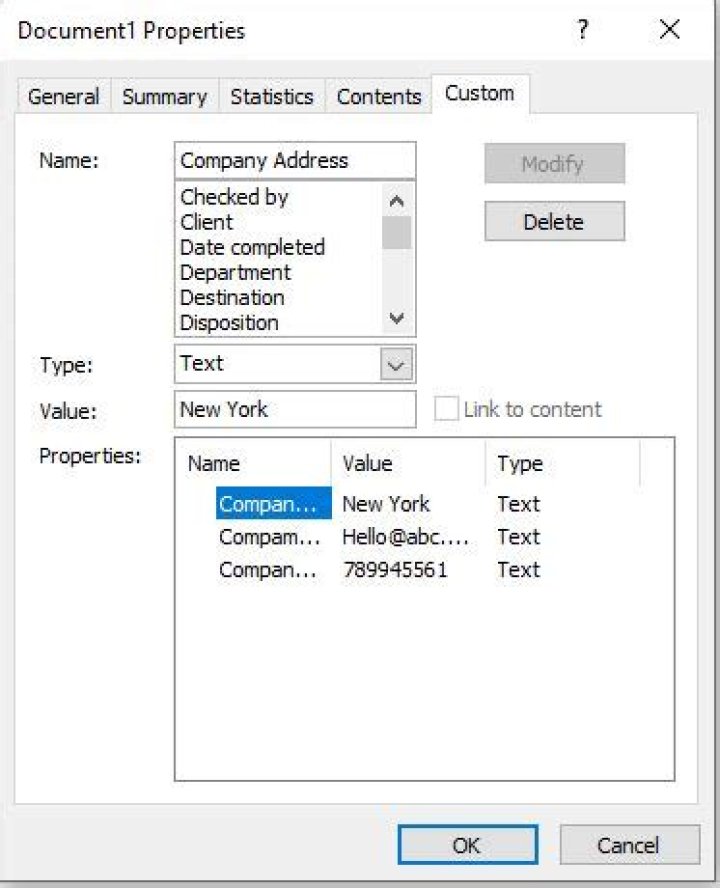
tl;dr: I can insert Company Address or Company e-mails fields in my Word 2010 document, but these fields remains empty. I can't find corresponding fields in document's properties. How can I make these fields (or any other company- or address-related) auto-populated with some of the document's property or field?
I am trying to create a template Word 2010 document which will have some fields auto-populated with document properties.
I am using Insert > Quick Parts > Document Property context menu and:
- When I use i.e.
AuthororTitleeverything is just fine -- a field is inserted and it is populated with corresponding document's property. Whenever I edit that property and change its value, corresponding field is auto updated. - When I use fields like
Company AddressorCompany E-mailthey remain empty and not populated all the time, because I can't find corresponding field in document's properties.

How can I / should I match fields that are available in Insert > Quick Parts > Document Property menu with actual document's properties?
Or how can I insert a field that will contain address, phone number and telephone number that will be always populated with document properties and will not require user to manually provide them in the document?
12 Answers
As far as I know, we can use Quick Parts > Document Property to insert a Content Control to display properties of current document. You can add document properties on Info page(File > Info > Properties > Advanced Properties) . You can see Company is there.
Considering Company Address, Company E-mail, Company Fax, Company Phone are not standard properties included in documents, there are no built-in properties corresponding to these Content Controls. It won't display any company information because these company information is included in current document.
I'm guessing you'll have to create custom document properties and map them to content controls. See Mapped Content Controls and Repeating Data (or populating multiple like fields).
You can add custom document properties (File > Info > Properties > Advanced Properties > Custom)and use DocProperty fields instead. (Insert > Quick Parts > Filed, select Document Information and DocProperty )
You do not need registry hacks or third party tools except for Office365 ("template Word 2010). This information is drawn from the author information (user).
- In the File -> Information view of an document/template you see in the lower right corner the author
- below the author field you see "add author" and a symbol looking like an
- address book clicking on that opens a contact manager
- There will probably only be one contact - the current user if you
- click on the name and then in the lower middle there is a
- button properties click.
- This opens the magic storage of all those fields you are offered by Word,Excel,...
So either on a single PC you fill them out for the user and from then on they can be used or in a company environment you import those either from active dir user database/ldap or from an exchange server or similar. Or you write a VBA forcing the user to fill in the used/needed fields when first using the template




