
(System here is Windows 7)
I have received this sentence in an E-Mail from higher powers...
Make sure that your system has JAVA JRE 1.6 Update 7 No clue, so I looked around and found THIS PAGE on the Java website, which only tells me that my java is "out of date". I tried again at THIS PAGE (a site called "JavaTester") which said to look in control panel (Win'7) then look in programs then Programs and features where I find...
Name Publisher Installed On Size Version Java(TM) 6 Update 29 Oracle 10/10/2013 97.0 MB 6.0.290 The Question: Do I have a Java JRE that's good enough ?
For that matter, how do I find out what version of the JAVA JRE actually exists on this machine ?
43 Answers
The short answer: yes, your JRE is new enough.
The longer answer: you can get the precise version string from your installed JRE by opening a command window, cding to your JRE's binaries folder, and doing java -version. For example, on my laptop I do
C:\Program Files (x86)\Java\jre7\bin>java -version java version "1.7.0_51" Java(TM) SE Runtime Environment (build 1.7.0_51-b13) Java HotSpot(TM) Client VM (build 24.51-b03, mixed mode, sharing) This is JRE 1.7.0 update 51, or just 'Java 7 update 51'.
You're using JRE 6, so the folder will be a bit different, but it shouldn't be too hard to find.
2You can check your java version by opening a command prompt and type java -version.

You can download and install the latest version of java:
Note: Windows 7 does not always map the java bin path. If you get an error when typing java -version then you can manually set your java path (see below)
Then either restart your machine or copy the entire contents from step 4. Open a command prompt and type set path=, right click and select paste. Press enter to run. You should then be able to type java -version.
I'm guessing they're going asking you verify that your default JRE is at that level or higher. It's entirely possible (and sometimes necessary) to have multiple versions installed at the same time.
That said, to check which versions are available, open your control panel, and search for java. Open the Java Control Panel, and one of the tabs will be the list of JRE's that are "officially" installed:
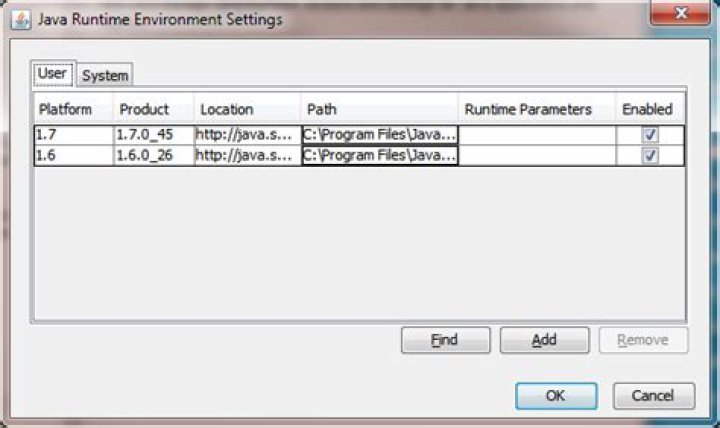
Edit (lots of good/fast answerers here!) Add this step to kobaltz's really good answer about finding the path/command-line version and you've got it.




