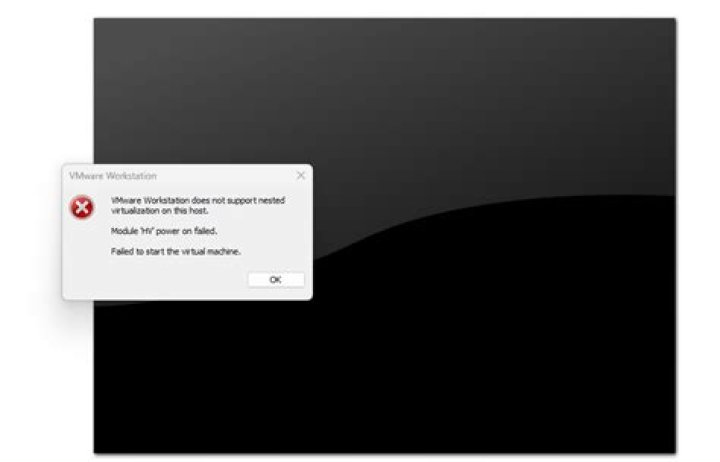

I have upgraded to Ubuntu 17.10 (from 17.04). Everything seems to work, however, VMware Workstation 12 does not startup anymore. No messages generated. Please help.
2 Answers
You need to upgrade to VMWare Workstation 14. Workstation 12 will not run with the kernel (4.13) in Ubuntu 17.10 unless you patch it. Patch available here:
Run the following commands in Terminal to Patch (there are two ways to do this):
Patch Procedure 1:
Gain root user access:
sudo su tar xvf vmmon.tar tar xvf vmnet.tar wget -O ./vmmon-only/linux/hostif.c vim vmnet-only/bridge.c cd vmmon-only/ make cd ../vmnet-only/ make cd .. mkdir /lib/modules/4.13.0-16-generic/misc cp *.o /lib/modules/4.13.0-16-generic/misc insmod /lib/modules/4.13.0-16-generic/misc/vmmon.o insmod /lib/modules/4.13.0-16-generic/misc/vmnet.o rm /usr/lib/vmware/lib/libz.so.1/libz.so.1 ln -s /lib/x86_64-linux-gnu/libz.so.1 /usr/lib/vmware/lib/libz.so.1/libz.so.1 vmware-networks --start exit Run VMWare as a normal user:
/usr/lib/vmware/bin/vmware OR
Patch Procedure 2:
Get into your home directory, or somewhere you can store files temporarily:
cd ~ [YOUR DIRECTORY] Copy the vmmon source tar ball to your temporary location:
cp /usr/lib/vmware/modules/source/vmmon.tar Extract the tar ball:
tar xf vmmon.tar Download the modified file and overwrite the one from the tar ball:
wget -O ./vmmon-only/linux/hostif.c Wrap up the newly modified files into a tar ball replacing the original one:
sudo tar cf /usr/lib/vmware/modules/source/vmmon.tar vmmon-only Rebuild the VMware kernel modules:
sudo vmware-modconfig --console --install-all Reboot your system:
sudo reboot Sources to patch:
AND
Ubuntu 17.10 Upgrade Broke VMWare Workstation 12.5
EVEN BETTER, I recommend upgrading to Workstation 14, which will remove Workstation 12.
Run the following commands in Terminal to install VMware Workstation Player 14:
mkdir ~/vmware cd ~/vmware wget -c OR
Download it here:
Give the package permissions:
sudo chmod u+x VMware-Player-14.1.1-7528167.x86_64.bundle Finally, install:
sudo ./VMware-Player-14.1.1-7528167.x86_64.bundle As soon as the installer starts, please follow on screen instructions to complete the installation.
Select I accept the terms in the license agreement and then Click on Next. Update on startup; select yes (if you want).
Feedback; select yes or no.
License Key is optional (can be left blank).
Click Install on next screen.
Close when finished.
UNINSTALLATION
sudo vmware-installer -u vmware-player Hope this helps.
6Using Charly's script on , I was able to build the needed modules for kernel 4.15.0-29-generic on 16.04LTS. There is a typo at the end of the script, there should not be a line return between sudo ln -s /lib/x86_64-linux-gnu/libz.so.1 and /usr/lib/vmware/lib/libz.so.1/libz.so.1
Another addition I would recommend is to add sudo /etc/init.d/vmware restart command to the end of the above script.
So the actual solution script with tweaks is:
#!/bin/bash VMWARE_VERSION=workstation-12.5.9 TMP_FOLDER=/tmp/patch-vmware rm -fdr $TMP_FOLDER mkdir -p $TMP_FOLDER cd $TMP_FOLDER git clone cd $TMP_FOLDER/vmware-host-modules git checkout $VMWARE_VERSION git fetch make sudo make install sudo rm /usr/lib/vmware/lib/libz.so.1/libz.so.1 sudo ln -s /lib/x86_64-linux-gnu/libz.so.1 /usr/lib/vmware/lib/libz.so.1/libz.so.1 sudo /etc/init.d/vmware restart Note that this will only work for Workstation 12.5.9, you can easily tell which version you have by running vmware --version and you can probably update the script to have it work for other versions... but I haven't tested that.