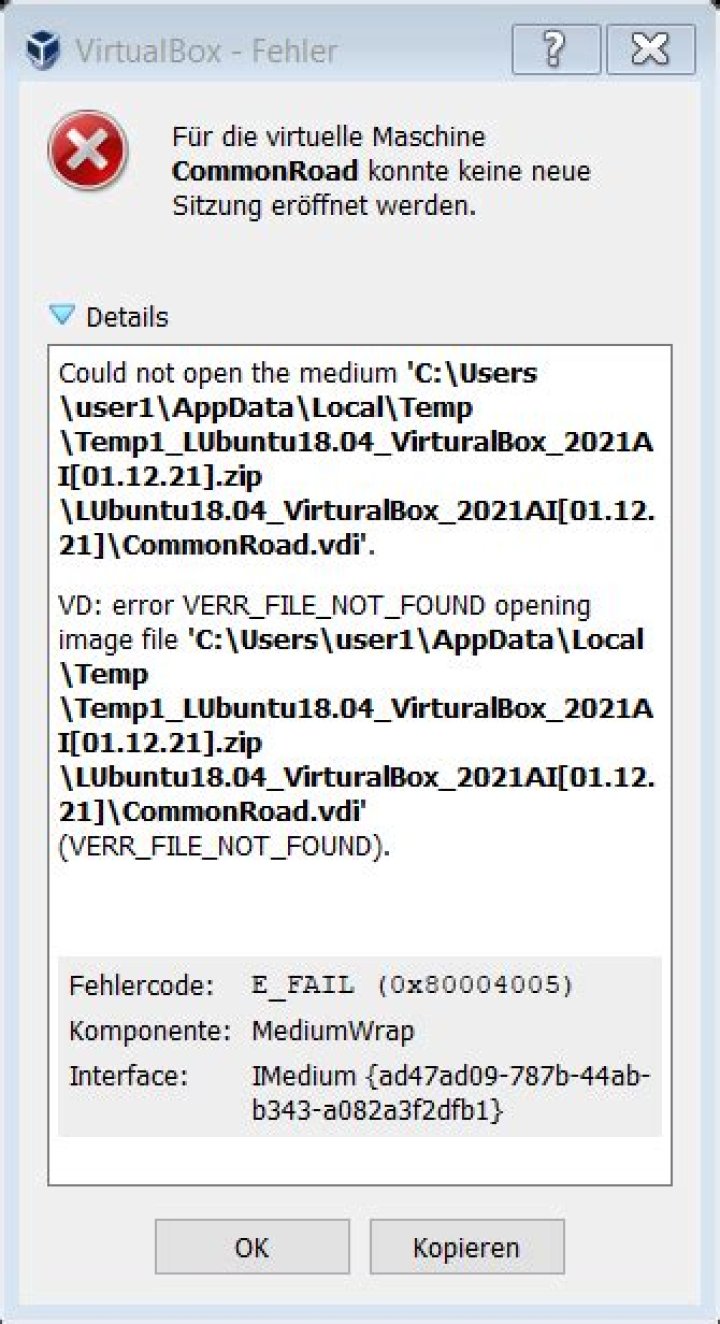

I migrated my noteboook from Windows 10 to Ubuntu 18.04 recently. I wanted to keep my two virtual machines so I copied their Folders containing their .vbox .vbox-prev and .vdi files (Looking back I should have used the integrated export functionality). When I try to start the machines now on Ubuntu 18.04 Virtual Box aborts on start up with the following error message:
VD: error VERR_FILE_NOT_FOUND opening image file '/home/user/VirtualBox VMs/Ubuntu Mate 16.05/Ubuntu Mate 16.05.vdi' (VERR_FILE_NOT_FOUND). Have I missed to copy something or is this related to the change of the operating system?
Is it possible to restore the virtual machines?
The vbox.log file:
00:00:01.798459 VirtualBox VM 6.0.0 r127566 linux.amd64 (Dec 18 2018 13:18:17) release log 00:00:01.798461 Log opened 2018-12-24T14:01:24.737853000Z 00:00:01.798462 Build Type: release 00:00:01.798464 OS Product: Linux 00:00:01.798465 OS Release: 4.15.0-43-generic 00:00:01.798465 OS Version: #46-Ubuntu SMP Thu Dec 6 14:45:28 UTC 2018 00:00:01.798480 DMI Product Name: 20H2S00700 00:00:01.798484 DMI Product Version: ThinkPad E470 00:00:01.798513 Host RAM: 15944MB (15.5GB) total, 13975MB (13.6GB) available 00:00:01.798515 Executable: /usr/lib/virtualbox/VirtualBoxVM 00:00:01.798516 Process ID: 8578 00:00:01.798516 Package type: LINUX_64BITS__UBUNTU_18_04 00:00:01.807559 Installed Extension Packs: 00:00:01.807572 Oracle VM VirtualBox Extension Pack (Version: 6.0.0 r127566; VRDE Module: VBoxVRDP) 00:00:01.808413 Console: Machine state changed to 'Starting' 00:00:01.808615 Qt version: 5.9.5 00:00:01.808625 X11 Window Manager code: 2 00:00:01.810852 Console: Machine state changed to 'PoweredOff' 00:00:01.814111 GUI: Show mini-toolbar for window #0 00:00:01.820202 Power up failed (vrc=VINF_SUCCESS, rc=NS_ERROR_FAILURE (0X80004005)) 00:00:01.838190 GUI: Adjust mini-toolbar for window #0 00:00:01.838310 GUI: Resize mini-toolbar for window #0 to 1920x1080 00:00:01.838358 GUI: Move mini-toolbar for window #0 to 0x0 00:00:01.838998 X Server details: vendor: The X.Org Foundation, release: 11906000, protocol version: 11.0, display string: :0 00:00:01.839007 Using XKB for keycode to scan code conversion 00:00:02.321204 GUI: Aborting startup due to power up progress issue detected... 2 Answers
- I removed the hard disk from VM setting and try to add it again but not worked.
- then I closed the VBox application and open it again it gives me a message that one of the hard drives did not exist when I looked to the virtual media manager it points to the same hard disk then I release the hard disk.
- and go to the VM settings and insert the hard disk again and worked.
my solution (and my problem was) was just slightly different then the solution of @Mohannd here.
i got:
I reinstalled KUbuntu and dont changed my virtual machines (in the second HDD)
Whey I try to start the machines now on Ubuntu 20.04 Virtual Box aborts on start up with the following error message:
Runtime error opening '/media/x/dev_n/VirtualBox-Machines/kubuntu ava in 0ad/kubuntu ava in 0ad.vbox' for reading: -102 (File not found.). /build/virtualbox-9t4MJt/virtualbox-6.1.16-dfsg/src/VBox/Main/src-server/MachineImpl.cpp[754] (nsresult Machine::i_registeredInit()). Fehlercode: NS_ERROR_FAILURE (0x80004005) Interface: IMachine {85632c68-b5bb-4316-a900-5eb28d3413df} I guessed that I just need to correct the user number (1000 is good). Unfortunately, that was not the case, as can be seen here:
sudo ls -n
-rw------- 1 1000 1000 14448 Mär 14 11:50 'kubuntu ava in 0ad.vbox'
....
Virtual Box reading Error -102 File not found after reinstall Ubuntu
I just closed the VBox application and open it again.




