Is there a way to use placeholders in yaml like this:
foo: &FOO <<propname>>: type: number default: <<default>> bar: - *FOO propname: "some_prop" default: "some default" 4 Answers
Context
- YAML version 1.2
- user wishes to
- include variable placeholders in YAML
- have placeholders replaced with computed values, upon
yaml.load - be able to use placeholders for both YAML mapping keys and values
Problem
- YAML does not natively support variable placeholders.
- Anchors and Aliases almost provide the desired functionality, but these do not work as variable placeholders that can be inserted into arbitrary regions throughout the YAML text. They must be placed as separate YAML nodes.
- There are some add-on libraries that support arbitrary variable placeholders, but they are not part of the native YAML specification.
Example
Consider the following example YAML. It is well-formed YAML syntax, however it uses (non-standard) curly-brace placeholders with embedded expressions.
The embedded expressions do not produce the desired result in YAML, because they are not part of the native YAML specification. Nevertheless, they are used in this example only to help illustrate what is available with standard YAML and what is not.
part01_customer_info: cust_fname: "Homer" cust_lname: "Himpson" cust_motto: "I love donuts!" cust_email: part01_government_info: govt_sales_taxrate: 1.15 part01_purchase_info: prch_unit_label: "Bacon-Wrapped Fancy Glazed Donut" prch_unit_price: 3.00 prch_unit_quant: 7 prch_product_cost: "{{prch_unit_price * prch_unit_quant}}" prch_total_cost: "{{prch_product_cost * govt_sales_taxrate}}" part02_shipping_info: cust_fname: "{{cust_fname}}" cust_lname: "{{cust_lname}}" ship_city: Houston ship_state: Hexas part03_email_info: cust_email: "{{cust_email}}" mail_subject: Thanks for your DoughNutz order! mail_notes: | We want the mail_greeting to have all the expected values with filled-in placeholders (and not curly-braces). mail_greeting: | Greetings {{cust_fname}} {{cust_lname}}! We love your motto "{{cust_motto}}" and we agree with you! Your total purchase price is {{prch_total_cost}} Explanation
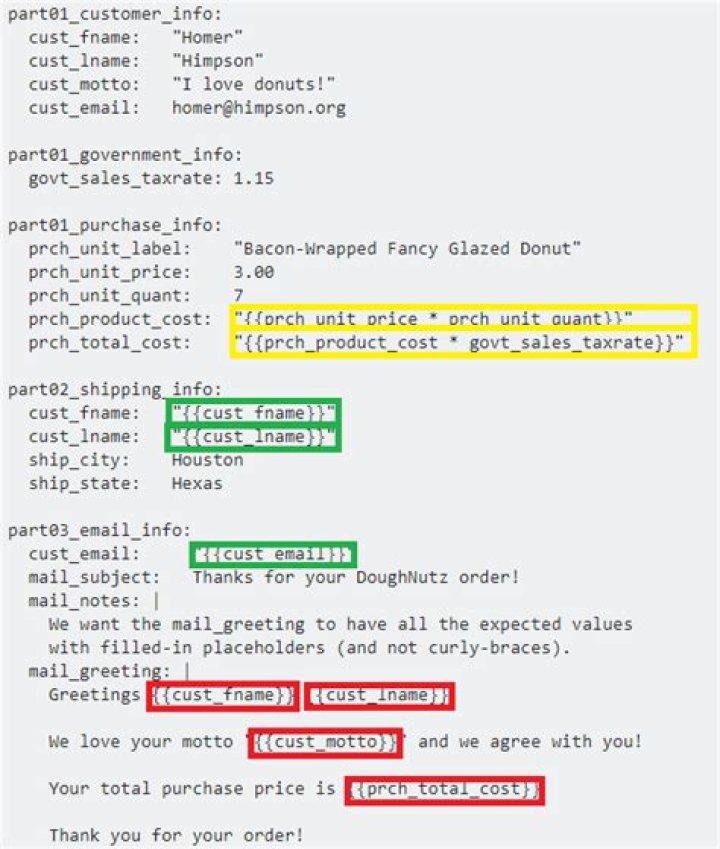
Below is an inline image that illustrates the example with colored regions in green, yellow and red.
The substitutions marked in GREEN are readily available in standard YAML, using anchors, aliases, and merge keys.
The substitutions marked in YELLOW are technically available in standard YAML, but not without a custom type declaration, or some other binding mechanism.
The substitutions marked in RED are not available in standard YAML. Yet there are workarounds and alternatives; such as through string formatting or string template engines (such as python's
str.format).

Details
A frequently-requested feature for YAML is the ability to insert arbitrary variable placeholders that support arbitrary cross-references and expressions that relate to the other content in the same (or transcluded) YAML file(s).
YAML supports anchors and aliases, but this feature does not support arbitrary placement of placeholders and expressions anywhere in the YAML text. They only work with YAML nodes.
YAML also supports custom type declarations, however these are less common, and there are security implications if you accept YAML content from potentially untrusted sources.
YAML addon libraries
There are YAML extension libraries, but these are not part of the native YAML spec.
Workarounds
- Use YAML in conjunction with a template system, such as Jinja2 or Twig
- Use a YAML extension library
- Use
sprintforstr.formatstyle functionality from the hosting language
Alternatives
- YTT YAML Templating essentially a fork of YAML with additional features that may be closer to the goal specified in the OP.
- Jsonnet shares some similarity with YAML, but with additional features that may be closer to the goal specified in the OP.
See also
Here at SO
- YAML variables in config files
- Load YAML nested with Jinja2 in Python
- String interpolation in YAML
- how to reference a YAML "setting" from elsewhere in the same YAML file?
- Use YAML with variables
- How can I include a YAML file inside another?
- Passing variables inside rails internationalization yml file
- Can one YAML object refer to another?
- is there a way to reference a constant in a yaml with rails?
- YAML with nested Jinja
- YAML merge keys
- YAML merge keys
Outside SO
2With Yglu Structural Templating, your example can be written:
foo: !() !? $.propname: type: number default: !? $.default bar: !apply .foo: propname: "some_prop" default: "some default" Disclaimer: I am the author or Yglu.
0I suppose would be an acceptable solution to your problem
I wanted to achieve templating in yaml files as well and I found dreftymac's answer really helpful as a starting point. After researching and coding for few hours this is my answer, please let me know if/how I can improve this.
I am not doing anything too special, I try to leverage python's string templating syntax and abuse the string format method a little. So it's all python's string templating and substitution that is doing the magic here. I have modified the way dreftymac's answer templated his yaml file to use as an example.
YAML:
part01_customer_info: cust_fname: "Homer" cust_lname: "Himpson" cust_motto: "I love donuts!" cust_email: part01_government_info: govt_sales_taxrate: 1.15 part01_purchase_info: prch_unit_label: "Bacon-Wrapped Fancy Glazed Donut" prch_unit_price: 3.00 prch_unit_quant: 7 prch_product_cost: "eval!#{part01_purchase_info[prch_unit_price]} * {part01_purchase_info[prch_unit_quant]}" prch_total_cost: "eval!#{part01_purchase_info[prch_product_cost]} * {part01_government_info[govt_sales_taxrate]}" part02_shipping_info: cust_fname: "{part01_customer_info[cust_fname]}" cust_lname: "{part01_customer_info[cust_lname]}" ship_city: Houston ship_state: Hexas part03_email_info: cust_email: "{part01_customer_info[cust_email]}" mail_subject: Thanks for your DoughNutz order! mail_notes: | We want the mail_greeting to have all the expected values with filled-in placeholders (and not curly-braces). mail_greeting: | Greetings {part01_customer_info[cust_fname]} {part01_customer_info[cust_lname]}! We love your motto "{part01_customer_info[cust_motto]}" and we agree with you! Your total purchase price is {part01_purchase_info[prch_total_cost]} I have changed
{{}}to{}and addedeval!#which is an identifier
Python:
from pprint import pprint import yaml EVAL_IDENTIFIER = "eval!#" def eval_math_expr(val): if val.startswith(EVAL_IDENTIFIER): val = val.replace(EVAL_IDENTIFIER, "") val = eval(val) return val def str_template_substitute(full, val=None, initial=True): val = val or full if initial else val if isinstance(val, dict): for k, v in val.items(): val[k] = str_template_substitute(full, v, False) elif isinstance(val, list): for idx, i in enumerate(val): val[idx] = str_template_substitute(full, i, False) elif isinstance(val, str): # NOTE: # Templating shouldn't be confused or tasked with extra work. # I am attaching evaluation to string substitution here, # just to prove this can be done. val = eval_math_expr(val.format(**full)) return val data = yaml.load(open('./data.yml')) str_template_substitute(data) pprint(data) Note: This function is pretty powerful as this can work on dictionaries which is what JSON/YAML and many other formats convert to in python.




