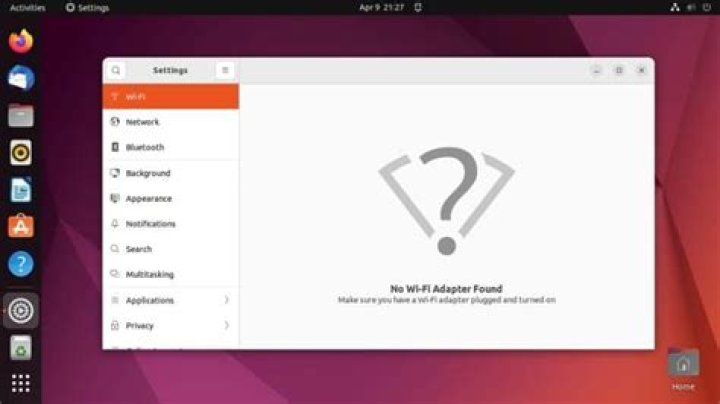

I bought a new Lenovo Ideapad 5 without any OS. I installed Ubuntu 20.04 on it. However, in Settings -> Wi-Fi I see "No Wi-Fi Adapter Found". I already spent hours trying to solve this problem. I don't know, what I'm missing.
Here, I paste the output from some common commands I found.
sudo lshw -C network *-network UNCLAIMED description: Network controller product: Realtek Semiconductor Co., Ltd. vendor: Realtek Semiconductor Co., Ltd. physical id: 0 bus info: pci@0000:03:00.0 version: 00 width: 64 bits clock: 33MHz capabilities: pm msi pciexpress cap_list configuration: latency=0 resources: ioport:2000(size=256) memory:d0500000-d05fffff *-network description: Ethernet interface physical id: 2 bus info: usb@3:2 logical name: usb0 serial: 16:00:4c:38:bb:e6 capabilities: ethernet physical configuration: broadcast=yes driver=rndis_host driverversion=22-Aug-2005 firmware=RNDIS device ip=192.168.42.59 link=yes multicast=yes lspci -v | grep -i network 03:00.0 Network controller: Realtek Semiconductor Co., Ltd. Device 8852 lsusb Bus 004 Device 001: ID 1d6b:0003 Linux Foundation 3.0 root hub Bus 003 Device 003: ID 0bda:4852 Realtek Semiconductor Corp. Bluetooth Radio Bus 003 Device 002: ID 04f3:0c4d Elan Microelectronics Corp. ELAN:Fingerprint Bus 003 Device 005: ID 22b8:2e24 Motorola PCS motorola one vision Bus 003 Device 001: ID 1d6b:0002 Linux Foundation 2.0 root hub Bus 002 Device 001: ID 1d6b:0003 Linux Foundation 3.0 root hub Bus 001 Device 003: ID 04f2:b725 Chicony Electronics Co., Ltd Integrated Camera Bus 001 Device 002: ID 046d:c534 Logitech, Inc. Unifying Receiver Bus 001 Device 001: ID 1d6b:0002 Linux Foundation 2.0 root hub Also, in Software & Updates -> Additional Drivers there is "No additional drivers available"
I have no idea, what to do next. Please, help.
81 Answer
To get the realtek 8852 PCI adapter working with Ubuntu, follow these steps:
Download dependencies:
sudo apt-get update sudo apt-get install make gcc linux-headers-$(uname -r) build-essential gitInstall 'fix':
git clone -b v5 cd rtw89 && make && sudo make installload module:
sudo modprobe rtw89pciIf you are lucky, this is all you will need to do. The driver should be loaded. If not, you will likely know. The driver load attempt will have caused an error. If this is the case, click the source link below for details.
Another Ubuntu user who used method with success (rtw89)
6