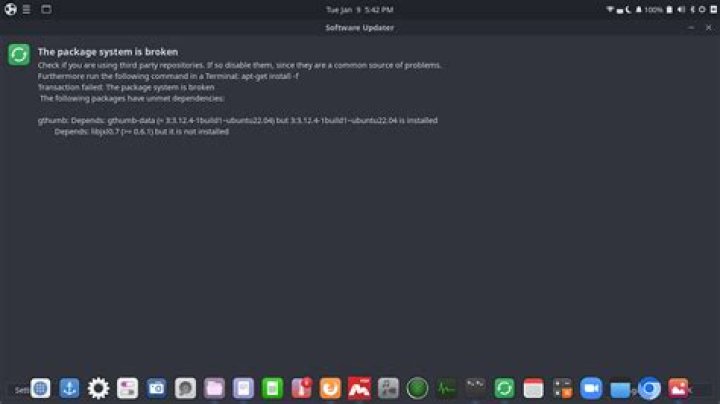
I can't update ubuntu because the package system is broken.
below is the picture of error:
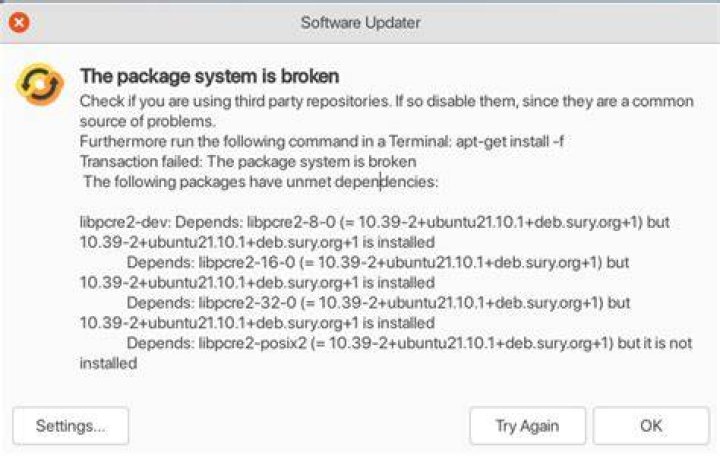
after updating ubuntu I got this issue.
update 1:
I have tried these: sudo apt-get clean:
output:
(base) ☁ ~ sudo apt-get clean (base) ☁ ~ , sudo apt-get install -f:
output:
(base) ☁ ~ sudo apt-get install -f Reading package lists... Done Building dependency tree... Done Reading state information... Done Correcting dependencies... Done The following packages were automatically installed and are no longer required: geoip-database libgeoip1 libnginx-mod-http-auth-pam libnginx-mod-http-cache-purge libnginx-mod-http-dav-ext libnginx-mod-http-fancyindex libnginx-mod-http-geoip libnginx-mod-http-headers-more-filter libnginx-mod-http-image-filter libnginx-mod-http-perl libnginx-mod-http-subs-filter libnginx-mod-http-uploadprogress libnginx-mod-http-upstream-fair libnginx-mod-http-xslt-filter libnginx-mod-mail libnginx-mod-nchan libnginx-mod-stream libnginx-mod-stream-geoip libnginx-mod-stream-geoip2 libpcre2-posix3 Use 'sudo apt autoremove' to remove them. The following additional packages will be installed: libpcre2-posix2 The following NEW packages will be installed: libpcre2-posix2 0 upgraded, 1 newly installed, 0 to remove and 29 not upgraded. 1 not fully installed or removed. Need to get 8,300 B of archives. After this operation, 33.8 kB of additional disk space will be used. Do you want to continue? [Y/n] y Get:1 impish/main amd64 libpcre2-posix2 amd64 10.39-2+ubuntu21.10.1+deb.sury.org+1 [8,300 B] Fetched 8,300 B in 10s (812 B/s) (Reading database ... 320322 files and directories currently installed.) Preparing to unpack .../libpcre2-posix2_10.39-2+ubuntu21.10.1+deb.sury.org+1_amd64.deb ... Unpacking libpcre2-posix2:amd64 (10.39-2+ubuntu21.10.1+deb.sury.org+1) ... dpkg: error processing archive /var/cache/apt/archives/libpcre2-posix2_10.39-2+ubuntu21.10.1+deb.sury.org+1_amd64.deb (--unpack): trying to overwrite '/usr/lib/x86_64-linux-gnu/libpcre2-posix.so.3', which is also in package libpcre2-posix3:amd64 10.37-0ubuntu2 Errors were encountered while processing: /var/cache/apt/archives/libpcre2-posix2_10.39-2+ubuntu21.10.1+deb.sury.org+1_amd64.deb E: Sub-process /usr/bin/dpkg returned an error code (1) sudo apt --fix-broken install:
output:
(base) ☁ ~ sudo apt --fix-broken install Reading package lists... Done Building dependency tree... Done Reading state information... Done Correcting dependencies... Done The following packages were automatically installed and are no longer required: geoip-database libgeoip1 libnginx-mod-http-auth-pam libnginx-mod-http-cache-purge libnginx-mod-http-dav-ext libnginx-mod-http-fancyindex libnginx-mod-http-geoip libnginx-mod-http-headers-more-filter libnginx-mod-http-image-filter libnginx-mod-http-perl libnginx-mod-http-subs-filter libnginx-mod-http-uploadprogress libnginx-mod-http-upstream-fair libnginx-mod-http-xslt-filter libnginx-mod-mail libnginx-mod-nchan libnginx-mod-stream libnginx-mod-stream-geoip libnginx-mod-stream-geoip2 libpcre2-posix3 Use 'sudo apt autoremove' to remove them. The following additional packages will be installed: libpcre2-posix2 The following NEW packages will be installed: libpcre2-posix2 0 upgraded, 1 newly installed, 0 to remove and 29 not upgraded. 1 not fully installed or removed. Need to get 0 B/8,300 B of archives. After this operation, 33.8 kB of additional disk space will be used. Do you want to continue? [Y/n] y (Reading database ... 320322 files and directories currently installed.) Preparing to unpack .../libpcre2-posix2_10.39-2+ubuntu21.10.1+deb.sury.org+1_amd64.deb ... Unpacking libpcre2-posix2:amd64 (10.39-2+ubuntu21.10.1+deb.sury.org+1) ... dpkg: error processing archive /var/cache/apt/archives/libpcre2-posix2_10.39-2+ubuntu21.10.1+deb.sury.org+1_amd64.deb (--unpack): trying to overwrite '/usr/lib/x86_64-linux-gnu/libpcre2-posix.so.3', which is also in package libpcre2-posix3:amd64 10.37-0ubuntu2 Errors were encountered while processing: /var/cache/apt/archives/libpcre2-posix2_10.39-2+ubuntu21.10.1+deb.sury.org+1_amd64.deb E: Sub-process /usr/bin/dpkg returned an error code (1) and some other solutions, but didn't work.
Update 2:
A popup came from the system software updater and wanted to update. I updated and after that update, I have this issue
Update 3:
I didn't know which third-party app to remove, so I didn't remove any third-party apps.
update 4:
sudo apt update
(base) ☁ ~ sudo apt update Hit:1 impish InRelease Hit:2 impish InRelease Hit:3 impish-security InRelease Ign:4 impish InRelease Err:5 impish Release 404 Not Found [IP: 3.125.197.172 80] Hit:6 impish InRelease Hit:7 impish-updates InRelease Hit:8 impish-backports InRelease Hit:9 stable InRelease Reading package lists... Done E: The repository ' impish Release' does not have a Release file. N: Updating from such a repository can't be done securely and is therefore disabled by default. N: See apt-secure(8) manpage for repository creation and user configuration details. sudo apt autoremove
(base) ☁ ~ sudo apt autoremove Reading package lists... Done Building dependency tree... Done Reading state information... Done The following packages will be REMOVED: geoip-database libgeoip1 libnginx-mod-http-auth-pam libnginx-mod-http-cache-purge libnginx-mod-http-dav-ext libnginx-mod-http-fancyindex libnginx-mod-http-geoip libnginx-mod-http-headers-more-filter libnginx-mod-http-image-filter libnginx-mod-http-perl libnginx-mod-http-subs-filter libnginx-mod-http-uploadprogress libnginx-mod-http-upstream-fair libnginx-mod-http-xslt-filter libnginx-mod-mail libnginx-mod-nchan libnginx-mod-stream libnginx-mod-stream-geoip libnginx-mod-stream-geoip2 libpcre2-posix3 0 upgraded, 0 newly installed, 20 to remove and 0 not upgraded. After this operation, 12.9 MB disk space will be freed. Do you want to continue? [Y/n] y (Reading database ... 320326 files and directories currently installed.) Removing geoip-database (20191224-3) ... Removing libnginx-mod-stream-geoip (1.18.0-6ubuntu11) ... Removing libnginx-mod-http-geoip (1.18.0-6ubuntu11) ... Removing libgeoip1:amd64 (1.6.12-7) ... Removing libnginx-mod-http-auth-pam (1.18.0-6ubuntu11) ... Removing libnginx-mod-http-cache-purge (1.18.0-6ubuntu11) ... Removing libnginx-mod-http-dav-ext (1.18.0-6ubuntu11) ... Removing libnginx-mod-http-fancyindex (1.18.0-6ubuntu11) ... Removing libnginx-mod-http-headers-more-filter (1.18.0-6ubuntu11) ... Removing libnginx-mod-http-image-filter (1.18.0-6ubuntu11) ... Removing libnginx-mod-http-perl (1.18.0-6ubuntu11) ... Removing libnginx-mod-http-subs-filter (1.18.0-6ubuntu11) ... Removing libnginx-mod-http-uploadprogress (1.18.0-6ubuntu11) ... Removing libnginx-mod-http-upstream-fair (1.18.0-6ubuntu11) ... Removing libnginx-mod-http-xslt-filter (1.18.0-6ubuntu11) ... Removing libnginx-mod-mail (1.18.0-6ubuntu11) ... Removing libnginx-mod-nchan (1.18.0-6ubuntu11) ... Removing libnginx-mod-stream-geoip2 (1.18.0-6ubuntu11) ... Removing libnginx-mod-stream (1.18.0-6ubuntu11) ... Removing libpcre2-posix3:amd64 (10.37-0ubuntu2) ... Processing triggers for nginx-light (1.18.0-6ubuntu11) ... Triggering nginx reload ... Processing triggers for libc-bin (2.34-0ubuntu3) ... 1 Answer
If you really want to use the PPA
It seems that the package libpcre2-posix2 is trying to overwrite a library used by libpcre2-posix3.
Give apt the permission to overwrite the file.
sudo apt-get -o Dpkg::Options::="--force-overwrite" install libpcre2-posix2 Then, run sudo apt update, and sudo apt install -f and sudo apt upgrade.
If you don't want to use the PPA
The following command should remove the PPA and the conflicting packages.
sudo apt install ppa-purge sudo ppa-purge ppa:ondrej/php