
I installed TensorFlow on my MacBook Pro 10.12.5 from source code by steps described here.
TensorFlow itself works well but I cannot run TensorBoard. It seems tensorboard is not installed properly.
When I try running tensorboard --logdir=... it says -bash: tensorboard: command not found. And locate tensorboard returns empty.
Do I need any additional step to install tensorboard?
17 Answers
You could call tensorboard as a python module like this:
python3 -m tensorboard.main --logdir=~/my/training/dir or add this to your .profile
alias tensorboard='python3 -m tensorboard.main'
If no other methods work then try this one. It may help you.
1. check the location of Tensorflow
pip show tensorflow It will show output something like this.
...
Name: tensorflow
Version: 1.4.0
Location: /home/abc/xy/.local/lib/python2.7/site-packages
...
2. Go to that location you get from the above output.
cd /home/abc/xy/.local/lib/python2.7/site-packages There you can see a directory named tensorboard.
cd tensorboard 3. There must be a file named 'main.py'.
4. Execute the following command to launch the tensorboard.
python main.py --logdir=/path/to/log_file/ If you installed Tensorflow with Virtualenv, then first Check whether you have activated the tensorflow envirnoment or not
If you have activated the tensorflow session then your command prompt will look like this :
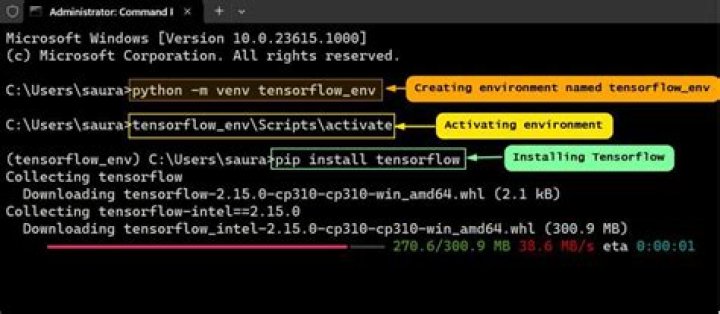
If not, Write the below command and try running tensorboard again.
source ~/tensorflow/bin/activate 
What version of Tensorflow are you running? Older versions don't include Tensorboard.
If you do have a newer version, I see you are using OSX, which apparently caused some problems for other people: Check this page to fix it!
1As a MacPorts user, I'm used to running things from out of the path /opt/local/bin. When you install a python package via MacPorts, that's where the executables go --- even if they're just symbolic links to files to a main python repository in /opt/local/Library/Frameworks/
pip installs things into the latter directory, but apparently does NOT add the symbolic link to /opt/local/bin
This has never been an issue (or even come up) for me before, because I've only used pip to install (non-executable) packages which load from within python. In conclusion, there is a /opt/local/Library/Frameworks/
This is a pip / MacPorts-SOP mismatch / user error*, and nothing to do with tensorboard in particular. Please close this issue. Thanks for your help.
*my 'locate' database was in the process of updating but hadn't completed
Run this command:
python3 -m tensorboard.main --logdir=logdir To run directory you can use,
Change =logdir to ="dir/TensorFlow" (Directory path)
Quickest solution -
echo "alias tensorboard='python3 -m tensorboard.main'" >> ~/.bash_profile
After adding this to your .bash_profile you can use
tensorboard --logdir=/path
If you are using pycharm in windows environment this may help: python -m tensorboard.main --logdir=logs




