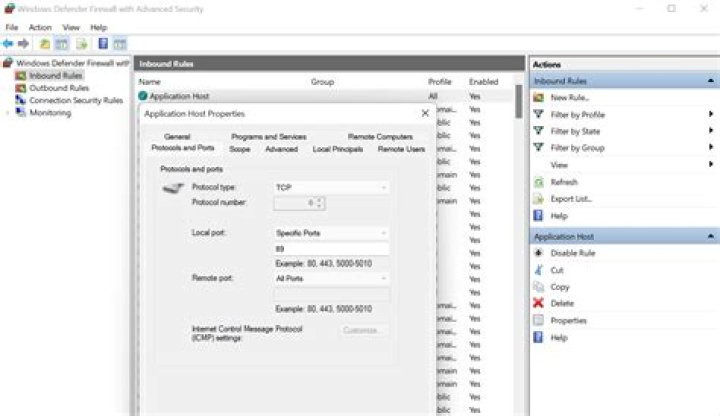
I am trying to connect to open up port 89 on my Windows machine so others can access it, but I'm having trouble doing so. I added a rule to Firewall to allow access to port 89, but it still seems like it's not working. Any advice on how to resolve or even how to debug?
PS D:\> Test-NetConnection devbox -p 89 WARNING: TCP connect to (fe80::188d:3b90:868b:c3f6%5 : 89) failed WARNING: TCP connect to (2001:4898:3:25:7975:d61e:f88e:bfe2 : 89) failed WARNING: TCP connect to (2001:4898:3:25:188d:3b90:868b:c3f6 : 89) failed WARNING: TCP connect to (fe80::4c9e:1380:c530:b43a%42 : 89) failed WARNING: TCP connect to (fe80::6d77:dd66:a5b1:902c%26 : 89) failed WARNING: TCP connect to (fe80::69d3:4282:2917:485d%18 : 89) failed WARNING: TCP connect to (fe80::c9a:5dbc:5823:fdd9%13 : 89) failed WARNING: TCP connect to (10.123.77.38 : 89) failed WARNING: TCP connect to (172.24.96.1 : 89) failed WARNING: TCP connect to (172.24.48.1 : 89) failed WARNING: TCP connect to (172.21.128.1 : 89) failed WARNING: TCP connect to (2001:0:d5b:9458:c9a:5dbc:5823:fdd9 : 89) failed ComputerName : devbox RemoteAddress : fe80::188d:3b90:868b:c3f6%5 RemotePort : 89 InterfaceAlias : vEthernet (New Virtual Switch) SourceAddress : 2001:4898:3:25:188d:3b90:868b:c3f6 PingSucceeded : True PingReplyDetails (RTT) : 0 ms TcpTestSucceeded : False 
1 Answer
Be sure that you or your friend exactly do this:
Navigate to Control Panel, System and Security and Windows Firewall. Select Advanced settings and highlight Inbound Rules in the left pane. Right click Inbound Rules and select New Rule. Add the port you need to open and click Next. Add the protocol (TCP or UDP) and the port number into the next window and click Next. Select Allow the connection in the next window and hit Next. Select the network type as you see fit and click Next. Name the rule something meaningful and click Finish. That's all you have to do to open a firewall port in Windows 10
Many devices have open ports to send error reports to a server. But the things is those devices are their to send and then recieve acknowledgement to the sent packet. So what you need is a device to recieve and then send to. To overcome this problem, you need to become that server which the device request/send to and recieve the service from it. You can send a .bat file to a friend/ victim laptop which cab change its dns and gateway address to your server which you will be running ,hence Becoming the middle man.(just an example)
Client tries to connect to IPv6 address: TCP connect to (fe80::188d:3b90:868b:c3f6%5 : 89) failed. Maybe your server is listening only IPv4.
Also the problem may come from trying to connect to an IPv6 address instead of the IPv4 address that you are listening to. Instead, you can try entering the IPv4 address, 10.3.10.200, as the "ComputerName" to restrict the test to IPv4.
Notify me if this works for you.