
SSH timeout issue, once connect to VPN.
Connecting via putty fine. No changes made before.
VPN established by open-connect. This is previously working. Reinstalled VPN packages and reboot still no luck
Environment
Dell XPS 9570 Ubuntu 16.04.6 Xenial Xerus) kernel - 4.15.0-55-generic $dpkg -l | grep -i openssh ii openssh-client 1:7.2p2-4ubuntu2.8 --> ii openssh-server 1:7.2p2-4ubuntu2.8 ii openssh-sftp-server 1:7.2p2-4ubuntu2.8 VPN tunnel info ==== vpn0 Link encap:UNSPEC HWaddr 00-00-00-00-00-00-00-00-00-00-00-00-00-00-00-00 inet addr:IP P-t-P:xx Mask:255.255.252.0 inet6 addr: fe80::b8e2:bea4:2e62:fe08/64 Scope:Link UP POINTOPOINT RUNNING NOARP MULTICAST MTU:1406 Metric:1 RX packets:962 errors:0 dropped:0 overruns:0 frame:0 TX packets:1029 errors:0 dropped:0 overruns:0 carrier:0 collisions:0 txqueuelen:500 RX bytes:87839 (87.8 KB) TX bytes:238740 (238.7 KB) Issue
Unable to connect to any host via ssh or sftp after VPN connection
Tried
Reinstalled the openssh-client package and still no luck. May I know why the default cipher is not taking/hanging? Please let me know . There were no recent changes.
Workaround
Able to connect to ssh / sftp $ssh -c aes128-ctr user@IP
Below is the debug ssh client logs ===
$ssh -vvv user@ip OpenSSH_7.2p2 Ubuntu-4ubuntu2.8, OpenSSL 1.0.2g 1 Mar 2016 debug1: Reading configuration data /etc/ssh/ssh_config debug1: /etc/ssh/ssh_config line 19: Applying options for * debug2: resolving "IP" port 22 debug2: ssh_connect_direct: needpriv 0 debug1: Connecting to IP [IP] port 22. debug1: Connection established. debug1: key_load_public: No such file or directory debug1: identity file /home/user/.ssh/id_rsa type -1 debug1: key_load_public: No such file or directory debug1: identity file /home/user/.ssh/id_rsa-cert type -1 debug2: compression stoc: none, debug2: languages ctos: debug2: languages stoc: debug2: first_kex_follows 0 debug2: reserved 0 debug1: kex: algorithm: debug1: kex: host key algorithm: ecdsa-sha2-nistp256 debug1: kex: server->client cipher: MAC: <implicit> compression: none debug1: kex: client->server cipher: MAC: <implicit> compression: none debug3: send packet: type 30 debug1: expecting SSH2_MSG_KEX_ECDH_REPLY << Hangs here >> Please shed some views
Thanks
74 Answers
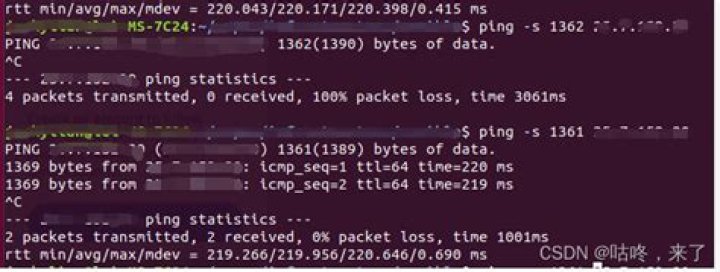
Setting MTU to 1200 solved it for me (Ubuntu 20.04).
with (replace {dev}): sudo ip li set mtu 1200 dev {dev} As a temporary workaround, setting the KEX algorithm manually solves this problem for me.
Add KexAlgorithms ecdh-sha2-nistp521 to the corresponding SSH config, or add -oKexAlgorithms=ecdh-sha2-nistp521 to the command line args for one time use.
The root cause of the issue is with the openconnect VPN client package, MTU handling fail to negotiate. Bug ->
A colleague of mine just experienced this hanging at "expecting SSH2_MSG_KEX_ECDH_REPLY" issue this morning. He couldn't ssh into an Ubuntu 20.04.2 LTS server via OpenVPN. At first I thought it was an MTU issue but it turns out that it was a file permissions issue. Our organization uses signed keys and the file containing the CA public key only had owner read/write permissions.
We fixed the problem by adding read permissions for all users:
chmod a+r ca.pub The bizarre thing about this problem was that even with the highest level of debug enabled while trying to use the ssh client, there was no error reported relating to the inability to read the file. The only related debug message had to do with successfully finding the @cert-authority line in the known_hosts file.
0



