I've been searching this over quite a bit, and I just can't see where I'm going wrong. I'm hoping someone can help me figure it out. I have two tables, one for all the Sales Orders (SO) for a part number, one for all the Purchase Orders (PO) for a part number. I want to merge the results together. Most of the times, there will not be the same number of Purchase Orders and Sales Orders per part. In this example, I have 2 Sales Orders and 1 Purchase order.
Table 1 (SO) Company Part SalesOrder ABC 123 5530 ABC 123 6854 ABC 456 7772 ABC 456 6868 Table 2 (PO) Company Part PurchaseOrder ABC 123 9889 ABC 456 9308 ABC 456 9655 ABC 456 9774 I would expect to see:
Company Part SalesOrder PurchaseOrder ABC 123 5530 9889 ABC 123 6854 NULL ABC 456 7772 9308 ABC 456 6868 9655 ABC 456 NULL 9774 But I am seeing:
Company Part SalesOrder PurchaseOrder ABC 123 5530 9889 ABC 123 6854 9889 ABC 456 7772 9308 ABC 456 7772 9655 ABC 456 7772 9774 ABC 456 6868 9308 ABC 456 6868 9655 ABC 456 6868 9774 This is my query:
select coalesce(SO.Company, PO.Company) as Company, coalesce(SO.Part, PO.Part) as Part, SO.SalesOrder, PO.PurchaseOrder from SO full outer join PO on SO.Company=PO.Company and SO.Part=PO.Part Maybe it's not a full outer join that I need to achieve this? For reference, I looked at posts like SQL Full Outer Join and I thought that my desired results look similar to those in the post, and I thought my query looks like the chosen solution, but obviously I am failing somewhere. I greatly appreciate any help.
----Update---- I think I am causing some confusion, and for that, I apologize. Just to clarify, the PO's and SO's have no relation to each other than they are for the same part. A particular PO is NOT getting created to fulfill a particular SO. Some parts may ONLY have SO's (for example, manufactured parts) some might have ONLY PO's (component parts to a manufactured item). Some parts will happen to have the same number of SO's and PO's by coincidence, but most of the time, there will probably be more than one or the other. For example, if I wanted to look at a part's historic activity, there might be 4 sales orders for it, and 1 purchase order for it. If I were to do a union where I basically clumped the 'activity' (SO's/Po's) into one column, then for that part, the query would return 5 rows of activity (4 SO's/ 1 PO). But instead of having 1 column and 5 rows, could I make it to where I would have 2 columns (one for SO's and one for PO's) and have 4 rows? All rows in the SO column would not be null, and 4 would be null for PO's and one would not. It's just a visual preference to have the first row to contain the PO row that is not null, but in no way, is the SO and PO of row one actually related, other than that they happen to be on the same row.
To give an entirely different example:
Lets say I have a customer table, and a vendor table, and they both have the field names of 'Name' and 'State' and I want to make a list of all my customers or vendors that are in California. I could do a union right?
select c.name, 'Cust' as Type, c.state from customer c where c.state='CA' union select v.name, 'Vend', v.state from vendor v where v.state='CA' and I would get something like:
Name Type State BB Shrimp Cust CA Vista Inc Cust CA Mary's Lamb Cust CA Cali Coffee Cust CA Cool Guys Cust CA Tap Corp Vendor CA Blue Supply Vendor CA Sun Shore Vendor CA But I wanted to see this instead:
Vendor Customer State Tap Corp BB Shrimp CA Blue Supply Vista Inc CA Sun Shore Mary's Lamb CA NULL Cali Coffee CA NULL Cool Guys CA NULL Tap Corp CA I could see where you would ask, why would I ever want to see that, but if I had data presented that way, I could throw it into SSRS and make it look like
State Vendors Customers CA Tap Corp BB Shrimp Blue Supply Vista Inc Sun Shore Mary's Lamb Cali Coffee Cool Guys Now switch State for Part, Vendor for PO, and Customer for SO, and that's what I am trying to achieve. Vendors and Customers have no relation other than being from the same state, some states might have more vendors than customers, they might have the same, but its unrelated. Same goal with PO and SO.
45 Answers
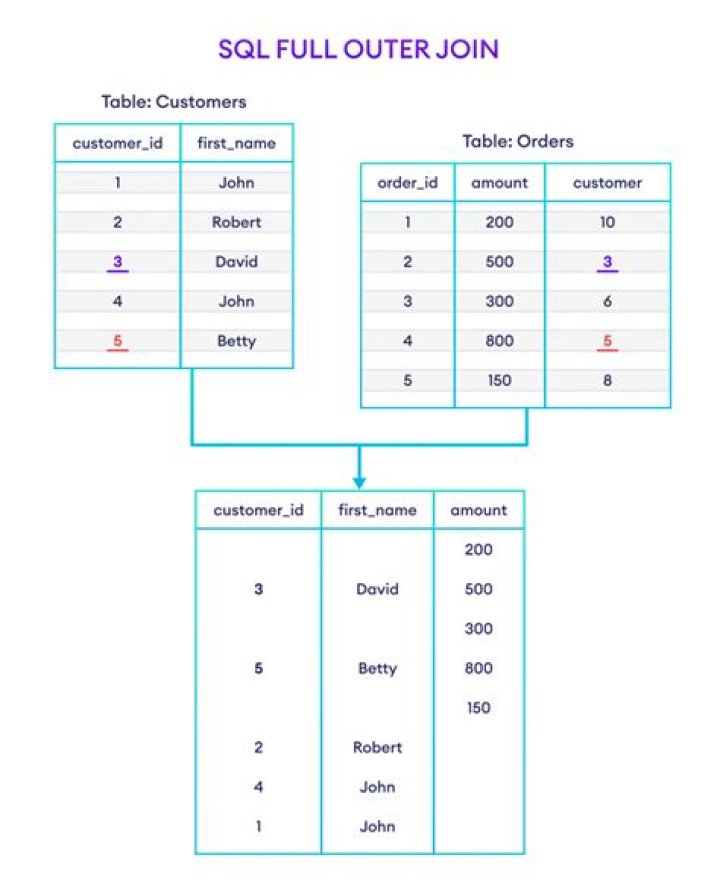
It seems like you want to pair off POs and SOs based on their sequence, but FULL OUTER JOIN is going to just pair them up in all possible combinations. If you want to capture the order, you need to do a ROW_NUMBER() first:
SELECT COALESCE(SO2.company, PO2.company) AS Company, COALESCE(SO2.part, PO2.part) AS Part, so.salesorder, po.purchaseorder FROM (SELECT *, Row_number() OVER ( partition BY so.part, so.company ORDER BY so.salesorder) AS SO_Sequence FROM so) AS SO2 FULL OUTER JOIN (SELECT *, Row_number() OVER ( partition BY po.part, po.company ORDER BY po.purchaseorder) AS PO_Sequence FROM po) AS PO2 ON SO2.company = PO2.company AND SO2.part = PO2.part AND SO2.so_sequence = PO2.po_sequence This is the nature of OUTER JOIN. Your LEFT table is your SO. Foreach row in SO you have a part number and order number, and will receive a row in your result set. Once all the LEFT rows are evaluated, sql will evaluate rows in the RIGHT table, hence you get a row in the result set for each row in both table sets.
The reason you see
Company Part SalesOrder PurchaseOrder ABC 123 5530 9889 ABC 123 6854 9889 Instead of
Company Part SalesOrder PurchaseOrder ABC 123 5530 9889 ABC 123 6854 NULL Is because it still matched on part number and company.
The OUTER JOIN is the correct way to get the results you are looking for, but your current relation model isn't definitive enough to achieve the goal correctly.
If you are supposed to have a 1::1 relationship, you should have either a PO id in the SO table, or SO id in the PO table.
@Greg Viers has shown a way to assign the PO id of the first occurrence in the PO table of your company/part combo to the first occurrence in the SO table. However, in almost every business case ever it is possible to fill orders out of the order they are received. Also do your orders not have quantities? Your current set up leaves lots of gaps in your data relationships.
As well as this is much more difficult to maintain on the data side as well; for example, what happens if a purchase order gets cancelled?
I just focused on Row 2 and Row 5 from your expected Result . I think Row 5 expected NULL for SalesOrder is wrong, I think it should be 6884 . Here is the logic to back my claim . I dont know how you got the result but i tried same query i am getting your expected result
CREATE TABLE #SO ( Company NVARCHAR(16), PART NVARCHAR(16), SalesOrder NVARCHAR(16) ) INSERT INTO #SO VALUES('ABC','123','6854') INSERT INTO #SO VALUES ('ABC','456','6868') CREATE TABLE #PO ( Company NVARCHAR(16), PART NVARCHAR(16), PurchaseOrder NVARCHAR(16) ) INSERT INTO #PO VALUES('ABC','456','9308') INSERT INTO #PO VALUES ('ABC','456','9774') select * from #SO SELECT * FROM #PO SELECt coalesce(PO.COMPANY, SO.COMPANY) as Company , coalesce(SO.PART, PO.PART) as Part , SO.SalesOrder,po.PurchaseOrder FROM #SO AS SO FULL OUTER JOIN #PO AS PO ON PO.PART = SO.PART AND PO.Company = SO.Company 
You can also use the Union for this. I have added the script with the union
SELECT Company, Part, SalesOrder, number = ROW_NUMBER() OVER(Partition By Company,Part ORDER BY Company,Part) INTO #TEMP_SO FROM SO SELECT Company, Part, PurchaseOrder, number = ROW_NUMBER() OVER(Partition By Company,Part ORDER BY Company,Part) INTO #TEMP_PO FROM PO SELECT s.Company, s.Part, s.SalesOrder, p.PurchaseOrder FROM #TEMP_SO s LEFT JOIN #TEMP_PO p ON p.Part = s.Part AND p.Company = s.Company AND p.number = s.number UNION SELECT p.Company, p.Part, s.SalesOrder, p.PurchaseOrder FROM #TEMP_PO p LEFT JOIN #TEMP_SO s ON p.Part = s.Part AND p.Company = s.Company AND p.number = s.number DROP TABLE #TEMP_PO DROP TABLE #TEMP_SO First Create the temp table for all the required columns and fill those columns by insert/update.
Here we can check with the number of rows. if the number of rows match, update the column of customer else insert the new row.
FOR YOUR Customer and vendor example you can use script as below:
-- create the final columns temp table CREATE TABLE #Temp ( ID INT primary KEY identity(1,1), Vendors VARCHAR(200), Customers VARCHAR(200), State VARCHAR(200) ) -- insert the vendor & state columns INSERT INTO #Temp (Vendors, Customers,State) SELECT name, NULL, state FROM vendor -- create customer temp table with row numbers SELECT num = ROW_NUMBER() OVER (ORDER BY name), * INTO #Temp_Customer FROM Customer c -- update temp table's customer column if the temp tables row number = customer's row number UPDATE T SET T.Customers = c.name FROM #Temp T INNER JOIN #Temp_Customer C ON c.num = T.ID -- insert into temp table for customer's record(if customer has row more than the temp table) INSERT INTO #Temp (Vendors, Customers,State) SELECT NULL, c.name, c.state FROM #Temp_Customer C LEFT JOIN #Temp T ON c.num = T.ID WHERE T.ID IS NULL SELECT * FROM #Temp DROP TABLE #Temp DROP TABLE #Temp_Customer




