
I am developing an application which generates pdf using ITextSharp and need to print silently or directly. My work flow is Like this, I have some forms listed in tree structure and on selecting the forms and click on the print button will automatically generate the pdf using Itextsharp and save to a location. this is because for multiple record we download it as zip file . And goes to print without opening any other windows. I am using google chrome as browser and uses the KIOSK mode.
But unfortunately when i execute the code the print preview will open up in my browser and i need to click on the back button to reach my page. I want this to be cleared. Also i need to clear the selection of the tree structure.
Hereby attaching the code while printing.
MemoryStream ms = new MemoryStream(); var urlPdf = Server.MapPath("~/Pdf/pdfMerge/" + id + "Merge_doc.pdf"); PdfReader ps = new PdfReader(urlPdf);//1 PdfStamper pdf = new PdfStamper(ps, ms);//2 pdf.JavaScript = "this.print({bUI: true,bSilent:false,bShrinkToFit: true});" + "\r\n" + "this.closeDoc();";//3 pdf.Close();//4 HttpContext.Current.Response.ClearContent();//5 HttpContext.Current.Response.ClearHeaders();//6 HttpContext.Current.Response.ContentType = "application/pdf";//7 HttpContext.Current.Response.AddHeader("Content-Disposition", "inline;filename=quickforms.pdf");//8 HttpContext.Current.Response.BinaryWrite(ms.ToArray());//9 ms.Flush(); Can anybody help me?
42 Answers
Use
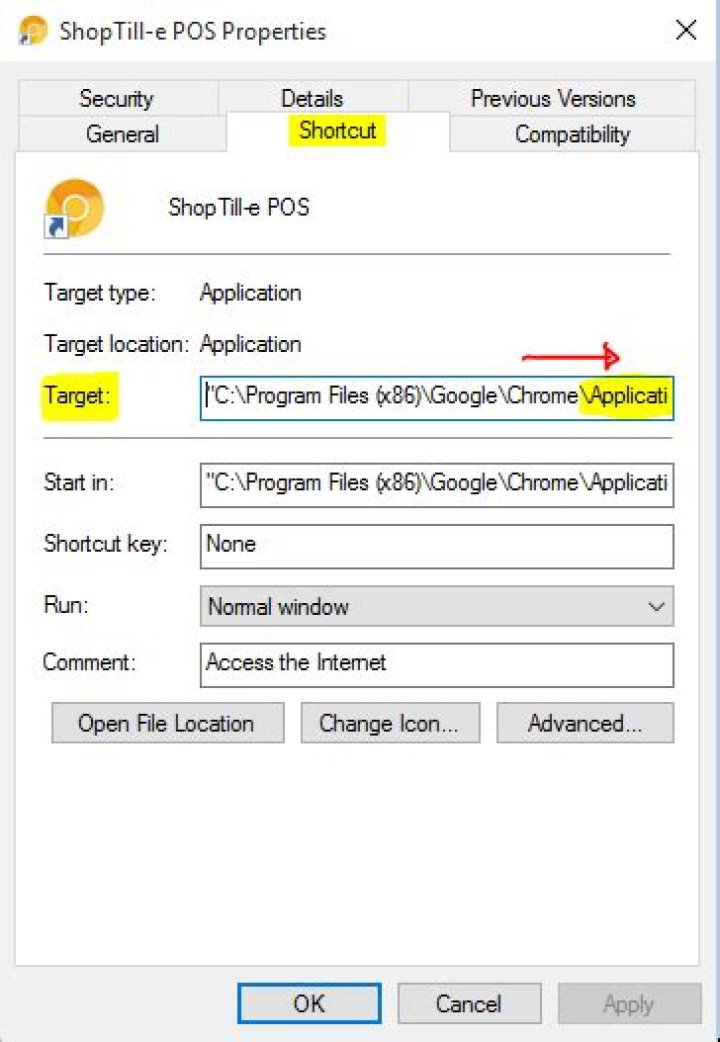
--kiosk --kiosk-printing <application_URL> Create a new chrome.exe shortcut Add –kiosk –kiosk-printing flags to the chrome.exe target shortcut Add the url of the kiosk as the starting page in Chrome settings (or replace chrome.exe with “chrome.exe –kiosk http:// [enter URL here]”) Drag the shortcut into the startup folder so it loads automatically.
That’s it! Then when you open it’s fullscreen and locked down with the kiosk and auto printing functionality all in one! :) To quit the Kiosk, press Alt + F4 on your keyboard.
0MUST USE:
PRINT DIRECT: --kiosk-printing
KIOSK MODE: --kiosk [application_url]
KIOSK MODE & PRINT DIRECT: --kiosk-printing --kiosk [application_url]




