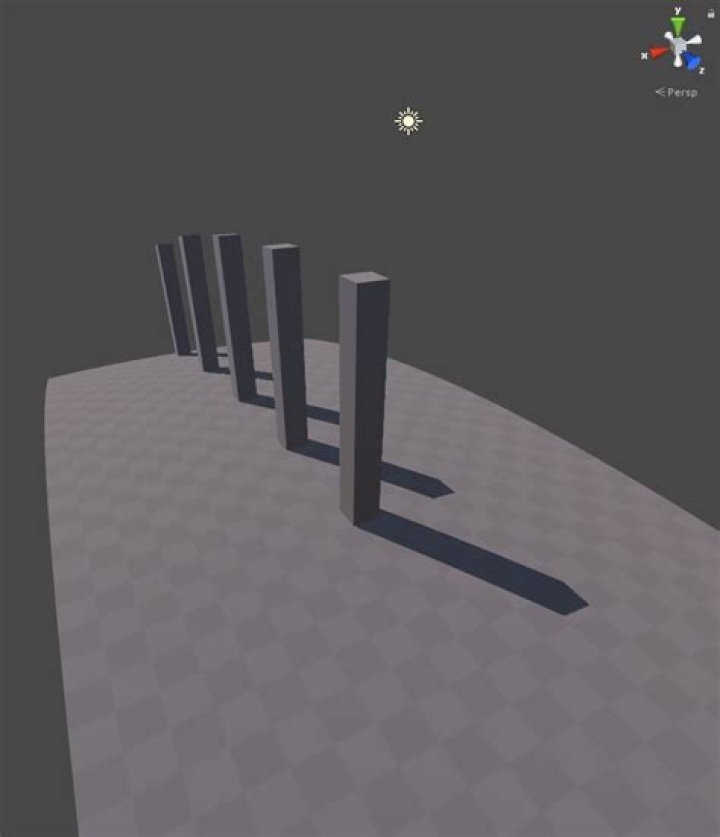
I'm trying to do a shader to curve the world like Subway Surfer does.
I have found a GitHub repo where someone pushes an approximation for it that works cool.
This is the code:
Shader "Custom/Curved" { Properties { _MainTex ("Base (RGB)", 2D) = "white" {} _QOffset ("Offset", Vector) = (0,0,0,0) _Dist ("Distance", Float) = 100.0 } SubShader { Tags { "RenderType"="Opaque" } Pass { CGPROGRAM #pragma vertex vert #pragma fragment frag #include "UnityCG.cginc" sampler2D _MainTex; float4 _QOffset; float _Dist; struct v2f { float4 pos : SV_POSITION; float4 uv : TEXCOORD0; }; v2f vert (appdata_base v) { v2f o; float4 vPos = mul (UNITY_MATRIX_MV, v.vertex); float zOff = vPos.z/_Dist; vPos += _QOffset*zOff*zOff; o.pos = mul (UNITY_MATRIX_P, vPos); o.uv = v.texcoord; return o; } half4 frag (v2f i) : COLOR { half4 col = tex2D(_MainTex, i.uv.xy); return col; } ENDCG } } FallBack "Diffuse" } The point is that now I want to send that new vertex positions to the surface shader to be able to have illumination an others.
I have read that I have to delete the fragment shader but I still having the problem that I can not send the new information to the surface shader.
This is my code:
Shader "Custom/Curve" { Properties{ _Color("Color", Color) = (1,1,1,1) _MainTex("Albedo (RGB)", 2D) = "white" {} _Glossiness("Smoothness", Range(0,1)) = 0.5 _Metallic("Metallic", Range(0,1)) = 0.0 _QOffset("Offset", Vector) = (0,0,0,0) _Dist("Distance", Float) = 100.0 } SubShader{ Tags{ "RenderType" = "Opaque" } LOD 200 CGPROGRAM #pragma surface surf Standard fullforwardshadows vertex:vert addshadow #pragma target 3.0 sampler2D _MainTex; struct Input { float2 uv_MainTex; }; half _Glossiness; half _Metallic; fixed4 _Color; float4 _QOffset; float _Dist; void vert(inout appdata_full v) { v.position.x += 10; } void surf(Input IN, inout SurfaceOutputStandard o) { // Albedo comes from a texture tinted by color fixed4 c = tex2D(_MainTex, IN.uv_MainTex) * _Color; o.Albedo = c.rgb; // Metallic and smoothness come from slider variables o.Metallic = _Metallic; o.Smoothness = _Glossiness; o.Alpha = c.a; } ENDCG } FallBack "Diffuse" } As you can see now in the vertex shader I'm just trying to add some units to the X position of the vertex because I think that if I achieve that apply the "curved change" would be trivial but If you think It is not going to be that easy I would appreciate if you warn me.
2 Answers
edited:
Here's an example for unity 2018.1
float4 worldPosition = mul(unity_ObjectToWorld, v.vertex); // get world space position of vertex half2 wpToCam = _WorldSpaceCameraPos.xz - worldPosition.xz; // get vector to camera and dismiss vertical component half distance = dot(wpToCam, wpToCam); // distance squared from vertex to the camera, this power gives the curvature worldPosition.y -= distance * _Curvature; // offset vertical position by factor and square of distance. // the default 0.01 would lower the position by 1cm at 1m distance, 1m at 10m and 100m at 100m v.vertex = mul(unity_WorldToObject, worldPosition); // reproject position into object space 
You are mixing up regular CG shaders and Surface shaders. Your sample from github is the former. v.vertex in Surface shaders is expected to be in object space, unlike float4 pos : SV_POSITION in the CG shader, which is expected to be in its final - clip/screen space - position.
The solution is to inverse the transformation back to object space. In your case you'd need to expose the inverse projection matrix from the camera.
replace v.vertex = mul (UNITY_MATRIX_P, vPos); with this matrix: . Since you transformed your vertex from object to camera space with UNITY_MATRIX_MV you need to reverse to world first, then to object space using unity_WorldToObject (or better combine both on the cpu).
BUT it is actually much easier to compute the curvature in world space with the matrices already provided:
2unity_ObjectToWorld Current model matrix.
unity_WorldToObject Inverse of current world matrix.
It's because there isn't value as position in appdata_full struct:
struct appdata_full { float4 vertex : POSITION; float4 tangent : TANGENT; float3 normal : NORMAL; float4 texcoord : TEXCOORD0; float4 texcoord1 : TEXCOORD1; fixed4 color : COLOR; #if defined(SHADER_API_XBOX360) half4 texcoord2 : TEXCOORD2; half4 texcoord3 : TEXCOORD3; half4 texcoord4 : TEXCOORD4; half4 texcoord5 : TEXCOORD5; #endif }; Instead of v.position use v.vertex like this:
void vert (inout appdata_full v, out Input o){ UNITY_INITIALIZE_OUTPUT(Input,o); v.vertex += 10; } And here Is surface version of your curve shader:
Shader "Custom/Curve" { Properties{ _Color("Color", Color) = (1,1,1,1) _MainTex("Albedo (RGB)", 2D) = "white" {} _Glossiness("Smoothness", Range(0,1)) = 0.5 _Metallic("Metallic", Range(0,1)) = 0.0 _QOffset("Offset", Vector) = (0,0,0,0) _Dist("Distance", Float) = 100.0 } SubShader{ Tags{ "RenderType" = "Opaque" } LOD 200 CGPROGRAM #pragma surface surf Standard fullforwardshadows vertex:vert addshadow #pragma target 3.0 sampler2D _MainTex; struct Input { float2 uv_MainTex; }; half _Glossiness; half _Metallic; fixed4 _Color; float4 _QOffset; float _Dist; void vert (inout appdata_full v, out Input o){ UNITY_INITIALIZE_OUTPUT(Input,o); float4 vPos = mul (UNITY_MATRIX_MV, v.vertex); float zOff = vPos.z/_Dist; vPos += _QOffset*zOff*zOff; v.vertex = mul (UNITY_MATRIX_P, vPos); v.texcoord = v.texcoord; } void surf(Input IN, inout SurfaceOutputStandard o) { // Albedo comes from a texture tinted by color fixed4 c = tex2D(_MainTex, IN.uv_MainTex) * _Color; o.Albedo = c.rgb; // Metallic and smoothness come from slider variables o.Metallic = _Metallic; o.Smoothness = _Glossiness; o.Alpha = c.a; } ENDCG } FallBack "Diffuse" } 



