
I have a Seagate 1 TB Backup Plus external hard drive that is partitioned in NTFS.
I don't know what's gone wrong – it was working perfectly under Windows.
35 Answers
I was having the same problem, my Seagate portable harddisk was not getting detected in Ubuntu 18.04, it seems the problem was I was connecting it via USB port 3.0, but when I have connected it with USB port 2.0 of my laptop, it got detected and working fine.
Hope this helps others as well.
Open terminal and type:
df If you see your external hard drive then you know Ubuntu can see it. If it is not showing up then you need to mount it with fstab. Here is some more info on that: mounting external hard drive with fstab
The poblem is 'UAS' module. This helped me...
Unload the conflicting UAS module if it's running by typing the following in a terminal window:
sudo rmmod uas Then create/edit the file /etc/modprobe.d/blacklist-uas.conf by typing:
sudo gedit /etc/modprobe.d/blacklist-uas.conf This opens a new file in gedit, where you need to type the following line:
blacklist uas Then save the file, close gedit, and finally reconnect external HDD.
Here is a page with more extensive details
Follow path:
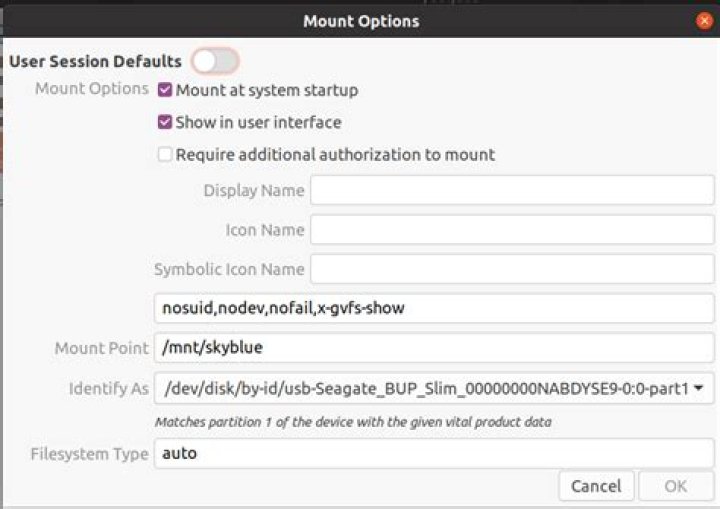
Ubuntu Software/installed/ ‘GNOME -DISKS/ launch All the drives should be listed including the non-visible drives. If your new drive is not listed then suspect that the following will not help
- Select relevant drive
- Select ‘settings’ (small icon)
Select ‘Edit mount options’
Ensure that ‘User Session Defaults‘ is in OFF position
- Tick ‘Mount at system Start’
- Then OK
Restart computer.
Under FILES your drive should be listed. It will have a different name. Changing the name involves adding yourself under ‘Permissions’
Big Job!
Yes, my new Seagate Backup Plus Slim (2tb) was invisible. With a GParted CD I formatted the Seagate to ext4 and gave it a name and a UUID. My Ubuntu box was using LVM (logical volume management) at the time, and Seagate was still invisible, even after the GParted changes. However, after I had erased my interior HDD and had reinstalled Ubuntu with the standard filesystems, voilà, Seagate appeared, and I was able to follow the steps in Giacomo1968's answer. Here's the screenshot.
1



