My environment:
Windows 11 22000.493 -> Host OS WSL 5.10.60.1 Ubuntu: 20.04.3 LTS -> Guest OS IntelliJ: Build #IC-213.6777.52, built on January 28, 2022 -> Running inside WSL I am running IntelliJ inside WSL as described here:
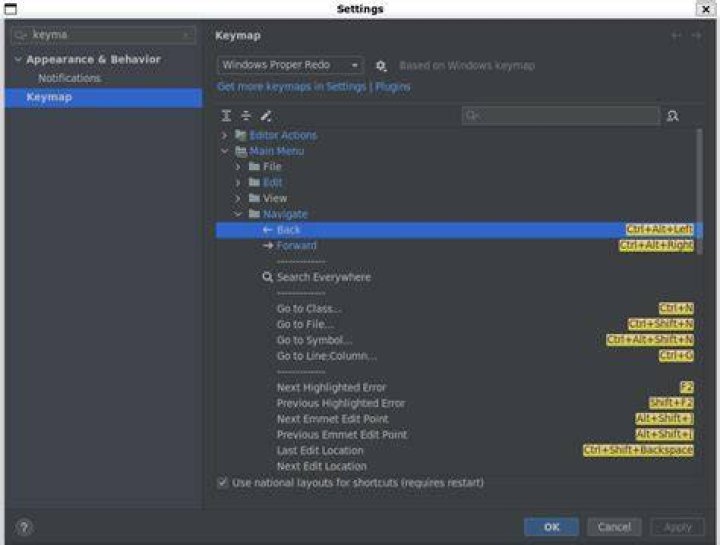
I have configured my IntelliJ to use Windows Proper Redo keymap so that my shortcuts are the same as in the Windows environment. All shortcuts seem to work as expected except the Navigation ones - Ctrl+Alt+Left/Right. 
As shown in the screenshot - they are properly configured. If I switch the combination - they start to work, but I want to have them under Ctrl+Alt+Left/Right.
I read here that Ctrl+Alt+Left/Right is interfering with Gnome but this is WSL and I have uninstalled Gnome completely by following How can I remove Gnome Desktop Environment without messing Unity DE? (Ubuntu 16.04) and running
sudo apt-get remove --auto-remove ubuntu-gnome-desktop Still there appear to be some settings left on my Ubuntu:
$ gsettings list-recursively | grep org.gnome.desktop.wm.keybindings | sort | grep Control org.gnome.desktop.wm.keybindings cycle-panels ['<Control><Alt>Escape'] org.gnome.desktop.wm.keybindings cycle-panels-backward ['<Shift><Control><Alt>Escape'] org.gnome.desktop.wm.keybindings move-to-workspace-down ['<Super><Shift>Page_Down', '<Control><Shift><Alt>Down'] org.gnome.desktop.wm.keybindings move-to-workspace-left ['<Control><Shift><Alt>Left'] org.gnome.desktop.wm.keybindings move-to-workspace-right ['<Control><Shift><Alt>Right'] org.gnome.desktop.wm.keybindings move-to-workspace-up ['<Super><Shift>Page_Up', '<Control><Shift><Alt>Up'] org.gnome.desktop.wm.keybindings switch-panels ['<Control><Alt>Tab'] org.gnome.desktop.wm.keybindings switch-panels-backward ['<Shift><Control><Alt>Tab'] org.gnome.desktop.wm.keybindings switch-to-workspace-down ['<Super>Page_Down', '<Control><Alt>Down'] org.gnome.desktop.wm.keybindings switch-to-workspace-up ['<Super>Page_Up', '<Control><Alt>Up'] But none of them are bound to Ctrl+Alt+Left/Right. I am out of ideas. How do I make the keyboard combination work in IntelliJ running inside WSL2?
Reset to default