Question
How to fix the Cannot download repodata/repomd.xml: All mirrors were tried for docker-ce.
Problem
Get the error Cannot download repodata/repomd.xml: All mirrors were tried with yum install docker-ce by following the current (as of 2021DEC13) Docker documentations to setup Docker yum/dnf repositories.
Steps & Error
$ sudo dnf -y install dnf-plugins-core Last metadata expiration check: 0:43:20 ago on Wed 15 Dec 2021 03:47:53 AM UTC. Package dnf-plugins-core-4.0.21-3.el8.noarch is already installed. Dependencies resolved. Nothing to do. Complete! $ sudo dnf config-manager \ > --add-repo \ > Adding repo from: $ sudo yum update Docker CE Stable - x86_64 357 B/s | 383 B 00:01 Errors during downloading metadata for repository 'docker-ce-stable': - Status code: 404 for (IP: 13.224.175.42) Error: Failed to download metadata for repo 'docker-ce-stable': Cannot download repomd.xml: Cannot download repodata/repomd.xml: All mirrors were tried Environment
Reproduced with 8.4 and 8.5. However, other Fedora/RHEL/CentOS would have the same issue.
$ cat /etc/os-release NAME="Red Hat Enterprise Linux" VERSION="8.5 (Ootpa)" 6 Answers
Cause
The commands specified in the Docker documentations generates incorrect repository configurations.
As per Changes to dockerproject.org APT and YUM repositories, the repository for docker is now moved to download.docker.com. The document links to the Docker documentations such as Install Docker Engine on Fedora.
What do I need to do?
If you are currently using the APT or YUM repositories from dockerproject.org or dockerproject.com, please update to use the repositories at download.docker.com.
You can find instructions for CentOS, Debian, Fedora and Ubuntu in the documentation.
You follow the instruction:
$ sudo dnf config-manager \ --add-repo \ The command creates /etc/yum.repos.d/docker-ce.repo which has wrong URL.
[docker-ce-stable] name=Docker CE Stable - $basearch baseurl= # <--- Wrong URL enabled=1 gpgcheck=1 gpgkey= As explained in Unable to install docker on rhel 8 linux, it should have been:
[docker-ce-stable] name=Docker CE Stable - $basearch baseurl= # <--- Correct URL enabled=1 gpgcheck=1 gpgkey= Not sure who should fix this. Please advise who is in charge.
Solution
Use the command below for RHEL/Fedora instead of the one specified in the Docker documentation.
sudo dnf config-manager \ --add-repo= If the incorrect configuration has been already created.
sed -i -e 's/baseurl=https:\/\/download\.docker\.com\/linux\/\(fedora\|rhel\)\/$releasever/baseurl\=https:\/\/download.docker.com\/linux\/centos\/$releasever/g' /etc/yum.repos.d/docker-ce.repo Note

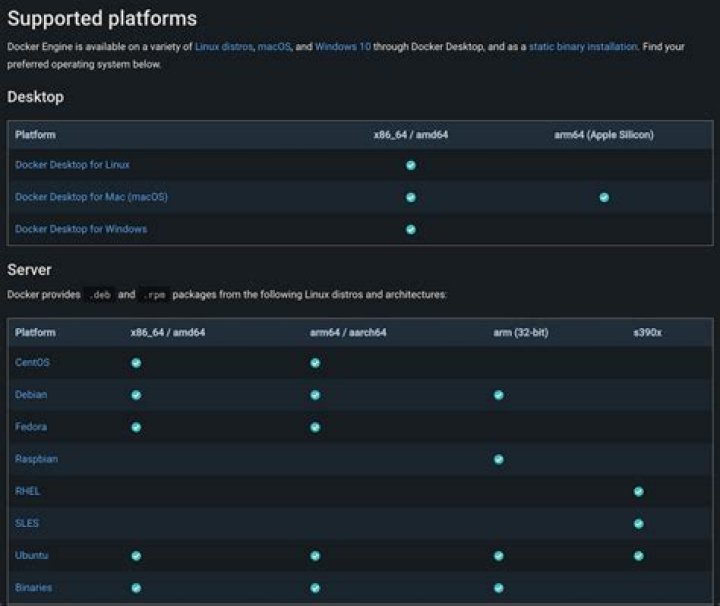
We currently only provide packages for RHEL on s390x (IBM Z). Other architectures are not yet supported for RHEL, but you may be able to install the CentOS packages on RHEL. Refer to the Install Docker Engine on CentOS page for details.
The docker package is not shipped or supported by Red Hat for Red Hat Enterprise Linux (RHEL) 8 and (RHEL) 9. The docker container engine is replaced by a suite of tools in the Container Tools module.
3Podman is an excellent alternative to Docker containers when you need increased security, unique identifier (UID) separation using namespaces, and integration with systemd. In this article, I use real-world examples to show you how to install Podman, use its basic commands, and transition from the Docker command-line interface (CLI) to Podman.
docker is not supported for RHEL 86x_64x
i saw a solution to edit the .repo file inside /etc/yum.repos.d/docker-ce****.repo and edit the [docker-ce-stable] baseurl to
centos will work with Docker.
2To simplify @mon solution
edit this file /etc/yum.repos.d/docker-ce.repo
If you're using fedora: then compare the example below with your file (make sure you have the word fedora in the baseurl and the gpgkey) If you're using a different distro (like centos): then everywhere that you see the word fedora replace it with the word centos. example:
[docker-ce-stable] name=Docker CE Stable - $basearch baseurl= enabled=1 gpgcheck=1 gpgkey= [docker-ce-stable-debuginfo] name=Docker CE Stable - Debuginfo $basearch baseurl= enabled=0 gpgcheck=1 gpgkey= [docker-ce-stable-source] name=Docker CE Stable - Sources baseurl= enabled=0 gpgcheck=1 gpgkey= [docker-ce-test] name=Docker CE Test - $basearch baseurl= enabled=0 gpgcheck=1 gpgkey= [docker-ce-test-debuginfo] name=Docker CE Test - Debuginfo $basearch baseurl= enabled=0 gpgcheck=1 gpgkey= [docker-ce-test-source] name=Docker CE Test - Sources baseurl= enabled=0 gpgcheck=1 gpgkey= [docker-ce-nightly] name=Docker CE Nightly - $basearch baseurl= enabled=0 gpgcheck=1 gpgkey= [docker-ce-nightly-debuginfo] name=Docker CE Nightly - Debuginfo $basearch baseurl= enabled=0 gpgcheck=1 gpgkey= [docker-ce-nightly-source] name=Docker CE Nightly - Sources baseurl= enabled=0 gpgcheck=1 gpgkey= Try this process. It works. From Ec2 having DNS issue with docker repository.
sudo curl -L "(uname -s)-$(uname -m)" -o /usr/local/bin/docker-composesudo chmod +x /usr/local/bin/docker-composedocker-compose --version
A new note has been added in the documentation.
We currently only provide packages for RHEL on s390x (IBM Z). Other architectures are not yet supported for RHEL, but you may be able to install the CentOS packages on RHEL. Refer to the Install Docker Engine on CentOS page for details.
It seems that currently, packages for architectures other than s390x (IBM Z) are not provided for RHEL. However, you may have an alternative solution by installing the CentOS packages on RHEL. You can refer to the Install Docker Engine on CentOS page for detailed instructions on how to proceed with the installation.
Docker wont work in Rhel we can try using same like centos.
sudo yum-config-manager --add-repo sudo yum install docker-ce docker-ce-cli containerd.io docker-buildx-plugin docker-compose-plugin once done do sudo service docker start
and then check docker version
2



