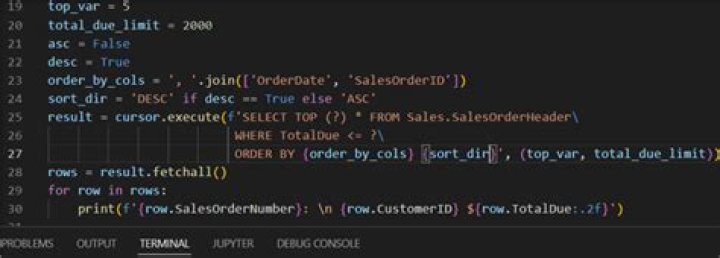

I am trying to retrieve data from an SQL server using pyodbc and print it in a table using Python. However, I can only seem to retrieve the column name and the data type and stuff like that, not the actual data values in each row of the column.
Basically I am trying to replicate an Excel sheet that retrieves server data and displays it in a table. I am not having any trouble connecting to the server, just that I can't seem to find the actual data that goes into the table.
Here is an example of my code:
import pyodbc cnxn = pyodbc.connect('DRIVER={SQL Server};SERVER=SQLSRV01;DATABASE=DATABASE;UID=USER;PWD=PASSWORD') cursor = cnxn.cursor() cursor.execute("SELECT * FROM sys.tables") tables = cursor.fetchall() #cursor.execute("SELECT WORK_ORDER.TYPE,WORK_ORDER.STATUS, WORK_ORDER.BASE_ID, WORK_ORDER.LOT_ID FROM WORK_ORDER") for row in cursor.columns(table='WORK_ORDER'): print row.column_name for field in row: print field However the result of this just gives me things like the table name, the column names, and some integers and 'None's and things like that that aren't of interest to me:
STATUS_EFF_DATE DATABASE dbo WORK_ORDER STATUS_EFF_DATE 93 datetime 23 16 3 None 0 None None 9 3 None 80 NO 61 So I'm not really sure where I can get the values to fill up my table. Would it should be in table='WORK_ORDER', but could it be under a different table name? Is there a way of printing the data that I am just missing?
Any advice or suggestions would be greatly appreciated.
18 Answers
You are so close!
import pyodbc cnxn = pyodbc.connect('DRIVER={SQL Server};SERVER=SQLSRV01;DATABASE=DATABASE;UID=USER;PWD=PASSWORD') cursor = cnxn.cursor() cursor.execute("SELECT WORK_ORDER.TYPE,WORK_ORDER.STATUS, WORK_ORDER.BASE_ID, WORK_ORDER.LOT_ID FROM WORK_ORDER") for row in cursor.fetchall(): print row (the "columns()" function collects meta-data about the columns in the named table, as opposed to the actual data).
2you could try using Pandas to retrieve information and get it as dataframe
import pyodbc as cnn import pandas as pd cnxn = pyodbc.connect('DRIVER={SQL Server};SERVER=SQLSRV01;DATABASE=DATABASE;UID=USER;PWD=PASSWORD') # Copy to Clipboard for paste in Excel sheet def copia (argumento): df=pd.DataFrame(argumento) df.to_clipboard(index=False,header=True) tableResult = pd.read_sql("SELECT * FROM YOURTABLE", cnxn) # Copy to Clipboard copia(tableResult) # Or create a Excel file with the results df=pd.DataFrame(tableResult) df.to_excel("FileExample.xlsx",sheet_name='Results') I hope this helps! Cheers!
In order to receive actual data stored in the table, you should use one of fetch...() functions or use the cursor as an iterator (i.e. "for row in cursor"...). This is described in the documentation:
cursor.execute("select user_id, user_name from users where user_id < 100") rows = cursor.fetchall() for row in rows: print row.user_id, row.user_name Just do this:
import pandas as pd import pyodbc cnxn = pyodbc.connect("Driver={SQL Server}\ ;Server=SERVER_NAME\ ;Database=DATABASE_NAME\ ;Trusted_Connection=yes") df = pd.read_sql("SELECT * FROM myTableName", cnxn) df.head() Instead of using the pyodbc library, use the pypyodbc library... This worked for me.
import pypyodbc conn = pypyodbc.connect("DRIVER={SQL Server};" "SERVER=server;" "DATABASE=database;" "Trusted_Connection=yes;") cursor = conn.cursor() cursor.execute('SELECT * FROM [table]') for row in cursor: print('row = %r' % (row,)) Upvoted answer din't work for me, It was fixed by editing connection line as follows(replace semicolons with coma and also remove those quotes):
import pyodbc cnxn = pyodbc.connect(DRIVER='{SQL Server}',SERVER=SQLSRV01,DATABASE=DATABASE,UID=USER,PWD=PASSWORD) cursor = cnxn.cursor() cursor.execute("SELECT WORK_ORDER.TYPE,WORK_ORDER.STATUS, WORK_ORDER.BASE_ID, WORK_ORDER.LOT_ID FROM WORK_ORDER") for row in cursor.fetchall(): print row import pyodbc conn = pyodbc.connect('Driver={SQL Server};' 'Server=db-server;' 'Database=db;' 'Trusted_Connection=yes;') sql = "SELECT * FROM [mytable] " cursor.execute(sql) for r in cursor: print(r) Why pyodbc you can try with pymssql. For more information follow this link: .
import pandas as pd import pymssql con = pymssql.connect(<conncetion to the server and db>) cursor = con.cursor() query = "<Your query>" cursor.execute(query) df = pd.read_sql(query, con) con.close() 



